

Verdict


Key Specifications
- Review Price: £1099.00
In an IT world increasingly dominated by notebook PCs, be they small low power netbooks or fully fledged desktop replacements, the regular desktop PC is becoming increasingly marginalised – a fact only exacerbated by the slow decline of PC gaming. All-In-One PCs like the Apple iMac and today’s specimen, the HP TouchSmart IQ500, have only enhanced this impression, though in the case of the TouchSmart PC things aren’t as straightforward as that.
Why is that, then? Well, the clue is in the name because whereas the likes of the iMac content themselves to regular PC duties, albeit in a compact and all inclusive shell, the HP throws a touchscreen into the mix as well. This is matched with a custom touch interface for accessing music, video, photos and all manner of other things, while a TV Tuner and a 500GB hard drive make this into something of a multimedia centre, too.
This is, in fact, the second generation of TouchSmart PCs, the first being the IQ770, but the IQ500 is so far removed from the original, that it feels like an entirely new product. Indeed, when we first set eyes upon the IQ500 at HP’s global launched event in June (see: Hands-On with HP TouchSmart IQ500), we’re not ashamed to admit we were somewhat smitten. Whereas the original TouchSmart was a rather bulky affair, the IQ500 is more like the great majority of All-In-One PCs in being slim, compact and thanks to some curvaceous lines and a clever stand, very good looking.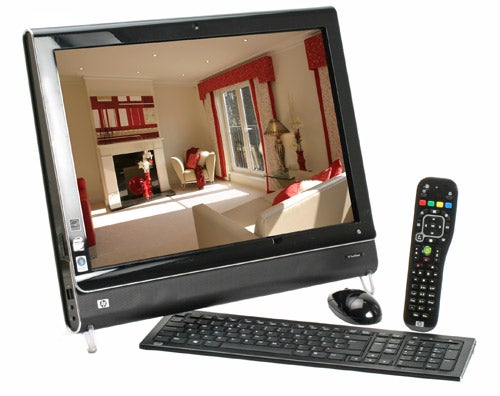
A smart glossy black bezel and silver trim surround a 22in, 1,680 x 1,050 LCD display that, like the iPhone, uses capacitive rather than resistive touchscreen technology. All you really need to take from this is that whereas older touchscreens required a certain level of pressure, the screen on the IQ500 responds to the lightest of touches. It’s also an impressively bright and colourful effort, bringing out photos and video with no shortage of fidelity, even if the glossy finish renders it more reflective than many.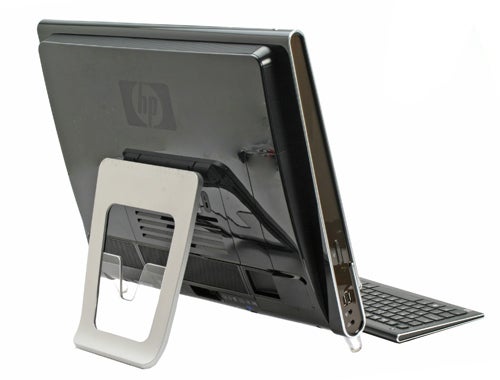
Going back to that stand, the system employed by HP is indecently simple but also incredibly effective. At the front are two little Perspex legs, both of which are balanced against a large adjustable arm at the back. It can be adjusted to offer anywhere between a 10 degree and 45 degree viewing angle and is suitably stiff and secure that it provides faultless stability.
Either side of the screen are an assortment of connections and shortcut buttons. On the left, for instance, are a couple of easy access USB ports, headphone and microphone jacks, above which sits a button for adjusting the ‘ambient light’. This runs along the bottom edge of the machine, lighting up the keyboard in the dark, and though we’d sooner see a backlit keyboard, this does the job well enough. Meanwhile on the right are a memory card reader and a four-pin FireWire port, above which sit some volume controls.
Things only improve with the provided peripherals. Both the keyboard and mouse are wireless, something the iMac doesn’t offer, and are excellent. Indeed, the keyboard in particular stands out. It’s very slim, slotting nicely underneath the machine when not in use, has strong, responsive keys and a faultless layout. Likewise, the provided remote is large, easy to handle and feels every bit as well put together as the rest of the TouchSmart PC.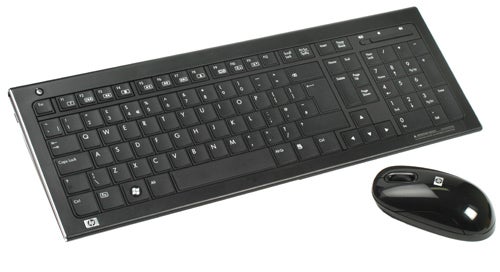
Predictably enough there are more connections on the back, hidden discreetly behind a removable panel. These include three more USB ports, an Ethernet port, an S/PDIF digital audio out, a regular 3.5mm audio output, a TV Aerial input, S-Video out, an audio Line-in and infrared receiver for the remote. All of which is pretty sufficient for a machine of this type, though if one were being picky a couple of video inputs (i.e. HMDI or Component) might extend the machine’s uses somewhat.
Of course, despite the TV Tuner and multimedia leanings the IQ500 is still a PC, but, it must be said, not an especially powerful one. Presumably to help maintain a relatively quiet and cool machine HP has utilised mobile components rather than desktop ones and though there’s nothing essentially wrong with this, those on offer here are somewhat threadbare. Its 2.16GHz Intel Core 2 Duo T5850, for instance, means in raw terms the IQ500 isn’t much faster than, say, the Samsung R510 – a relatively modest entry level laptop.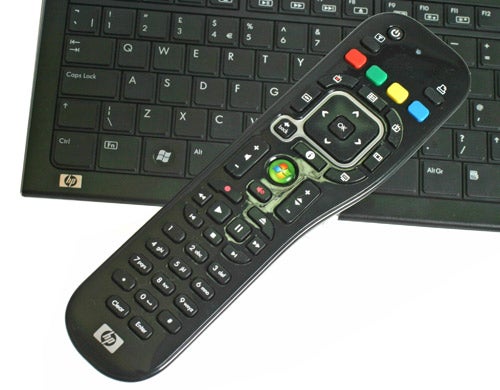
This, for the most part, isn’t a problem while navigating the sumptuous touch sensitive interface (more on which in a moment), but even with 4GB of RAM and 64-bit Windows Vista Home Premium this shouldn’t be misconstrued as a genuine desktop replacement – it simply doesn’t have the grunt for such a role. A relatively measly nVidia 9300M GS with 256MB dedicated memory only reinforces this point.
Still, if the IQ500 is no powerhouse it’s largely because it’s not meant to be – its duties are likely to be web surfing, video and TV viewing and the occasional bit of photo editing. For these tasks it’s perfectly capable, while the inclusion of Draft-N wireless and Gigabit Ethernet means you should have no problems streaming content to or from the IQ500. Moreover, the inclusion of integrated Wi-Fi and wireless peripherals meant that, provided you connect nothing else, the IQ500 is essentially a one cable device – that one cable coming from the relatively large AC adapter. This means the IQ500 should generate an absolute minimum of clutter, something all All-In-One PCs should aspire to.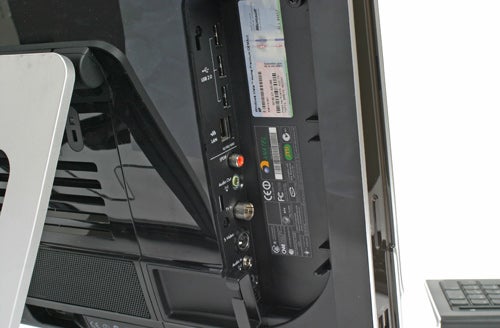
Some praise must also be reserved for the integrated speakers. There’s no “5.1 surround sound” trickery going on here, just two discrete full-range drivers, but they’re very good ones, capable of pumping music out with impressive clarity and dealing with TV audio capably, too.
Of course, the IQ500 was always going to live or die on the quality of its touch interface, so it’s about time we got onto that. Initial impressions are, as before, very strong. Upon launching the TouchSmart PC interface from the desktop, or via the ‘Home’ button at the bottom right, you’re greeted by a tile based arrangement that’s unintimidating and simply invites interaction.
This is split into two, with primary applications dominating the centre of the screen and a strip of lower level ones below. Each can be navigated by dragging or flicking your finger across them, with the screen responding to the speed and ferocity or these movements. You can also customise and re-arrange all the programs, dragging and dropping them into your own desired locations. In addition, the larger tiles will display information relevant to that program so, in the case of the weather application, it shows the weather for that day within its tile.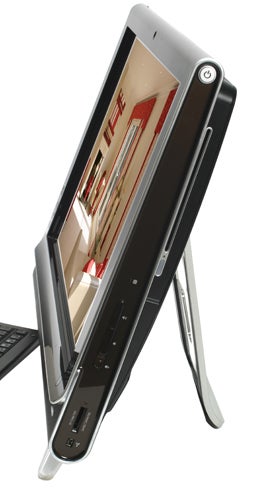
Fundamentally the TouchSmart interface is focussed on multimedia, with music, video and photos being the mainstay of its functionality. Here the TouchSmart performs very well. Both the Music and Photo applications feature a rather smart album flip style interface, along with more conventional grid based systems – with music displayed using album art.
Playlists can be created by dragging and dropping and you can control the music playback from any screen using media controls in top right corner, or through the provided remote. Like any good media player it’ll keep an eye on your music folder, updating as files are added, while you can also opt to use your iTunes music folder if that’s what you happen to use.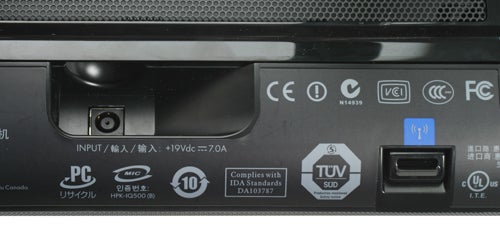
For anyone who wants to do very minor edits to photos the Photo application is perfectly capable, too. In it you can crop, rotate, auto-enhance and remove red-eye and if you decide the changes aren’t that good, you can always revert back to the original. Everything is arranged intuitively, making it easy for any novice to quickly control.
All is much the same in the Video segment, with large, friendly and easy to use controls. It’s a shame, though, that while you can playback regular video files, you can’t watch DVDs through the TouchSmart interface. This, of course, can be done using Windows Media Center, but it seems like an odd omission.
Elsewhere there’s a moderate assortment of applications, some useful, some less so. We liked the RSS Feed reader and weather applications, while the ability to play chess and solitaire using the touchscreen was nice, though hardly revolutionary. Unfortunately, things like the notes application were less useful. It might look nice but its assortment of sticky notes doesn’t cry out as a killer application, whether it’s simply for writing or recording messages.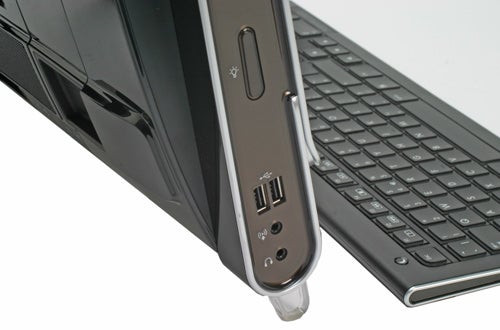
We were also a little disappointed by the browser because, though it does the basics pretty well, it lacks a little refinement. To scroll pages you can’t just drag the page around, you have to use the scroll bars either side of the page. You must also rely on Windows’ own and rather basic on-screen keyboard for inputting text, where we’d sooner see something bespoke that’s more attractive and easier to use.
Indeed, if there were one criticism of the TouchSmart interface it would be that it doesn’t quite go far enough. What has been done is excellent; everything works very nicely and is more or less instantly intuitive. Yet, once you’ve played around with it a bit, you can’t help but wish for a little bit more. It would be nice, for instance, to have a custom email client and some kind of basic word processing tool, so that the number of tasks that require the normal OS are greatly reduced. If and when HP achieves this, the TouchSmart will truly be a device that changes the way people use PCs.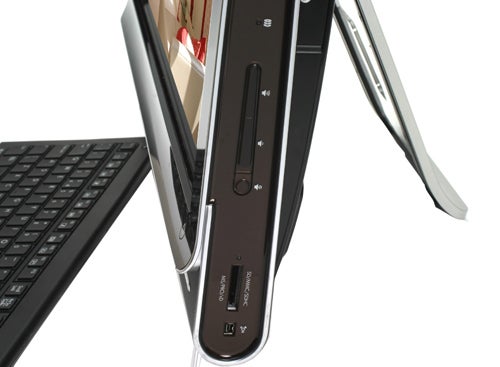
Still, just to re-iterate, what is there works very well and though the price is comparatively high, the potential uses are numerous. As a TV come PC for communal areas of the home, particularly a kitchen or play room, the IQ500 has great potential and even if you don’t use the touchscreen functionality regularly, this is still a very capable All-In-One PC, a fact helped greatly by the use of wireless accessories. Inevitably this is a machine that will split opinions, one you’ll either “get” or not, but if the idea appeals then it’s definitely worth investigating further and hopefully HP will continue to refine the interface over the coming years.
Verdict
An accomplished All-In-One PC with a twist, the HP TouchSmart IQ500 is an innovative piece of kit that delivers a genuinely unique approach to integrated computing. It does have its issues, a modest spec and high price being among them, but if you have the money and fancy something a little bit different then the IQ500 will fit the bill perfectly.
Trusted Score
Score in detail
-
Value 7
-
Features 9
-
Performance 6
-
Design 9


Editorial independence
Editorial independence means being able to give an unbiased verdict about a product or company, with the avoidance of conflicts of interest. To ensure this is possible, every member of the editorial staff follows a clear code of conduct.

Professional conduct
We also expect our journalists to follow clear ethical standards in their work. Our staff members must strive for honesty and accuracy in everything they do. We follow the IPSO Editors’ code of practice to underpin these standards.
Editorial independence
Editorial independence means being able to give an unbiased verdict about a product or company, with the avoidance of conflicts of interest. To ensure this is possible, every member of the editorial staff follows a clear code of conduct.
Professional conduct
We also expect our journalists to follow clear ethical standards in their work. Our staff members must strive for honesty and accuracy in everything they do. We follow the IPSO Editors’ code of practice to underpin these standards.
