

Verdict


Key Specifications
- Review Price: £1799.00
It seems that Sony has no end of new and updated notebooks waiting in the wings. Only a matter of weeks after I looked at the cutting edge TX1XP, I now have the new VAIO S5VP sitting in front of me. In fact, it wasn’t that long ago that I was reviewing the VAIO S4M, the predecessor to the machine I’m typing on right now.
The VAIO S series is like a halfway house for users that find the T Series too small to work on, but still want something small and light enough to carry around with them all day, every day. In this respect, the S5VP hits its mark perfectly, providing slightly larger dimensions than the TX1XP, while remaining light enough to sit unobtrusively in your bag. As far as weight goes, the S5VP slips under that magic 2kg bar, just, at 1.9kg. Dimensions have shrunk slightly from the outgoing S4 model, at 312.5 X 30 x 225mm (WxHxD).
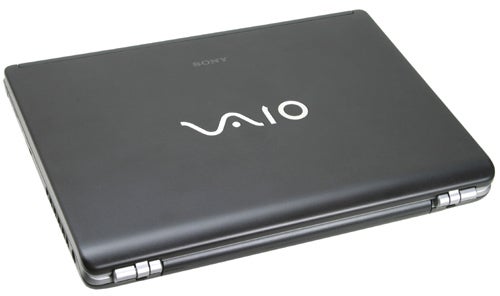
I’ve always liked the shape of the VAIO S Series – it’s all sweeping curves and soft lines. The way the lid wraps itself around the chassis at the hinge side reminds me of something organic like an oyster or scallop shell. Sony has continued its stance on lid fastening with the S5VP, in that there isn’t any. Whereas most notebooks are held shut with a clip or hook, Sony has chosen to gently spring load the lid so that it holds itself shut and can be opened without the need for button pressing or switch sliding.
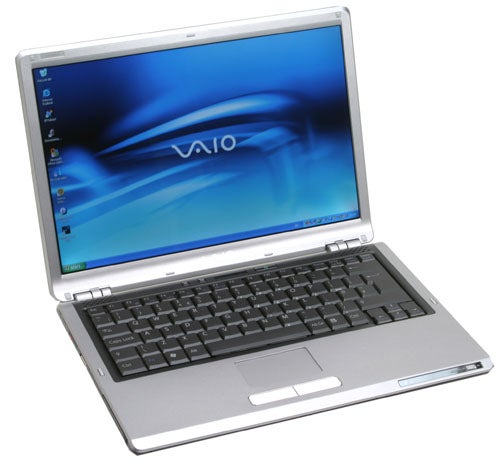
The lid is finished in a matt black with a mirrored VAIO logo at the centre – with most VAIOs having a silver lid, the S5VP makes a pleasant change and also creates a striking contrast when you open the lid and see the matt liver finish inside. The Screen bezel, wrist rest and keyboard surround are all matt sliver, while the keyboard itself is black.
The 13.3in widescreen display is superb, although it doesn’t sport the same 1,366 x 768 resolution of the TX1XP, instead displaying a more conventional 1,280 x 800 pixels. The screen is equipped with Sony’s high-contrast X-Black coating. The result is bright and vivid colours, and an image that reaches out and grabs you when you’re watching movies. As always, I’ll mention that the X-Black coating does mean that the screen is more reflective than a standard TFT, but the general opinion around the TrustedReviews office is that the benefits far outweigh this issue. Interestingly, at a recent Sony event, the head of IT for the England cricket team insisted that the X-Black screens meant that they could use the notebooks in bright sunlight – something that they could not do with normal screens. Now there is probably some truth in this, since standard TFT screens can often “wash out” in bright sunlight, making it impossible to read anything.
The keyboard is up to Sony’s usual high standards, and should be large enough for most users to cope with. Personally I find the keyboards on the T Series VAIOs fine, but then I do have fairly small hands. The keys on the S5VP are a decent size, while the Tab, Caps Lock, Shift, Return and Backspace keys are all large, for easy striking when typing at speed. One thing that I have always liked about Sony keyboards is that the Ctrl key is located at the bottom left, just where it should be. Many notebook manufacturers place the Fn key at the bottom left instead, which can be annoying if you use a lot of keyboard shortcuts and expect the Ctrl key to be where it is on a desktop keyboard. The cursor keys are dropped away from the main keyboard too, which makes cursor manipulation easy.
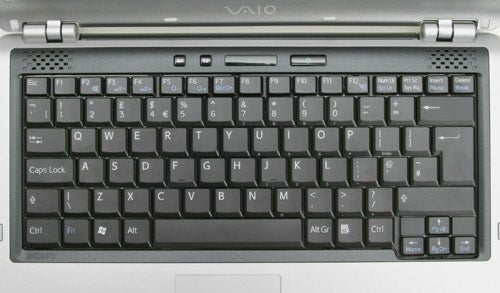
Below the Spacebar is a small silver touchpad with a widescreen aspect ratio to match the display. The far right side of the touchpad can be used for scrolling up and down through documents, while the bottom can be used to scroll sideways. However, Sony still insists on giving no indication of this functionality on the touchpad itself. Below the touchpad are two large buttons finished in what looks like brushed aluminium. The touchpad and buttons worked flawlessly during my time with the S5VP and pointer manipulation was quick, simple and accurate.
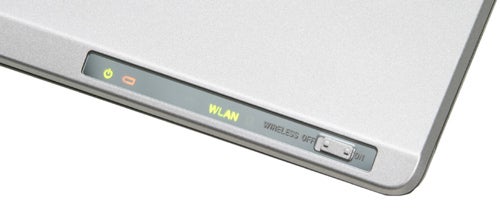
Right at the front of the wrist rest you’ll find an array of indicator lights as well as a hardware switch for the integrated 802.11b/g WiFi adapter. There‘s also integrated Bluetooth in case you want to get online using your mobile phone. Bluetooth also gives you the option of transferring data to and from your mobile phone as well as synchronising it with Outlook.
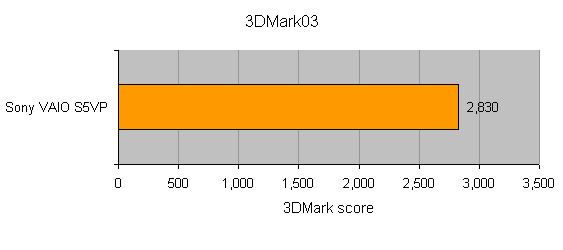
Despite it’s svelte construction, the S5VP has some pretty beefy specs under the hood. Sitting in the driver’s seat is an Intel Pentium M CPU running at 2.13GHz, while 1GB of memory rides shotgun. Taking care of storage is a 120GB hard disk, which should be capacious enough for even the most greedy user. If you did find yourself running out of disk space, you could easily backup data to the integrated DVD writer – this drive will burn DVD+R/RW DVD+R DL, DVD-R/RW and CD-R/RW media. Graphics power comes via an nVidia GeForce GO 6400 – not a chipset that I’ve come across before, but as you’d expect, performance seemed to be somewhere between a GO 6200 and 6600.
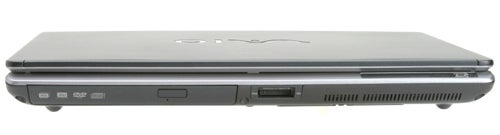
Looking around the chassis, the right side is populated by the power socket and a plastic flap – the flap hides two USB 2.0 ports and a four-pin FireWire port. The front is dominated by the DVD writer although there is a MemoryStick slot next to it. Putting the optical drive at the front of the chassis certainly makes access easier when you’re using the notebook on an aeroplane, but it makes this more tricky when it’s on your lap.
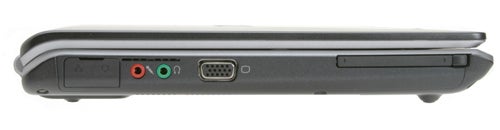
On the left side you’ll find a single Type II PC Card slot. Another regular feature on Sony notebooks is the hinged flap that covers the PC Card slot – the removable spacers that many notebook manufacturers populate their PC Card slots with have a tendency to disappear when you’ve got a device in the slot. Next to the PC Card slot is a D-SUB port for connecting to an external monitor, as well as headphone and microphone sockets. Finally there’s another plastic flap, this one hiding the modem socket and the network port for the integrated 10/100 Ethernet adapter.
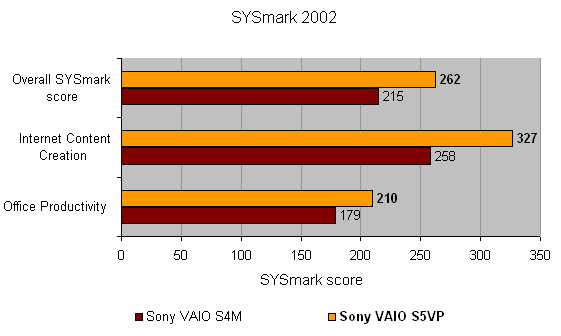
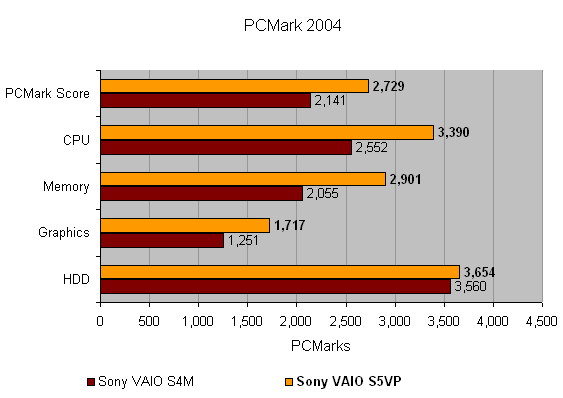
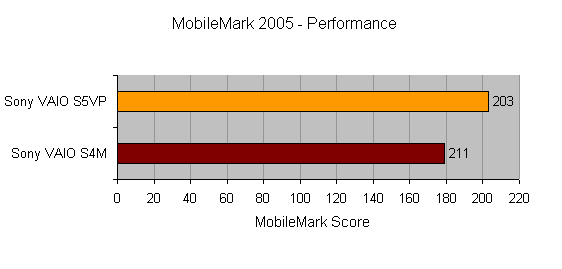
Performance wise the S5VP beats the outgoing S4M in pretty much every department. That’s not surprising considering the fast 2.13GHz CPU driving it along. In fact this particular S5VP is exclusive to Sony Style, while the more widely available S5XP only sports a 2GHz CPU and 100GB hard drive. Back to performance, the S5VP turned in overall scores of 262 and 2729 in SYSmark 2002 and PCMark 2005 respectively – comparatively the S4M scored 215 and 2141.
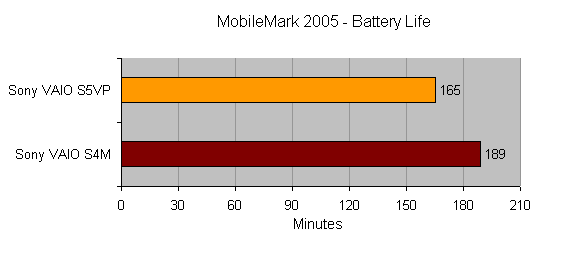
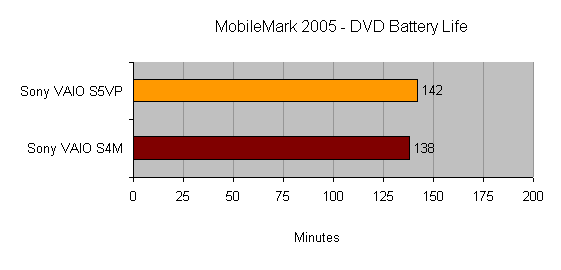
Battery life is down a little with the S5VP, but that’s hardly surprising considering the higher specification. A time of two hours 45 minutes in Mobile Mark 2005 is somewhat disappointing, since I would have liked to have seen at least three hours from a thin and light machine like this. DVD playback time came in at two hours 22 minutes, which should be enough to watch most movies.
To be fair, I think that Sony has spoiled me when it comes to battery life after reviewing the superb VAIO TX1XP, which turned in a Mobile Mark time of five hours 43 minutes! I have to remind myself that the TX1XP is a much smaller device, with far slower components, not to mention a smaller screen that’s equipped with an LED backlight.
As with all Sony notebooks you get a very impressive software bundle with the S5VP. As well as Windows XP Professional, you’ll also find a suite of Adobe applications like Premiere Standard, Photoshop Elements 3.0 and Acrobat Elements. You also get Microsoft Works thrown in so you’ll be able to get productive straight out of the box.
Considering the special specification of the S5VP it comes as no surprise that it doesn’t come cheap, and £1,799 including VAT is definitely pushing the upper end of the scale for a notebook like this. That said, you are getting some very beefy components, including a very fast CPU and a massive hard drive considering the physical size of the notebook.
Also, when you buy the S5VP from Sony Style you get 12 months free broadband from BT, including a router. This is the basic 2Mbit/sec package with a download limit of 2GB per month, but this would cost you £17.99 per month if you purchased it separately.
”’Verdict”’
The Sony VAIO S5VP is a surprisingly powerful notebook considering its size. Battery life could be better, but it’s not far behind Sony’s quoted three hours. The price is high, but if you’re looking for a powerful notebook that can still slip unobtrusively in your bag every day, the S5VP should definitely be near the top of your list.
How we test laptops
Unlike other sites, we test every laptop we review thoroughly over an extended period of time. We use industry standard tests to compare features properly. We’ll always tell you what we find. We never, ever, accept money to review a product.
Trusted Score
Score in detail
-
Performance 9
-
Value 7
-
Features 9


Editorial independence
Editorial independence means being able to give an unbiased verdict about a product or company, with the avoidance of conflicts of interest. To ensure this is possible, every member of the editorial staff follows a clear code of conduct.

Professional conduct
We also expect our journalists to follow clear ethical standards in their work. Our staff members must strive for honesty and accuracy in everything they do. We follow the IPSO Editors’ code of practice to underpin these standards.
Editorial independence
Editorial independence means being able to give an unbiased verdict about a product or company, with the avoidance of conflicts of interest. To ensure this is possible, every member of the editorial staff follows a clear code of conduct.
Professional conduct
We also expect our journalists to follow clear ethical standards in their work. Our staff members must strive for honesty and accuracy in everything they do. We follow the IPSO Editors’ code of practice to underpin these standards.
