

Verdict


Key Specifications
- Review Price: £585.00
When Thecus launched its N5200 RouStor last year we didn’t think it was possible to squeeze any more features into a desktop NAS appliance. However, with its latest, the N5200PRO Thecus has proved us wrong. It was the first manufacturer to deliver a solution with room for a quintet of hot-swap SATA hard disks and it is still the only one to provide support for RAID-6 dual redundant arrays. It now goes one step beyond as it’s also the first desktop box to deliver support for iSCSI (Internet SCSI) enabling the appliance to present virtual hard disks to the network.
The appliance is offered in two versions and we have the N5200BR PRO on review, which has five Gigabit Ethernet ports with four presented as an Ethernet switch and the fifth provided for WAN access. Routing is performed across the two groups but you can stop them communicating with each other. If you want load balancing or link failover then go for the N5200B, which has a pair of Gigabit ports that supports these functions. 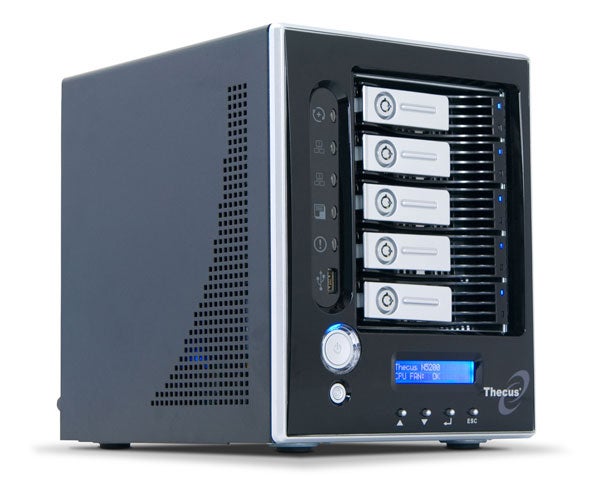
The appliance delivers a fine hardware specification as it sports a low voltage 1.5GHz Intel Celeron processor and 512MB of DDR memory. There are plenty of extra connection options as you have three USB 2.0 ports, a separate USB host port for connecting the appliance directly to a PC and even an eSATA port. The appliance can be purchased diskless as the Linux OS is implemented on a separate 64MB IDE CompactFlash card.
Installation is helped along nicely by the bundled Setup Wizard, which locates the appliance on the network and presents it ready for initial configuration. You can step straight from here to the browser management interface and we’ll start by looking at the new RAID setup procedures as this is where you configure your iSCSI targets. From the Storage menu you can view the hard disks and choose from an impressive range of RAID arrays. The appliance also supports multiple arrays and enables you to migrate mirrors and stripes to RAID-5 as well. For testing we used a pair of 150GB Western Digital Raptor hard disks configured as a mirror. After selecting the array member drives you need to select the percentage of space to be used for general data storage. The remainder can then be can be split up and assigned to the USB host port or for iSCSI target use.
Your next job is to decide on a name for the target which must adhere to the IQN (iSCSI qualified name) format and add CHAP authentication if you want to protect access. We tested using Windows Vista, which has Microsoft’s iSCSI initiator preinstalled and had no problems logging on to the new target. You just need to format the new drive and then it’s ready for use. Also, from the appliance’s web interface you can view each target and see which initiators have logged on to them.
To test performance we copied a 690MB video file to and from the iSCSI target over Gigabit Ethernet and watched it deliver average read and write speeds of around 35-36MB/sec. It is fast but to put this in perspective we’ve regularly tested larger business level iSCSI appliances and have seen them return two to three times this performance. However, these devices cost a heck of a lot more than the N5200PRO.
For general NAS duties the N5200PRO delivers plenty of features. It supports Windows, Linux, Unix and Mac clients, runs an FTP server and can use NT domain and AD authentication along with its local user database. The appliance also offers UPnP media services for streaming to suitable media players but unlike the majority of similar products it doesn’t have an iTunes server. It’s easy being green with Thecus as you can schedule the appliance to power itself off and on and use WoL (Wake on LAN) to start it up when next accessed.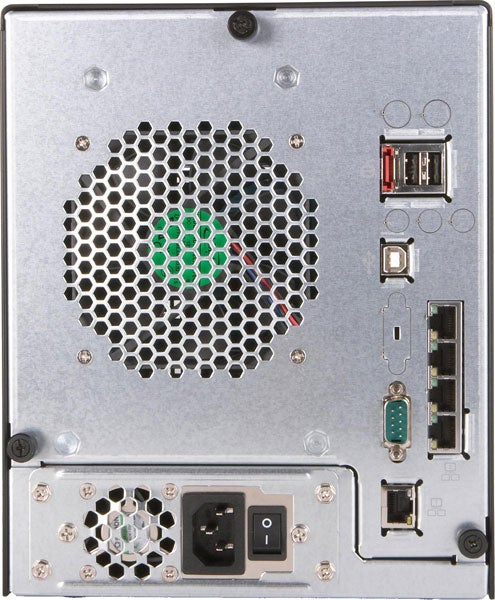
Backup options are plentiful as the Nsync option enables selected folders to be backed up regularly to another Thecus appliance. Thecus bundles its own client backup software, which although somewhat basic does enable you to secure selected folders to a destination of your choice and schedule full and incremental backups. However, the volume snapshot feature has now been removed by Thecus due to various problems with it.
General NAS performance is particularly good with a copy of our test video file using the Vista workstation returning read and write speeds of 34.5MB/sec and 29MB/sec. For FTP performance the Filezilla utility reported read and write speeds of 43MB/sec and 31.5MB/sec when copying a 2.52GB video file. However, the backup utility proved to be a sluggard as securing 12.1GB of test data to a network share took over an hour for an average of only 3.4MB/sec. We also tested speeds when copying files from a Maxtor USB hard disk on the appliance to a network share and this returned averages of 23MB/sec.
”’Verdict”’
One of the best desktop NAS appliances on the market just got even better. There’s little to touch the N5200PRO for features and performance and the new iSCSI target capabilities make it quite unique.
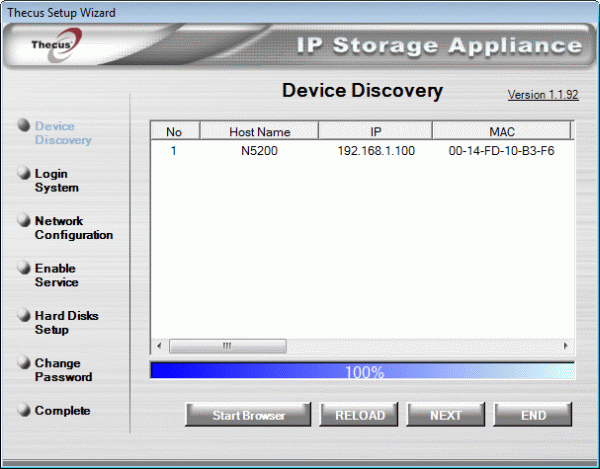 (centre)”’Thecus’ Setup Wizard makes light work of appliance discovery and initial configuration.
—-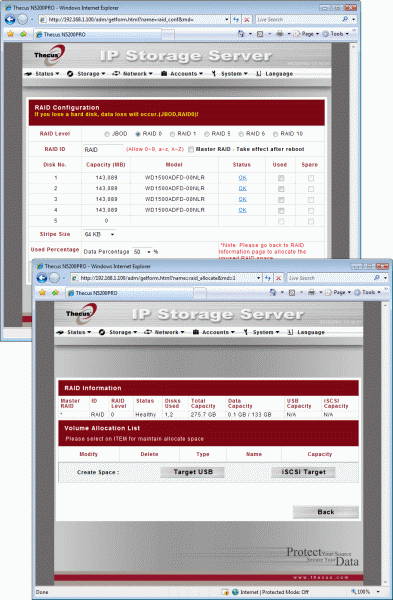 During RAID array creation you need to set aside space for host USB and iSCSI target use.
—-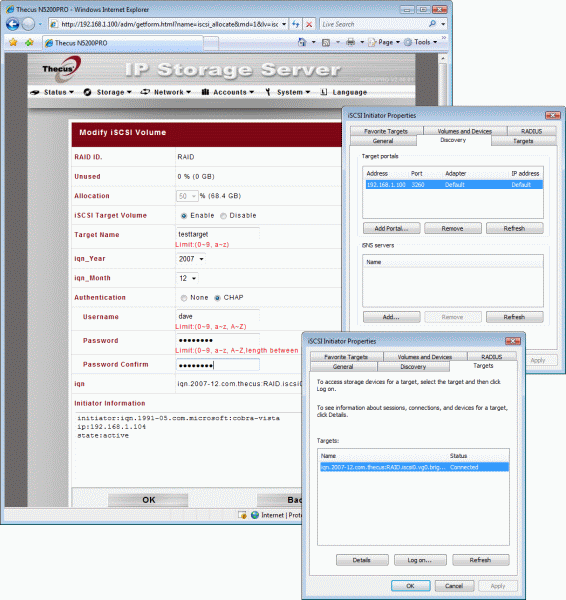 Target setup is simple enough and the Vista iSCSI initiator worked happily with the appliance.
—-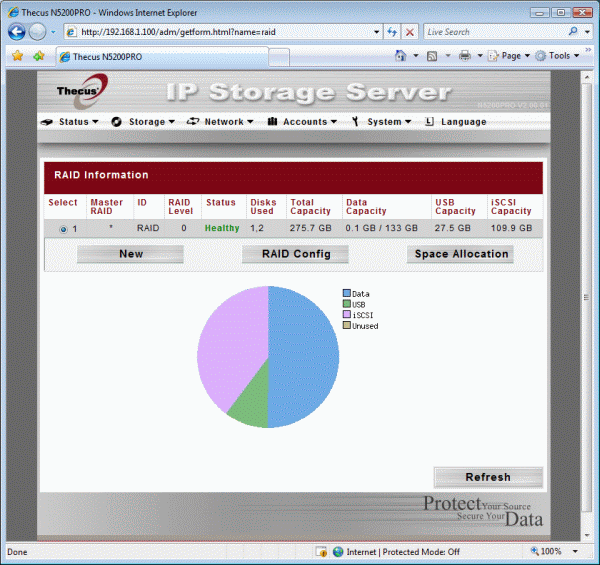 From here you can see how your RAID array space has been carved up.
—-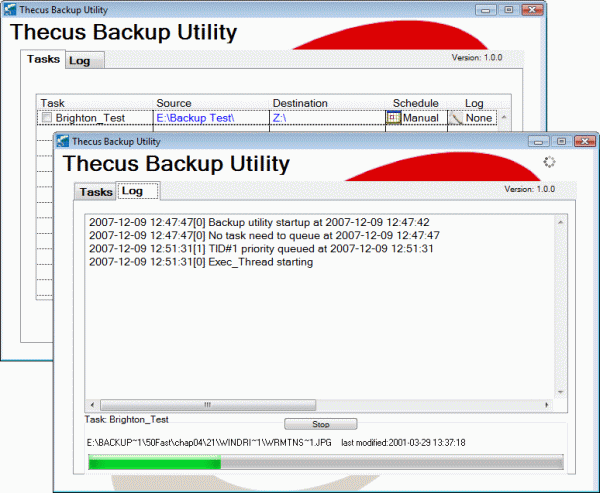 It’s basic and it’s slow but Thecus Backup Utility provides useful workstation backup tools.
—-
Trusted Score
Score in detail
-
Value 8
-
Features 9


Editorial independence
Editorial independence means being able to give an unbiased verdict about a product or company, with the avoidance of conflicts of interest. To ensure this is possible, every member of the editorial staff follows a clear code of conduct.

Professional conduct
We also expect our journalists to follow clear ethical standards in their work. Our staff members must strive for honesty and accuracy in everything they do. We follow the IPSO Editors’ code of practice to underpin these standards.
Editorial independence
Editorial independence means being able to give an unbiased verdict about a product or company, with the avoidance of conflicts of interest. To ensure this is possible, every member of the editorial staff follows a clear code of conduct.
Professional conduct
We also expect our journalists to follow clear ethical standards in their work. Our staff members must strive for honesty and accuracy in everything they do. We follow the IPSO Editors’ code of practice to underpin these standards.
