

Verdict


Key Specifications
- Review Price: £164.97
Not only does the Linksys WVC200 stand out for it distinctive design but it’s also the lowest cost PTZ camera we’ve yet seen. For such a low price you’re actually getting a lot of features as along with pan, tilt and zoom functions the camera supports 802.11g wireless operations, has built in audio functions and provides motion detection facilities.
The camera body is built well enough although the lightweight plastic stand supplied in the kit is too flimsy and not heavy enough to stop the power and network cables moving it around. Lens coverage is comparatively good as the camera can cover ± 67 degrees in the horizontal plane and +30/-34 degrees in the vertical. To keep costs down, optical zoom is a casualty as all you get is a basic 2x digital zoom and our tests showed it delivering some poor results.
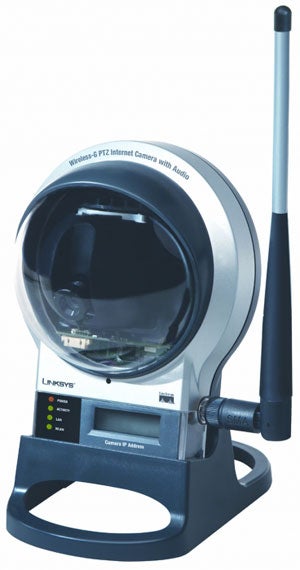
The camera is equipped with a Fast Ethernet port and an 802.11g wireless client – a useful feature is the small LCD display at the front which shows the unit’s IP address. This does have security implications as you don’t really want everyone knowing the camera’s address but Linksys has this covered as you can switch the display and status LEDs off from the web management interface. Operations in low light levels aren’t as good as most of Axis’ IP cameras as the WVC200 can only go down to 2lux but it does have an IR filter so it’ll work with any IR illuminator. We tested this with an Axis MFLED 850nm LED illuminator and the camera showed it lighting up the surrounding area like daylight.
With a DHCP server on the case, installation is a cinch as you just read the IP address from the front panel and enter it into a web browser. Alternatively, you can use the bundled setup wizard utility which searches for Linksys cameras and takes you through wireless configuration if required. On first contact, the web interface requires valid login credentials after which you go to the home page which offers a row of tabs across the top for each function. The live view page provides plenty of camera controls alongside the viewing window so you use the nine button keypad to control pan and tilt or use the on-image controls where you point at the area you want the camera to move to.
To use the digital zoom you select the button and click on the location you want to magnify. Prepare to be disappointed as the WVC200 shows clearly why most digital zooms are a poor substitute for the real thing as focus is a big casualty. Overall picture quality isn’t great either and this camera won’t be worrying Axis with disappointingly grainy image quality. Colour balance was reasonably good but we found the auto-iris coped poorly with bright sunlight and we needed to play with the sharpness settings before we could see any detail in distant objects. Nevertheless, to get better image quality from a PTZ camera you will need to cough up a lot more cash than this.
For wireless operations we had no problems connecting to a SpeedTouch 780WL and the camera supports WEP and WPA Personal encryption. Both MPEG-4 and Motion-JPEG modes are supported and can be swapped over from the web interface. The former delivers a smoother video display thanks to superior compression but the latter is better where bandwidth is at a premium as it merely drops its frame rate to compensate.
—-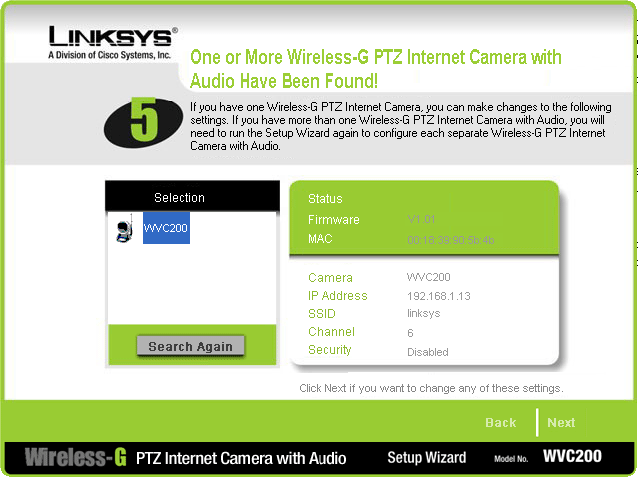
”’The quick setup wizard locates the camera and offers to set up wireless access and security.”’
—-
Motion detection options aren’t as good as those offered by Axis as you can only email video clips of up to five seconds when this is activated. Most Axis cameras also allow snapshots to be sent to an FTP server as well. However, the WVC200 can upload snapshots to an FTP server but only as often as every thirty minutes. If you can afford more than one Linksys camera then the bundled Viewer and Recorder utility will come in handy as this provides a single interface for monitoring multiple cameras and tools to set up recordings at scheduled times.
The patrol function could prove handy for watching a large area as you can save lens positions and add them to a list where the camera will move to each one at preset intervals. Up to nine pan/tilt combinations are maintained and you can assign different dwell periods of up to sixty seconds for each one. The only drawback is the camera only cycles through the list once and stops at the last defined position. The camera has a socket for attaching an external microphone but we did find the internal one produced some good results. A volume slider is provided on the live view page and, apart from a lag of around one second, quality was clear enough to easily hear any action in the area under surveillance.
”’Verdict”’
It’s inevitable that there will be some sacrifices to achieve PTZ functions at this low price but the WVC200 does a reasonably good job nonetheless. The digital zoom is largely redundant but picture quality is reasonably good while the camera offers a useful range of general surveillance features.
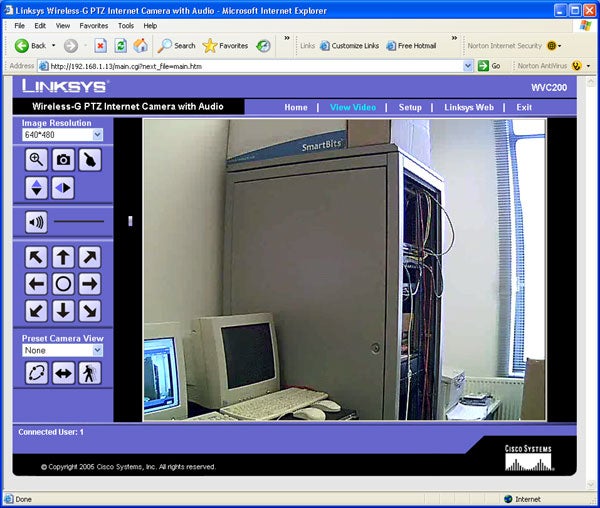
”’The main viewing screen provides access to plenty of lens control functions.”’
—-
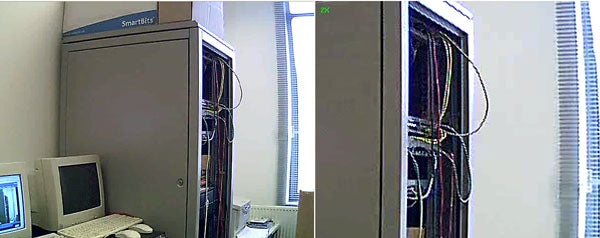
”’The 2X digital zoom function is easily this camera’s weakest link.”’
—-
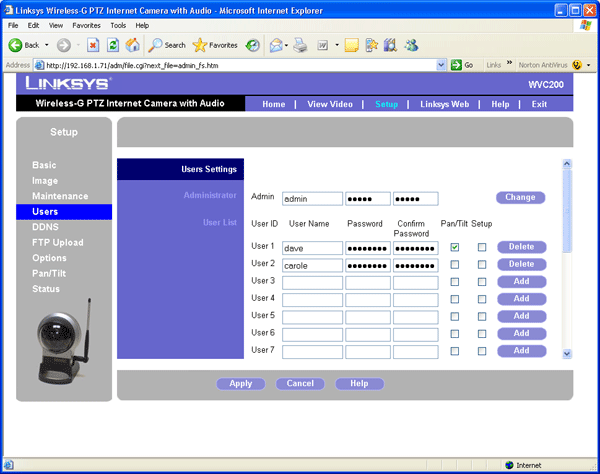
”’The camera supports up to twenty different users each with their own access privileges.”’
—-
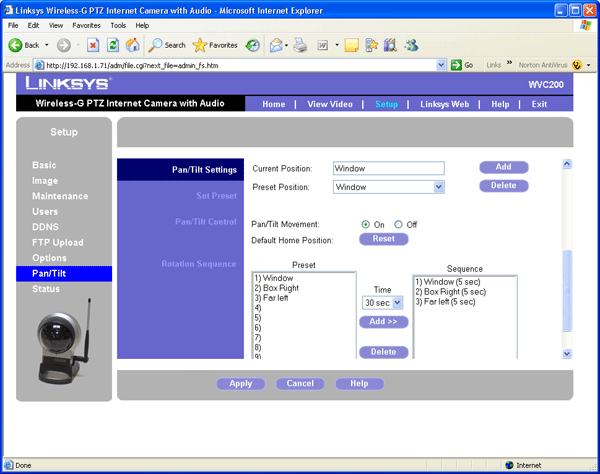
”’The patrol functions will move the camera to each predefined position after a set number of seconds.”’
—-
Trusted Score
Score in detail
-
Value 8
-
Features 8


Editorial independence
Editorial independence means being able to give an unbiased verdict about a product or company, with the avoidance of conflicts of interest. To ensure this is possible, every member of the editorial staff follows a clear code of conduct.

Professional conduct
We also expect our journalists to follow clear ethical standards in their work. Our staff members must strive for honesty and accuracy in everything they do. We follow the IPSO Editors’ code of practice to underpin these standards.
Editorial independence
Editorial independence means being able to give an unbiased verdict about a product or company, with the avoidance of conflicts of interest. To ensure this is possible, every member of the editorial staff follows a clear code of conduct.
Professional conduct
We also expect our journalists to follow clear ethical standards in their work. Our staff members must strive for honesty and accuracy in everything they do. We follow the IPSO Editors’ code of practice to underpin these standards.
