

Verdict


Key Specifications
- Review Price: £99.99
Last month Riyad reviewed Roxio’s excellent Crunch video conversion software, which offered iPod and iPhone users a quick and simple way to convert video files stored on a PC or Mac into an Apple friendly format. In a similar vein, Pinnacle’s new Video Transfer device is aimed at making life just as easy for users who need to capture and digitise video from an analogue source, and all without the use of a computer.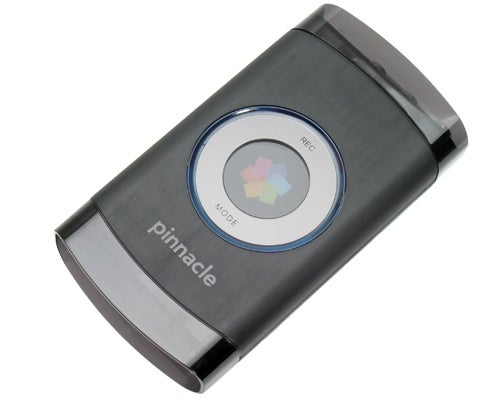
Rather than spend time worrying about what software settings and bit-rates to use, with the Pinnacle Video Transfer (PVT) all you need is a FAT32 mobile storage device such as an external USB 2.0 hard disk or flash memory key and you can start recording pretty much straight away. The PVT will even record directly to a Sony PSP (running firmware version 2.81 or later) and most types of Apple iPod (firmware version 1.21 or later), but not the iPod Touch. In principal, the PVT will record video from any device that outputs a Composite or S-video signal, such as a VHS recorder, DVD player, set-top box or gaming console. But before we get onto recording, let’s take a quick look at the device itself.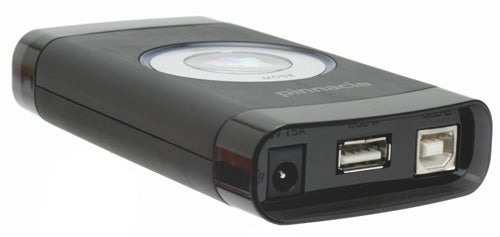
The unit measures a compact 12.3 x 6.6 x 2.2cm, and is constructed largely of black plastic which feels sturdy enough in the hand. The top of the PVT is dominated by a colourful circular logo, next to which sit the unit’s only two buttons; REC and MODE. Just below the MODE button are three small blue LEDs which light up depending on the selected recording quality – one LED for ‘Good’, two for ‘Better’ and all three for ‘Best’. Videos are recorded using the H.264 (MPEG-4) video compression format, but the exact properties of each recording setting depend on the connected USB device.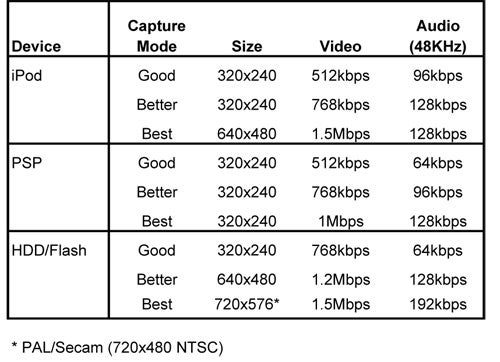
To record at the highest resolution of 720 x 576 pixels you will need to use a hard disk or memory key. However, videos captured at this resolution are recorded with interlaced frames, just like regular TV broadcasts. When viewed on a computer screen, annoying ‘comb’ artefacts may show up on the resulting video images, which are particularly noticeable on moving edges. Pinnacle therefore recommends using the Good or Better quality settings when using a hard disk or memory key, if you intend to watch the captured videos exclusively on a PC screen.
On the bottom end of the PVT you’ll find the DC power input and the main USB port. There’s also a second USB Type-B port which, according to the user manual, is “reserved for future use”. Presumably, then, the PVT’s functionality could be improved or upgraded in the future, but for the time being at least this secondary USB port remains superfluous. Sitting along the top end are the all-important Composite and S-video inputs, as well as the stereo audio inputs. LEDs are also positioned above each of the video/audio inputs and the USB port, which light up either blue or red depending on the PVT’s current state of operation.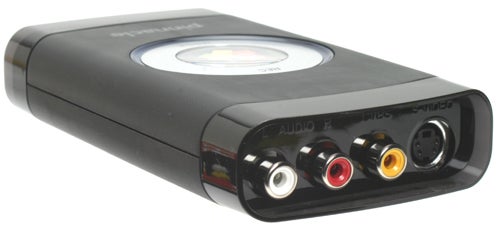
A User Manual, Quick Start Guide, DC power adaptor, a usefully long 1.5m Composite Video/Audio cable (3x Phono), and a SCART adapter (in EU markets only) are all included in the box. For better quality recordings, Pinnacle advises using the S-video input rather than Composite Video, but surprisingly doesn’t include an S-video lead as part of the package. Pinnacle also doesn’t supply any video editing software but if you need to carry out any subsequent editing you can download a free copy of its VideoSpin software.
Making a recording with the PVT is extremely straightforward. After connecting it to a video source and plugging in a USB storage device, the first step is to press the MODE button to switch the device on. After a few seconds, the unit detects the connected USB device and the video input being used. Once all the main LEDs have turned blue, the desired recording quality can then be selected by pressing the MODE button repeatedly until the relevant number of smaller LEDs illuminate (one LED for ‘Good’, two for ‘Better’ and three for ‘Best’).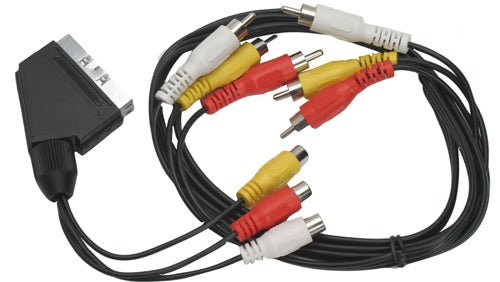
When you’re ready to start a recording, simply press the REC button. The main LEDs then all turn red to confirm that a recording is being made. To stop the recording press the REC button a second time. Once the recording has been finalised and safely stored on the USB device, the main LEDs then turn blue again, indicating that the PVT can then be removed.
Video recordings are saved in a directory called VIDEO, located in the root of the USB hard disk or flash key. If the directory doesn’t currently exist then one is automatically created. Recordings made on the PSP are shown in the Video area. Each video is respectively named and numbered according to the sequence in which it was recorded, eg. Vid00001.mp4. In a similar fashion, recordings made on an iPod are stored in a directory called F99 which is located in the iPod’s hidden Music folder, and are named sequentially from 0001.mp4 upwards. One thing to bear in mind is that because the PVT doesn’t have an internal clock, the video files won’t have a time and date that match up to when the file was actually recorded.
I didn’t have a Sony PSP to hand but for testing I used a 30GB iPod Video and a 4GB USB flash key. Throughout testing, the device generally worked without a hitch and I successfully recorded a variety of video clips from my satellite box and DVD player at all the different quality settings. However, it was when I tried to view the captured video on my iPod that I started to run into difficulties.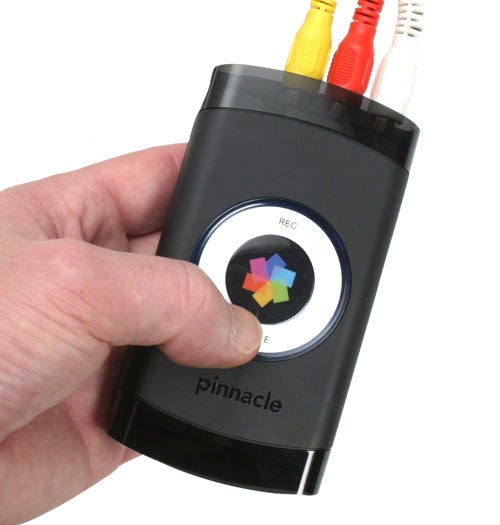
Video clips captured onto the iPod are supposed to be viewable immediately after recording, but I was disappointed to find that I couldn’t locate and play back any of the saved video clips using the iPod’s menu system. Updating the PVT with the latest firmware didn’t fix the problem and, despite the best efforts from Pinnacle Support, I was unable to resolve the issue. In order to watch the clips on my iPod, my workaround was to hook it up to iTunes on my PC, then browse for the video files manually (in the hidden F99 directory) and finally add them to my iPod’s Video library, but that of course defeats the whole purpose of PC-less video capture. It may well be the case that the latest-generation iPods will work as they should with the PVT, but with only my two-year old iPod Video to hand I have no way of knowing for sure. That’s said, Pinnacle will hopefully address this issue.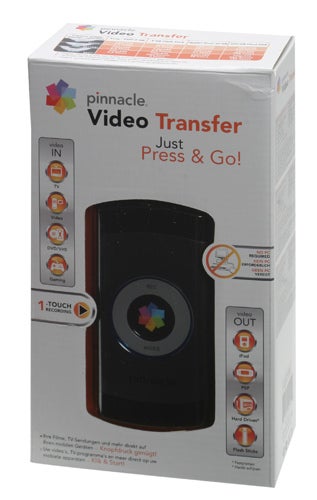
Quality-wise, the captured video recordings were impressive. Even at the lowest capture setting the recordings looked smooth and clean with no visible jerkiness whatsoever. At the higher quality settings the video looked even better with fewer compression artefacts, and to be honest I had to look (and listen) quite hard to distinguish a difference between the original and the copy.
”’Verdict”’
At just under £100, the Pinnacle Video Transfer is a unique little gadget that will appeal to people who don’t like the idea of messing around with computers and complicated capture software in order to digitise their movies. Despite the issue I encountered trying to view recordings directly on my iPod Video’s display (which hopefully can be fixed in a future firmware update), I found the Pinnacle Video Transfer very easy to use and the results first rate.
Trusted Score
Score in detail
-
Value 8


Editorial independence
Editorial independence means being able to give an unbiased verdict about a product or company, with the avoidance of conflicts of interest. To ensure this is possible, every member of the editorial staff follows a clear code of conduct.

Professional conduct
We also expect our journalists to follow clear ethical standards in their work. Our staff members must strive for honesty and accuracy in everything they do. We follow the IPSO Editors’ code of practice to underpin these standards.
Editorial independence
Editorial independence means being able to give an unbiased verdict about a product or company, with the avoidance of conflicts of interest. To ensure this is possible, every member of the editorial staff follows a clear code of conduct.
Professional conduct
We also expect our journalists to follow clear ethical standards in their work. Our staff members must strive for honesty and accuracy in everything they do. We follow the IPSO Editors’ code of practice to underpin these standards.
