

Verdict


Key Specifications
- Review Price: £109.99
It’s said that the perfect interface design is one that’s obvious and easy to use. You shouldn’t need a manual or a degree in rocket science to make it work. Take a kettle – it’s simple. Fill it with water, switch it on and when it boils it turns itself off. Same goes for a toaster, unless you own one of those peculiar Dualit thingies…
In the world of MP3 players, the closest you’ll get to this kind of usability is the iPod click wheel. Once you’ve understood that moving your thumb around the circular thing in the middle changes the volume and scrolls up and down lists, the rest is as easy as – well – using an iPod. As a result it’s a much-imitated system.
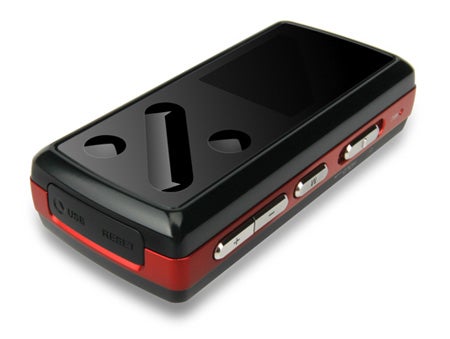
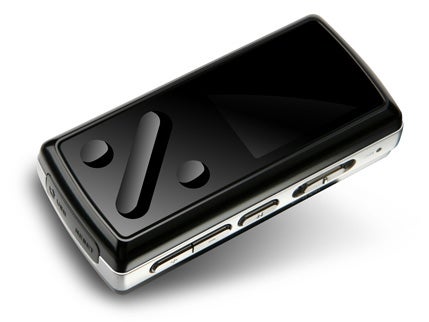
The latest attempt to ape this simplicity comes aboard Korean firm Cowon’s latest flash memory-based digital audio player, the iAudio 7. The front panel of this chunky little player, which comes in 4GB and 8GB capacities, with a 16GB version to come, is split into two. The left half is devoted to the 1.3in colour screen; the right half is given over to a rather odd collection of indentations.
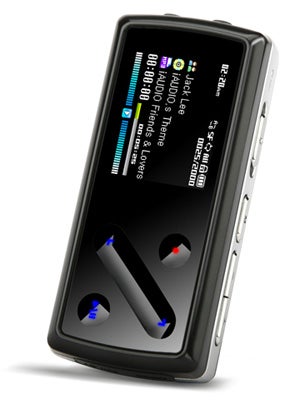
As soon as you turn the iAudio on and the indentations light up like a control panel on the Starship Enterprise, it becomes apparent what they’re for – they’re touch sensitive controls. Cowon calls them, collectively, its Swing Touch system: there’s one long diagonal groove used to scroll up and down lists of tracks; either side of it are two circular indentations – the bottom right one is used to select, pause and play; the top left one performs a number of different functions, depending on which mode you’re in.
As a control system it’s a mixed bag. The scroller works brilliantly in conjunction with the high-resolution 160 x 128 TFT screen, allowing you to whiz up and down long lists of tracks, albums, artists with gay abandon. However, the touch-sensitive ‘buttons’ flanking it aren’t as good and it takes a fair bit of practice to figure out how to get them to respond to your touch every time. Normal buttons combined with the touch-sensitive slider would have worked much better here.
It’s not helped by the fact that what you do with them isn’t always obvious either – the context sensitive button, for instance, is used to go up a folder level, but not when you’re in the Now Playing screen. You have to hit the menu button on the top edge of the device to get into browse mode, and then use the red touch-sensitive button to go up a level. Not very intuitive.
So the control system works, but it’s not as easy as it could be, and this is the story with most things on the iAudio 7. I’ll start with what works, and here there’s no better place to begin than with file support – it’s about as wide as you’re likely to get in a player of this type. Not only does the iAudio 7 play MP3 and WMA, but it also plays OGG, WAV, WMA DRM and even lossless FLAC files, so you can listen to CD quality audio if you really want to.
Another feature worth highlighting is the player’s dynamic playlist function. Hold down play for a few seconds while browsing through your music and you’re given the option to add it to the playlist. This is a brilliant feature that allows you to build up a good mix of music to match your mood without having to constantly fish the player out of your pocket to pick the next track or switch albums.
The iAudio can also play video, although I challenge anyone to watch a full episode of Heroes on its 1.3in screen without going cross-eyed. It has an FM radio, a built-in microphone and line-in socket for recording. You can browse pictures and read text files, use the player as an alarm clock and it has scheduled record if you want to record a radio show during the night. It’ll even display lyrics, if they’re available for a given track.
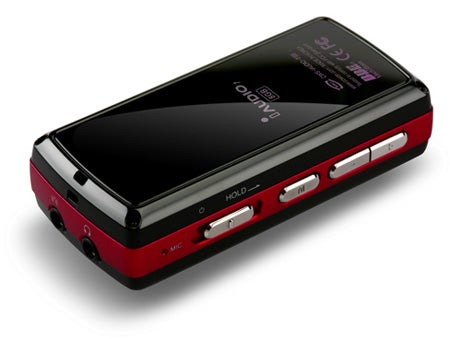
Access to all these functions is via what is possibly the most comprehensive and detailed menu system you’re ever likely to see on a flash-based MP3 player. This iAudio 7, among other things, allows you customise buttons, switch between MTP and UMS (universal mass storage) modes without have to flash the firmware, and choose between file-and-folder browsing or browse by tag (artist, album, genre and so on). You can customise what appears on the Now Playing screen – ID3 tag or file name – and how fast track names scroll. There’s even the facility to change the frequency level at which the various EQ bands operate. It’s a real power user’s player.
The jetAudio software supplied lives up to the same standards. It’s not particularly easy to use or novice friendly, but packed with features. Converting video, for example, is a snip with options to crop or stretch widescreen format files during conversion and even filter out subtitles, though support for DivX files is missing.
The good things don’t end there. Files are transferred and the device is charged using a standard USB to mini-USB cable, which is much more convenient than some proprietary connection. It also has the most incredible battery life. Cowon claims it’ll run for anything up to 60 hours (that’s nearly three days solid!) and I wouldn’t argue with that. I never saw the four-bar battery gauge at anything less than three throughout the period I tested it, and I listened to it extensively on the train and at home everyday for more than a week.
Obviously there are downsides – there’s no AAC playback compatibility, and those incredibly detailed menus also make it more difficult to locate and adjust simple things such as play mode and the user equaliser.
Sound quality, though good, isn’t quite up there with the best in class either and the hissy bundled headphones aren’t much cop. With a better set of cans the talents of the iAudio 7 shine through more clearly. It’s much more detailed and clear than, say, Samsung’s YP-T9 but doesn’t have quite as much presence as the Sony NW-E015 or the balance and clarity of iRiver’s Clix 2 or T60 players.
The driving guitars on Biffy Clyro’s Puzzle don’t have quite as much body as I’d normally like. Amy Winehouse’s vocals on Back to Black sounded a little harsh and over edgy. And the choral music on a recording of Mozart’s requiem lacks the drama that it can have on better playback equipment. You’ll also probably have to fiddle with the bass settings on the iAudio 7, because with all the usual enhancements turned off, the sound is neutral and is missing a little weight at the bottom end. The normally rumbustious Jamiroquai lacks his normal synth-driven swagger, and the bass lines on Nitin Sawhney’s Beyond Skin album don’t have enough substance until you nudge the Mach3Bass adjustment up a few notches.
But these complaints are relatively small. Overall, I enjoyed listening to the iAudio 7, with the slightly disappointing sound quality offset by the fact that I could simply drop my Ogg Vorbis and Flac files straight on it without having to convert them first.
”’Verdict”’
Ultimately, the iAudio 7 is a strange mix – a bit like that that mad, slightly unstable uncle you’d rather not be seen in public with but you’re fond of anyway.
It’s fiddly to use, but incredibly powerful. It’s quirky to listen to, but has a huge battery life. And though it isn’t the cheapest at £109 for the 4GB and £149 for the 8GB (the 8GB Sandisk Sansa e280 can be had for £114), it is still well-priced.
So there’s no getting past the fact that the iAudio 7 is odd, but if you accept its faults and embrace its strengths it makes the perfect geek’s music player. In the inimitable words of Borat, the ultimate oddball – I liiiiike…
Trusted Score
Score in detail
-
Sound Quality 7
-
Features 9
-
Value 8


Editorial independence
Editorial independence means being able to give an unbiased verdict about a product or company, with the avoidance of conflicts of interest. To ensure this is possible, every member of the editorial staff follows a clear code of conduct.

Professional conduct
We also expect our journalists to follow clear ethical standards in their work. Our staff members must strive for honesty and accuracy in everything they do. We follow the IPSO Editors’ code of practice to underpin these standards.
Editorial independence
Editorial independence means being able to give an unbiased verdict about a product or company, with the avoidance of conflicts of interest. To ensure this is possible, every member of the editorial staff follows a clear code of conduct.
Professional conduct
We also expect our journalists to follow clear ethical standards in their work. Our staff members must strive for honesty and accuracy in everything they do. We follow the IPSO Editors’ code of practice to underpin these standards.
