

Verdict


Key Specifications
- Review Price: £119.00
Asus has done its best to cover all the bases by using Intel’s new P45 chipset in an extensive range of motherboards. The basic P5Q has a single graphics slot, The P5Q Pro adds a second graphics slot for CrossFire and the P5Q-E adds eSATA and a second Gigabit port. Moving up the product range we have the P5Q Deluxe that we’re reviewing this week which is effectively a Pro with a third PCI Express graphics slot, then there’s a DDR3 Wi-Fi version and finally we have the Republic of Gamers Maximus II Formula that we’ll be reviewing very soon.
The P5Q Deluxe sits squarely in the middle of that list and supplies a fair number of bells and whistles without going ridiculously over the top. It has a certain amount in common with the MSI P45 Diamond that we reviewed a couple of weeks ago
including the P45 chipset, the passive cooling system, a stack of SATA ports, HD audio and one eSATA port on the I/O panel.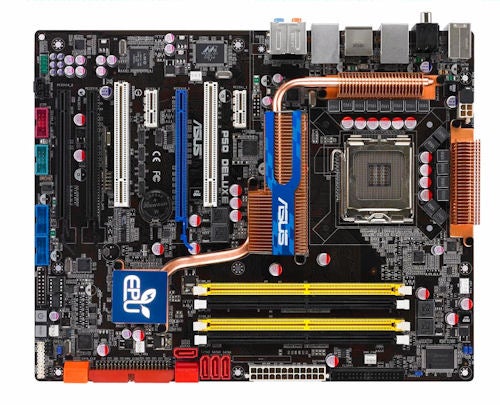
Asus has added a third long PCI Express graphics slot but we’re not really in the realms of CrossFireX here. The P45 chipset supplies 16 lanes of PCI Express 2.0 to a single graphics slot or splits it eight and eight if you use two graphics cards in CrossFire. That’s pretty much the limit of the chipset’s abilities and if you plug in a third graphics card you’ll get a maximum of four lanes so we’d strongly advise you to treat the third slot as something of a gimmick.
The layout of the board is very tidy with only one possible cause for complaint as the six SATA connectors on the ICH10R Southbridge have been crammed in higgledy piggledy. Two of the ports are laid down while the remaining four stand vertically which is a shame as some judicious movement of the floppy connector would have created enough space to pretty the thing up. Moreover, dare we suggest that the time has come to ditch the venerable floppy connector? We do. You can update the BIOS from a USB key with ease so we feel that the need for a floppy drive has passed.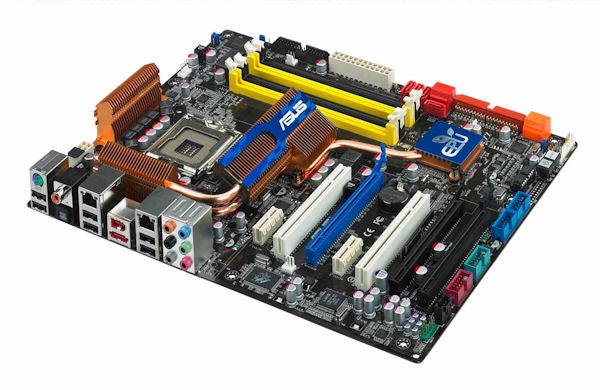
The area around the CPU socket is remarkably neat despite Asus having to find accommodation for a prodigious amount of hardware as Asus is making use of 16-phase power for the first time. When the demand for power is low the P5Q Deluxe uses four phases and as the load increases and efficiency drops the system switches over to the full 16-phases. The business of power regulation and efficiency has received a huge amount of attention from Asus, Gigabyte and MSI and lies at the heart of a dispute between Asus and Gigabyte over their rival technologies, so we’re in thorny territory here.
Asus uses a hardware power management chip called EPU-6 that monitors your CPU, ”Asus” VGA card, memory, chipset, hard drive and fans and adjusts the supply of power for maximum efficiency. At least that’s the idea but when we first received our P5Q Deluxe sample with BIOS 0302 the board was as flaky as anything and suffered from USB and SATA problems. After an update to BIOS 0506 the P5Q Deluxe behaved itself but the Asus Six Engine utility refused to run. When we took our CPU overclocking efforts too far the BIOS got corrupted on two occasions and the DieHard BIOS had to save the day. Then Asus hit us with BIOS 0702 which adds some overclocking features and which seemed like a distinct improvement however Asus spoiled things by including a screenshot showing a 600MHz front side bus on the P5Q Deluxe and a link to evidence that some bloke had gone even further to 625MHz using a standard Intel heatsink – Blimey!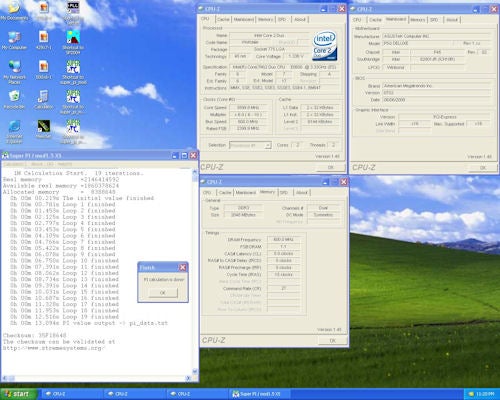
We installed our trusty Core 2 Extreme QX9650 (yes it’s a quad core rather than a dual core) along with 2GB of devilishly fast Kingston KHX9600 DDR2 memory and got to work.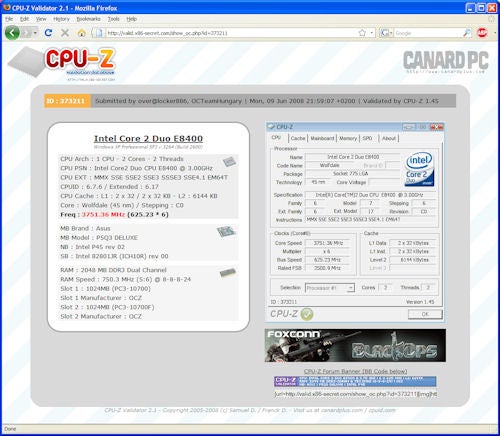
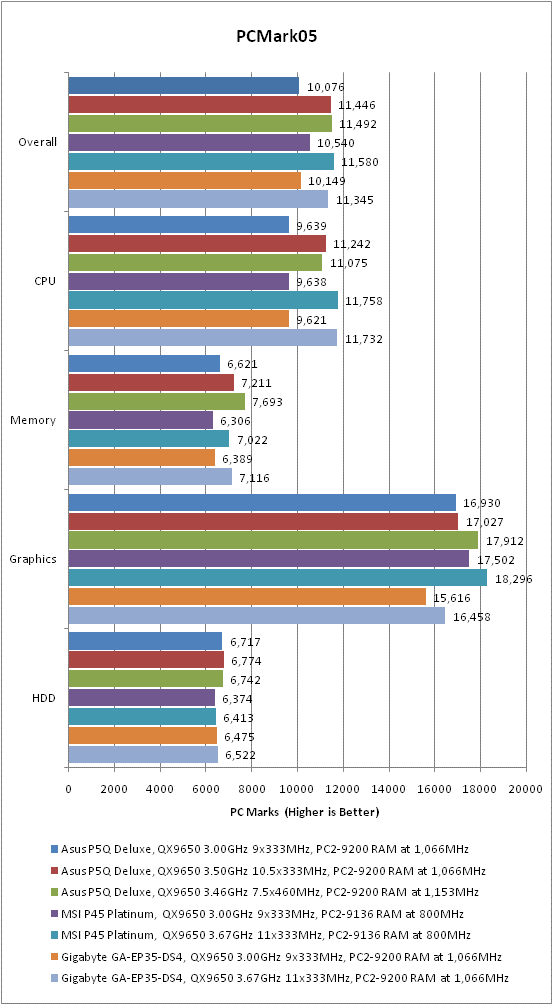
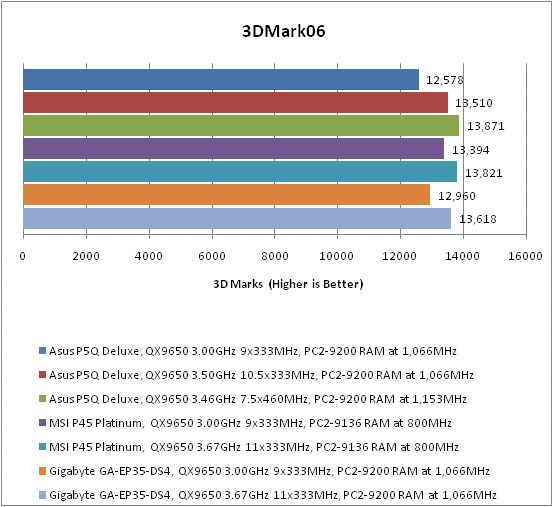
The first thing to note is that at standard clock speeds the P5Q Deluxe delivers marginally less performance than the MSI P45 Diamond. Secondly no matter what we did with the CPU multiplier the front side bus wouldn’t go above 460MHz and remain stable. Asus included a BIOS profile that was supposed to deliver the 600MHz front side bus so we loaded it up and were able to see that the power settings were far from dramatic.
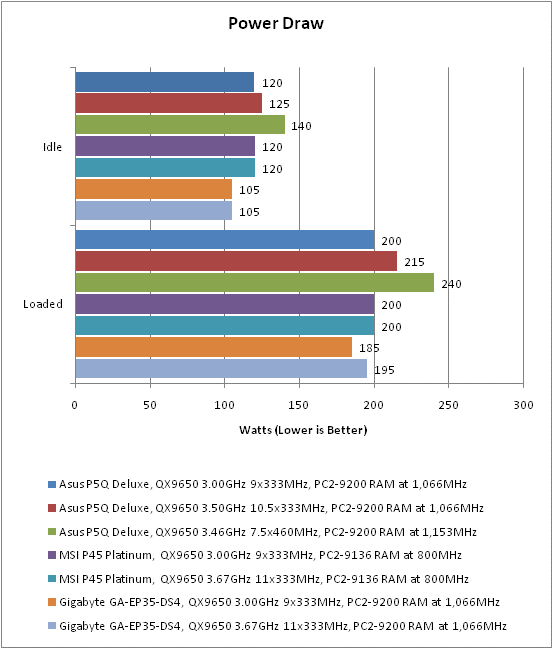
The CPU Voltage remained at the 1.35V we were already using, CPU PLL Voltage rose to 1.8V, FSB Termination Voltage to 1.4V and NB Voltage to 1.4V. The settings actually dropped the DRAM Voltage to 2.1V so we had to raise it to 2.3V as this is what Kingston say you should use. Despite all that we were unable to raise the front side bus speed but we could see that power consumption went up a notch.
There was another wrinkle as our efforts to overclock to 500MHz, 550MHz and 600MHz all failed and the system refused to POST. When we cycled the power the system restarted to allow us to correct the ludicrous clock settings in the BIOS and then it was happy to start Windows. Somewhere along the line this fun and games broke Windows Vista and both our network adapter and audio hardware vanished. The drivers weren’t broken or faulty – the devices simply vanished from System Properties and we couldn’t get them using System Restore, repair Windows or a reinstallation of chipset drivers.
Make no mistake about it, if you overclock your P5Q Deluxe and use sane settings you’ll be fine. We inflicted these troubles upon ourselves because we tried to follow the instructions that were sent by Asus. Ironic? We think so.
”’Verdict”’
The P5Q Deluxe is very close to being a fine gaming motherboard with a decent layout. However, it feels like it needs more a little more BIOS development to get up to scratch in the performance department and the third graphics slot is a complete waste of space.
Trusted Score
Score in detail
-
Value 8
-
Performance 7


Editorial independence
Editorial independence means being able to give an unbiased verdict about a product or company, with the avoidance of conflicts of interest. To ensure this is possible, every member of the editorial staff follows a clear code of conduct.

Professional conduct
We also expect our journalists to follow clear ethical standards in their work. Our staff members must strive for honesty and accuracy in everything they do. We follow the IPSO Editors’ code of practice to underpin these standards.
Editorial independence
Editorial independence means being able to give an unbiased verdict about a product or company, with the avoidance of conflicts of interest. To ensure this is possible, every member of the editorial staff follows a clear code of conduct.
Professional conduct
We also expect our journalists to follow clear ethical standards in their work. Our staff members must strive for honesty and accuracy in everything they do. We follow the IPSO Editors’ code of practice to underpin these standards.
