

Verdict


Pros
- Excellent connectivity
- Well designed
- Outstanding viewing angles
Cons
- Confusing controls
- Dithering pattern
- Became warm along the top
Key Specifications
- Review Price: £431.00
- 1,920 x 1,200 pixel monitor
- 24in
- Input for USB hub
- 2 X USB input
- HDMI
 (centre)
Best PC Monitor(/centre)
In 2005, Dell almost single-handedly brought high-end 24in monitors to the average consumer thanks to the incredibly affordable price of its 2405FPW. Since then it has kept the ball rolling with its 2407WFP and 2408WFP in 2007 and 2008 respectively, and though the U2410 actually came out at the tail-end of 2009 it’s pretty much in line with Dell’s logical naming scheme. 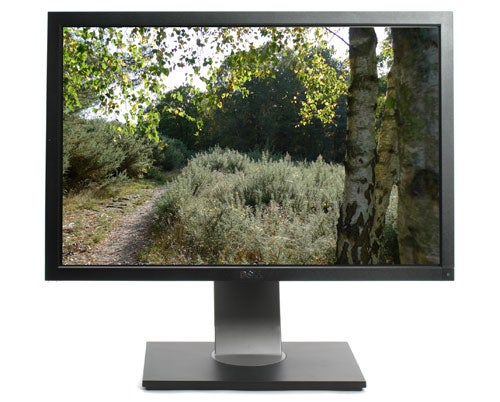
This is the first in the 24in range to consistently ditch PVA panels in favour of IPS, which is arguably a superior technology, especially for colour-critical work. Its new H-IPS screen enables the UltraSharp U2410 to offer some pretty impressive specifications, not least of which are an 8,000:1 claimed dynamic contrast ratio and 96 per cent Adobe RGB (110 per cent sRGB) colour gamut. Together with a low response time, Dell’s usual plethora of connections and full adjustability, is this the monitor to topple the brilliant HP LP2475w from its throne? Let’s find out.
Like its predecessors, this Dell is very simple to set up. It comes in two parts which easily yet securely click into each other and come apart again at the touch of a button, with no screws or other complications. The slim metal stand offers generous amounts of tilt, a 45 degree swivel to either side, smooth height adjustment and pivot – basically everything we could ask for. The only slight niggle is that since the screen only lifts 11.5cm off its base (13cm off your desk), you still need to tilt it back to pivot it. There was also an issue (which we assume is just a glitch with our specific sample) where the screen in landscape mode was not level, but rather it was tilted by a degree or two.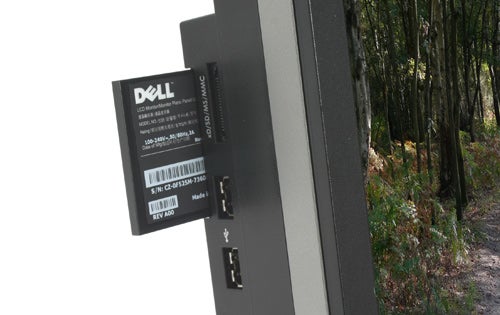
Connectivity hasn’t changed much from the U2410’s predecessors, which is no big deal since they were already more than generous. Behind the bezel and to the left you’ll find two of the monitor’s four USB hub inputs, together with a memory card reader and a pull-out plastic tag with all the monitor’s information printed on it (a far easier to access, better-looking and longer-lasting solution than the sticker found on the back of almost all other monitors). It’s a pity that the card reader no longer supports CompactFlash as previous models did.
At the monitor’s back you’ll find the input for the USB hub and a further two USB outputs, composite and component video inputs, VGA, twin DVIs, HDMI, and DisplayPort. Some users will be sorry to hear the S-Video present on older UtraSharps is on the casualty list. Ideally we would have liked to have seen twin HDMI outputs too, but really that’s just being picky – especially as DisplayPort and the HDCP-enabled DVI ports will work as HDMI video inputs with an adapter, the only caveat being that they won’t carry sound. This brings us to the one area where we really wish Dell would up its game: though a 3.5mm analogue audio output (and Dell speaker bar connection) is provided to carry sound from HDMI, we would prefer a digital output as found on the HP LP2475w.
In terms of design Dell hasn’t fixed what wasn’t broken. That’s not to say the U2410 hasn’t had a bit of a visual upgrade though, and we like what we see. Both the stand’s leg and a narrow strip running around the sides are gunmetal grey rather than the previous silver, and aside from the chromed Dell logo the rest of this monitor is unrelieved black. It makes a somewhat more subdued but also more stylish impression, and wouldn’t look out of place on any desk.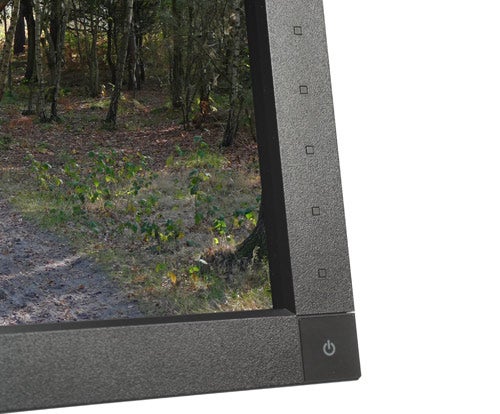
Perhaps the single biggest change in both looks and usability concerns the buttons – or rather lack thereof. Every high-end Dell up to the recent 2408WFP had a set of six buttons along the right bottom edge of the bezel, but like with the 27in 2708WFP before it the U2410 offers a set of touch-sensitive ones, removing the only visual blemish of previous designs. These are located just above the square, blue-backlit (orange when in standby) power button in the lower right corner. Unfortunately the power button’s backlighting can’t be turned off, though it’s subtle enough to not be a possible distraction in anything but a dark room.
Dell’s touch-control implementation is pretty special, though not without its flaws. When you turn the monitor on, all five identical ‘buttons’ light up in blue and dim again. Once dimmed the ‘buttons’ can’t be pressed, so you need to press the bottom one to turn them on. The coolest part is that the U2410 is fitted with a proximity sensor which activates this main ‘button’ when it detects your fingers coming near. Once you press it, the other controls light up and can now be used in conjunction with the context-sensitive on-screen menus. 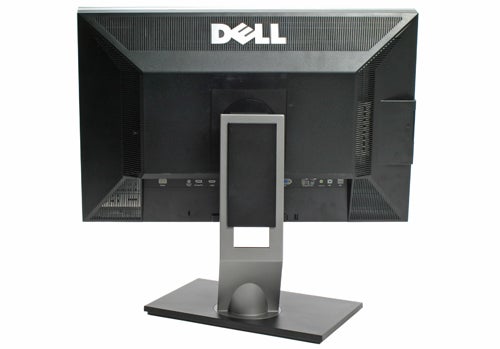
The U2410’s system makes it easy to configure in the dark, especially as the controls are well-spaced and very sensitive. There’s also an optional sound to denote a press which is thankfully turned off by default, and we never missed it.
When not on an active input, the aforementioned main ‘button’ calls up the input selection, while if the display is receiving a signal it calls up the standard OSD instead. This context-sensitive system is easier to use than Dell’s previous implementations, which were unwieldy at best. Our only real gripe with the new control system is that, where before you could press a shortcut button instantly, it now requires two presses: one to activate the button and another to actually use it. At least you can assign the three shortcut keys to Preset Modes, Brightness/Contrast, Auto Adjust, PIP Mode or Input Source.
As one would hope, the new OSD is more practical than was previously the case. All the usual adjustments are present, and in some areas Dell goes well beyond the call of duty. In the Custom Color preset mode (other modes include Standard, Multimedia, Game, Warm, Cool, Adobe RGB and sRGB), for example, you can adjust RGB in both Gain and Offset, and in Hue and Saturation you can adjust not just RGB, but CMY too! Sharpness is still adjusted in 10 per cent increments and menu rotation is still manual (where some high-end screens have a sensor that automatically adjusts this), but on the bright side DisplayPort has been added to the PIP (Picture In Picture) selection. 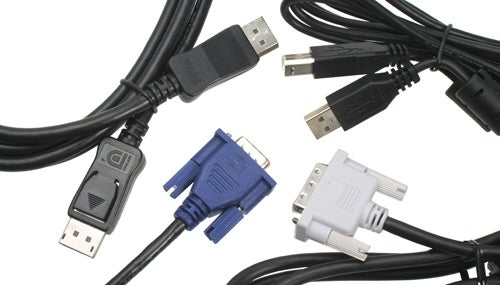
As with any monitor, the most important factor is of course image quality. Initial subjective impressions of this 1,920 x 1,200 pixel 24 incher were certainly good – in fact the U2410 provided far superior quality to Dell’s previous 2408WFP out of the box, as you would hope considering it uses a superior H-IPS panel rather than a PVA variant.
Good news continued with our image quality tests, as the U2410 happily chomped its way through greyscale and colour images, showing subtle distinctions and stark contrast differences with consummate ease – doubtlessly helped by its 12-bit colour processing. There was almost no sign of banding – the best performance we’ve seen since reviewing HP’s £2,000 professional DreamColor LP2480zx, no backlight bleed (though some slight backlighting inconsistency in two corners), excellent sharpness and not a hint of the aberrations we saw across tiny fonts on previous Dells. 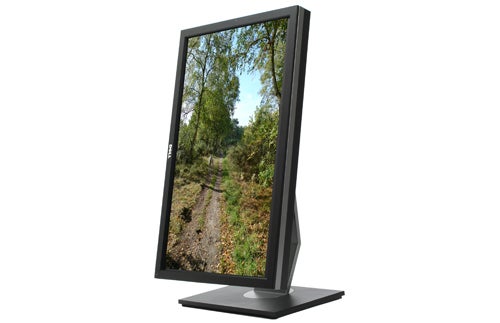
Viewing angles were also among the best we’ve seen. Though those on the (admittedly far cheaper) Samsung SyncMaster F2080 using a cPVA panel were decent, the U2410 is on a whole other level, with none of the contrast shift we noted there. Comparing apples to apples, this Dell is even slightly better than HP’s LP2475w, which also uses H-IPS and had delivered one of the most impressive performances we had previously come across for under £500.
As already mentioned, the UltraSharp U2410 offers an impressive 96 per cent of the Adobe RGB colour space, where its 12-bit processing combined with its exclusive PremierColor system should make for excellent colour range. Naturally DDC/CI profiles are supported, and aside from the rare ability to colour-adjust CMY, Dell shows that it’s really serious about going after colour professionals by delivering each U2410 pre-calibrated with a sheet giving a unique Tester reference number, mentioning the test applications and giving graphs indicating the Delta, Greyscale and Gamma values of the monitor after factory testing.
Indeed, the Adobe RGB preset turned out to be singularly impressive in real life, certainly adequate for professionals. In fact, after calibration with the Datacolor Spyder3 Express colorimeter, there was almost no discernible difference between the post-calibration profile and Dell’s factory Adobe RGB preset! 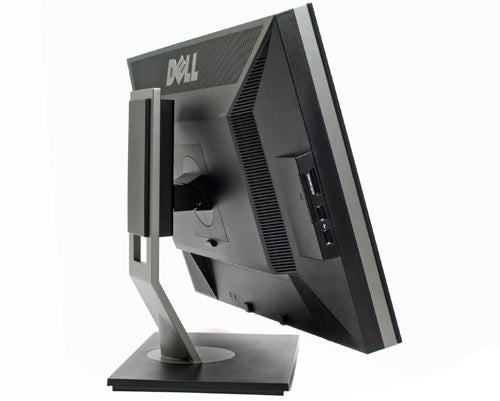
So, is this the ideal out-of-the-box monitor for imaging professionals at its price point? Unfortunately, not quite; the Adobe RGB preset was marred by a very strange dithering pattern over mid-tone grey shades that we could not completely get rid of, no matter how many settings we altered. It’s a real shame too considering the otherwise excellent performance, but at least it disappears if you change presets. Hopefully Dell will fix this in a future revision, as there is no good reason for a high-quality 8-bit panel with 12-bit processing to suffer from dithering artifacts.
Obviously games and movies are a pleasure – though you’ll want to use the Custom preset rather than the predefined ones. There was no sign of ghosting and the 1,000:1 (8,000:1 dynamic) contrast ratio helps ensure plenty of visible dark detail. Aspect ratios comprise Fill, Aspect and 1:1, which offer an ideal option for every scenario. In use the U2410 did get very warm along the top, but there was no audible operating noise. Another point to note is that it does take a while to start up when you turn it on (about eight seconds), but that’s hardly a big deal.
HP’s LP2475w is currently the only monitor we have reviewed that offers a similar feature set at a similar price point. In fact it’s available for around £420 making it slightly cheaper than the Dell. Though the HP offers greater height adjustment, the U2410 beats it hands down in every other way, offering smoother adjustments, superior build quality and far nicer looks. When it comes to connectivity, the U2410 gets you a card reader and a dedicated VGA port, but the LP2475w wins out with an extra two USB ports and a digital co-axial audio output for pass-through of sound from an HDMI input.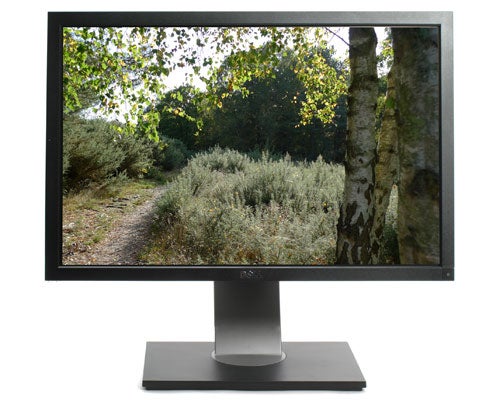
Of course image quality is the most important criteria for most users, and here Dell does seem to offer slightly better quality across the board despite slightly lower real-world contrast, with RGB/CMY adjustments being a particularly nice touch. In fact it would probably win if it weren’t for the dithering pattern we came across, though this is circumvented by avoiding the Adobe RGB preset. On the other hand the HP LP2475w appears to suffer from poor quality control on panels if the comments on our review are anything to go by, so the Dell is still likely to be the safer bet.
Verdict
While not perfect, Dell’s new IPS-based 24in 1,920 x 1,200 pixel monitor offers streamlined design, outstanding ergonomics, almost every connection we could ask for and generally impressive image quality to boot. Minor flaws aside, it’s the best 24in monitor available for the money right now, whether you’re a discerning gamer, graphics enthusiast or just someone who likes working on an excellent screen.
Addendum: A firmware update issued by Dell has fixed the dithering issue in the Adobe RGB preset mentioned above, and a A00-revision monitor which we have re-tested with the new firmware performed flawlessly.
Trusted Score
Score in detail
-
Image Quality 9
-
Design 9
-
Value 9
-
Features 9
Specs
| Screen Size (inches) (Inch) | 24 in |
| Aspect Ratio | 16:10 |
| Response Time (Millisecond) | 6 ms |
| Brightness (Lumen) | 400 Nitlm |
| Dot Pitch | 0.270 mm |
| Horizontal Viewing Angles | 178? |
| Vertical Viewing Angles | 178? |


Editorial independence
Editorial independence means being able to give an unbiased verdict about a product or company, with the avoidance of conflicts of interest. To ensure this is possible, every member of the editorial staff follows a clear code of conduct.

Professional conduct
We also expect our journalists to follow clear ethical standards in their work. Our staff members must strive for honesty and accuracy in everything they do. We follow the IPSO Editors’ code of practice to underpin these standards.
Editorial independence
Editorial independence means being able to give an unbiased verdict about a product or company, with the avoidance of conflicts of interest. To ensure this is possible, every member of the editorial staff follows a clear code of conduct.
Professional conduct
We also expect our journalists to follow clear ethical standards in their work. Our staff members must strive for honesty and accuracy in everything they do. We follow the IPSO Editors’ code of practice to underpin these standards.
