

Verdict

Key Specifications
- Review Price: £646.24
At the end of March I looked at the Samsung SyncMaster 244T and was amazed at how much it offered considering the price. At the time, finding a good 24in 1,920 x 1,200 monitor for around £800 was quite impressive, but it seems that things have moved on considerably since then. Sitting on my desk right now is the BenQ FP241W 24in monitor, which has even more tricks up its sleeve, while hitting a price point that makes the Samsung look expensive.
The first thing that you notice when you take this BenQ out of its box is that it comes in two pieces, like the Dell 2405FPW did. This makes it really easy to lift the FP241W out of the box – you simply place the stand on your desk then just clip the screen to the front of it. I was actually amazed at how easily the screen clipped into place and how secure it was afterwards.
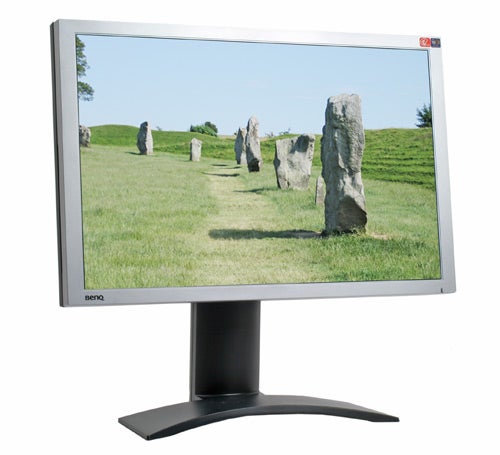
Once set up you’ll see that despite the large screen size, BenQ has managed to surround the panel with a very slim bezel, at just under 2cm. That said, this is only very slightly slimmer than the bezel surrounding the Dell 2407WFP, but somehow it looks far slimmer, perhaps due to the silver, rather than black finish. The bezel and fascia are also kept very clean, with only a BenQ logo in the bottom left and an LED at the bottom right. There are some stickers in the top right corner, but you’ll probably remove those so that they don’t spoil the clean lines.
In order to achieve this clean fascia, BenQ has moved all the buttons to the right hand edge of the screen. At first this can be a little annoying since you have to stick your head around the side of the monitor in order to see which button does what. However, once you’ve been using the FP241W for a while, you just instinctively know where each button is and what it does, so there’s no need to crane your neck.
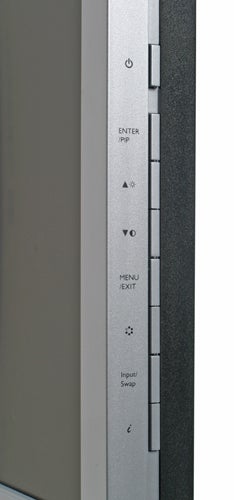
There are eight buttons in total at the side. The power button is at the top and is slightly separated from the others to avoid accidental activation. Below this is the Enter button, which also doubles as the Picture-in-Picture switcher. Next up are the up and down arrow keys, which also act as shortcuts for brightness and contrast adjustments. There’s the Menu/Exit button next which brings up the OSD and exits from it when you’ve finished making your adjustments.
The last three buttons comprise an input switch, an auto adjust button and finally what BenQ calls a mode button. The latter works much like Samsung’s MagicBright button and switches between multiple pre-set screen configurations – you can choose between Standard, Movie, Dynamic and Photo. Obviously each mode adjusts the brightness, contrast and colour settings to match what ever task you’re undertaking at the time. Switching to Movie for example makes the image really punchy, with bright, vivid colours.
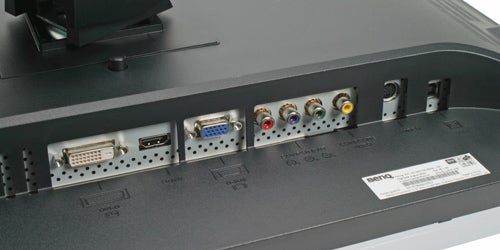
Looking at the rear of the FP241W reveals the feature that makes this monitor stand out from the crowd of other 24in widescreen displays – an HDMI port. Not only is there an HDMI port, but it’s an HDCP compliant HDMI port, so you’ll have no problem hooking up a Blu-ray or HD DVD player, or like I did, a Sky HD box.
There were absolutely no issues hooking up my Sky HD box to the FP241W, which would indicate that BenQ has certainly implemented its HDCP support correctly. With a resolution of 1,920 x 1,200, I was getting the full benefit of the 1080i signal of the Sky box’s output and I have to say that the image looked superb. Playing back some Premiership football footage proved suitably breathtaking, with the pitch looking amazingly green and lifelike, while the vivid colours on the players’ shirts were superbly resolved without being oversaturated.
High definition movie footage looked equally impressive – in fact Angelina Jolie and Jennifer Garner have never looked so good as Mrs Smith and Elektra respectively. Obviously my choice of movies was all about the breadth of the footage rather than who was in them, honestly. What I did notice when watching films is that the BenQ does a good job of picking out detail in low light scenes, while blacks managed to look, well, black rather than grey. The 1000:1 contrast ratio is pretty good for what is, essentially a desktop monitor rather than a TV, and the results show that BenQ is being very honest with its specifications.
Despite the fact that HDMI carries digital audio as well as video, the FP241W doesn’t have any integrated speakers. I don’t see this as a big issue though, since integrated speakers are usually pretty poor, and it’s unlikely that any high definition source wouldn’t have separate digital and analogue audio outputs.
As well as an HDMI port, you’ve also got an HDCP compliant DVI port, so you can hook it up to your PC safe in the knowledge that you’ll be able to playback protected video content when Windows Vista launches, or if you put a Blu-ray or HD DVD drive in your machine. There’s also an analogue D-Sub port, S-Video and composite inputs.
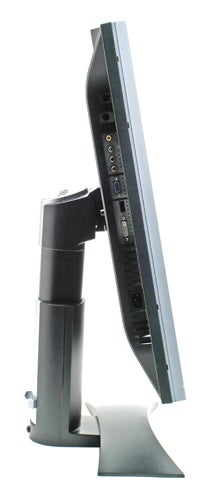
The last input method is component video, meaning that the FP241W can wear the HD Ready badge. The component video connectors mean that you can happily hook your Xbox 360 up to this screen – believe me, it’s worth doing! With so many inputs, the FP241W really could address all your work, video and gaming needs. Hell, you could even hook up a PlayStation 3 to the HDMI port, assuming that Sony ever bothers to launch its new console in Europe of course.
Talking of gaming, this monitor isn’t just great for high definition consoles like the Xbox 360, if you’ve got a fast enough PC you’ll soon realise how good it is to play games at such a high resolution. I was using the FP241W to play Counter Strike: Source at the full native resolution of 1,920 x 1,200 and it was great. Does a screen like this give you an advantage over your opponents? Probably, as long as your graphics hardware is fast enough to cope, but one thing’s for sure, gaming at 1,920 x 1,200 looks awesome.
Talking of games, I’m sure there are a lot of you out there waiting for me to talk about response time. To be honest I don’t tend to buy into the whole response time myth, and in my opinion the drive to lower response times has just compromised image quality – we’ve ended up seeing new monitors with 6-bit panels instead of 8-bit, when we really should be pushing towards 10-bit technology. Also the introduction of grey-to-grey response times has meant that we’re seeing ridiculous numbers like 2ms being thrown around, but unlike most manufacturers BenQ is honest enough to quote both the grey-to-grey response time AND the off-on-off response time. So, the FP241W gets a 6ms grey-to-grey time, compared to 16ms for off-on-off – choose which ever number is more important to you, but I was more than happy with the response on this screen.
BenQ has ensured decent colour accuracy by equipping the FP241W with an 8-bit panel, producing the full True Colour gamut of 16.7 million colours – no need for dithering algorithms here. This is borne out when you use the FP241W for some image editing, as well as when I threw DisplayMate at it.
A lot of LCD monitors have problems with greyscale gradation, but the FP241W had no such issues. The 256 level intensity ramp DisplayMate test showed an incredibly smooth transition from the upper to lower ends of the intensity spectrum, without even a hint of green or pink creeping into the midrange, as is often seen on other screens. Likewise, the 64 step greyscale test showed no issues with colour ingress, while the FP241W didn’t suffer from any compression issues at either end of the intensity spectrum.
Colour performance was every bit as good, with the 256 level colour intensity ramp displaying a smooth transition from high to low, with the red green and blue channels all looking as pure as they could be. Likewise, the colour scales test was spot on, with no compression at the high end and every single colour falling off uniformly at the last block.
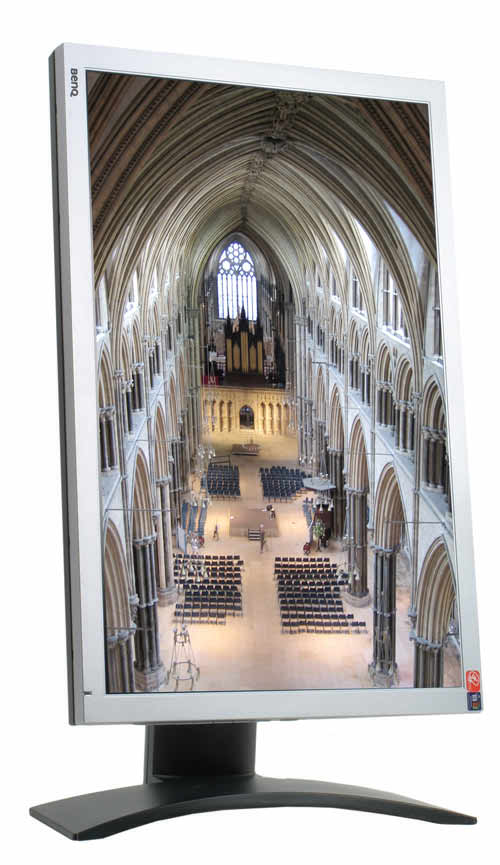
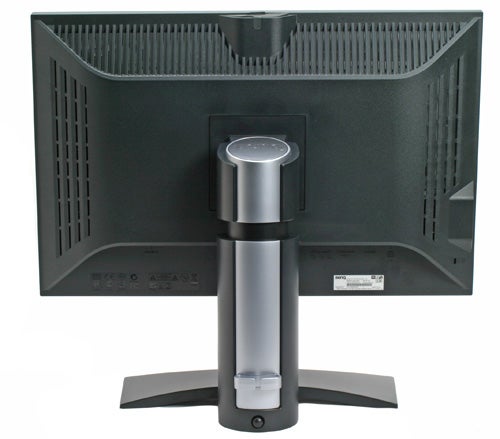
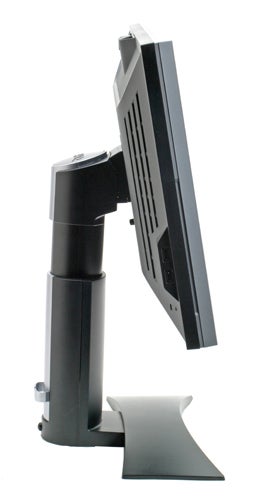
The stand is probably the best I have seen on any monitor. Bizarrely, it doesn’t look like it would be particularly steady, but it is in fact rock solid. Despite the fact that the stand plants the FP241W to your desk, it takes up a minimal amount of room – I’ve actually seen stands on 19in monitors take up more desk space. There’s also no denying that the stand looks sleek and stylish and matches the screen itself perfectly.
The stand offers a full range of movement, as you’d expect with a 24in widescreen monitor. There screen can be raised and lowered vertically, and I have to say that I’ve never encountered a stand with better damping than this one – you really can slide the screen up and down with the pressure of a single finger. When you push the screen down to the very bottom of its movement it locks into place – there’s a button at the rear of the stand which will release it for vertical movement once more. If there’s one criticism it’s that I couldn’t set the screen as low as I would have liked.
The panning movement is every bit as smooth as the vertical movement, with the rubber feet on the stand keeping it clamped to the desk while the screen pans on the central column. The screen will also tilt forwards and backwards, helping ensure that you find that elusive, perfect viewing position.
And if you want to read a very, very long document, you have the option of pivoting the screen into a portrait orientation. There is even pivoting software bundled in the box, although most graphics drivers will do this for you these days.
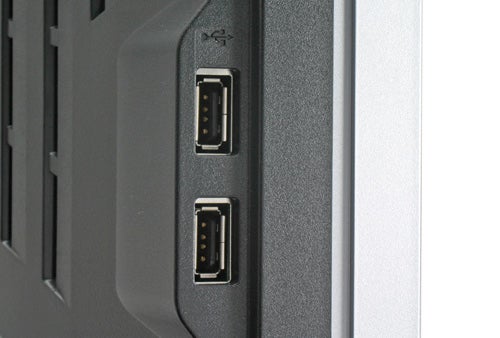
There’s also an integrated USB hub, with two ports on the left hand side and one directly on top of the screen. The latter is there to take advantage of BenQ’s USB webcam that just slots straight in, with no need for messy trailing cables. The webcam is an optional extra, but BenQ couldn’t tell me how much it will be at the time of writing.
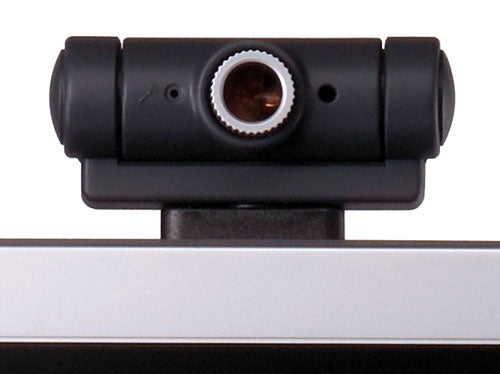
BenQ hasn’t been too stingy with the extras either. In the box you’ll find a DVI cable (it says optional in the manual, but the website says it’s included and I had one in the box), a D-SUB cable, a USB cable, a quick start guide and a full user manual on disc. There’s no HDMI cable provided, but to be fair to BenQ, I’d expect to get one of these with a source device, as I did with my Sky HD box.
As I mentioned at the beginning of this review, the FP241W makes my previous favourite monitor look decidedly expensive – although £835 was a bargain for the Samsung back in March, you’re still going to pay around £740 for it now. BenQ on the other hand has been incredibly aggressive with the pricing for the FP241W, and it’s already available for a truly staggering £646 including VAT! And with that in mind, it’s impossible not to recommend this screen.
”’Verdict”’
I’ve looked at a few BenQ monitors over the years, but the FP241W completely rewrites the script. Not only does it have the widest array of inputs that I’ve ever seen in a desktop monitor, but the image quality is equally impressive, while the price is truly incredible. Even the design and build quality of this screen are both first rate. When you throw the HDCP compliant HDMI port into the equation, BenQ really does have every single base covered with this screen. Put simply, if you’re after a 24in widescreen monitor, this is the one to buy.
Trusted Score
Score in detail
-
Image Quality 10
-
Value 10


Editorial independence
Editorial independence means being able to give an unbiased verdict about a product or company, with the avoidance of conflicts of interest. To ensure this is possible, every member of the editorial staff follows a clear code of conduct.

Professional conduct
We also expect our journalists to follow clear ethical standards in their work. Our staff members must strive for honesty and accuracy in everything they do. We follow the IPSO Editors’ code of practice to underpin these standards.
Editorial independence
Editorial independence means being able to give an unbiased verdict about a product or company, with the avoidance of conflicts of interest. To ensure this is possible, every member of the editorial staff follows a clear code of conduct.
Professional conduct
We also expect our journalists to follow clear ethical standards in their work. Our staff members must strive for honesty and accuracy in everything they do. We follow the IPSO Editors’ code of practice to underpin these standards.
