

Verdict


It’s pretty evident from the three swappable covers included in the box and the social networking widgets loaded on the phone that Samsung is targeting the ‘yoof’ market with the Genio Touch.
As the name suggests this handset is designed to be driven almost entirely from its 2.8in touchscreen. However, by touchscreen standards the handset is relatively small. It’s a good deal shorter and narrower than the iPhone for example, but this helps it feel more comfortable to hold in your hand and means it’ll slide easily into even the tightest pockets of your skinny jeans. 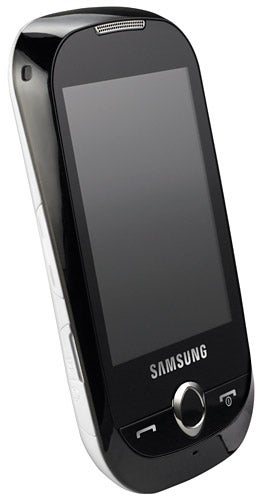
In terms of design it’s a lot closer to the Palm Pre than the iPhone, as its rounded shape means it’s got a similar pebble-like appearance. It’s not exactly overloaded with physical buttons, as it instead lets the touchscreen take most of the strain, but you do get dedicated call handling buttons on the front as well as a volume rocker switch and a camera button on the side.
In fact, our only real niggle about the design is that Samsung has hidden the microSD card slot under the battery cover. Thankfully you don’t actually have to remove the battery to get at it, but it’s still not the ideal location as it makes it cumbersome to hot swap cards.
The phone’s interface is well thought out and quite easy to use. For example, there are three home screens that you access by swiping your finger left or right across the screen and each of these screens can be assigned its own wallpaper. 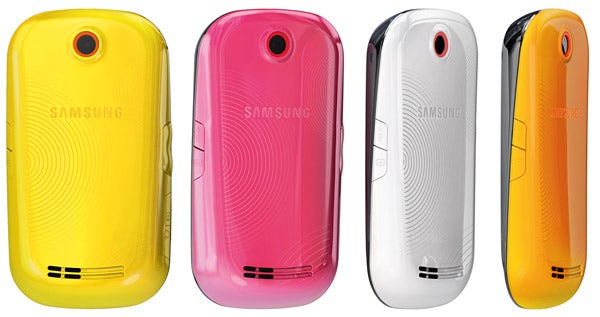
These home screens are the place where you store the phone’s active widgets, which are accessed via a small tab that’s always visible on the left hand side of the display. Open the tab and you’re presented with a single column of widgets that you can scroll up and down through. When you find a widget you want to use you just drag it to the right to add it to your home screen. It’s all pretty straightforward stuff.
There are a decent number of widgets loaded as standard on the phone, although some do duplicate the same functionality. For example, there are three different types of clock. Nevertheless, there are still plenty of useful ones including one for viewing photos from Picasa along with the obligatory Facebook, Twitter and MySpace widgets that seem to be becoming standard on youth orientated phones.
In the main menu you’ll find plenty of useful apps including a decent calendar along with the FM radio tuner, RSS reader and a Java version of Googlemaps. There are also some nice touches dotted around the phone’s interface including a rather neat 3D carousel menu that uses a picture to represent each of your contacts.
Unfortunately, Samsung’s decision not to include an onscreen QWERTY keyboard in the operating system has hampered the interface. Instead, you have to always rely on the alphanumerical key pad, which is a pain when you’re texting or entering web addresses. Perhaps this was a necessity because the resistive touchscreen isn’t as accurate at registering finger presses as the capacitive screens found on the iPhone and HTC Hero. Certainly the touchscreen can be a little temperamental when it comes to registering user input. Most of the time it does a good job, but every now and again it just fails to register a finger press at a crucial moment and this can soon become frustrating. 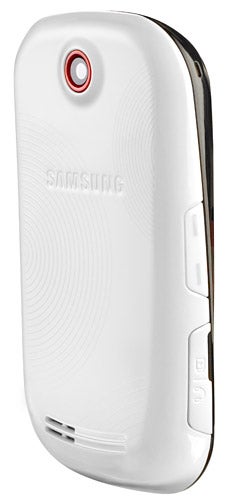
Another area that’s certainly not the Genio’s strong point is connectivity. There’s no 3G or Wi-Fi support leaving you completely reliant on GPRS or EDGE for data downloads. This means the browser can be excruciatingly slow to use and that downloads, such as music tracks, take so long that you won’t bother trying again after your first attempt. Another thing that may be an issue for some is the phone’s lack of GPS, although at this price you can hardly expect this feature to be included. Nevertheless, the phone’s Java version of Google Maps can use triangulation to give you a rough estimate of your current location.
Price cutting is also evident in the phone’s camera. As a result you get a very basic 2.0-megapixel shooter that lacks both a flash and autofocus. As you would expect, indoor shots in low light come out looking quite poor with the little detail on offer swallowed up by graininess. Outdoors in decent light it performs a little better, but let’s face it, you’re never going to get great results from a camera with such a low resolution.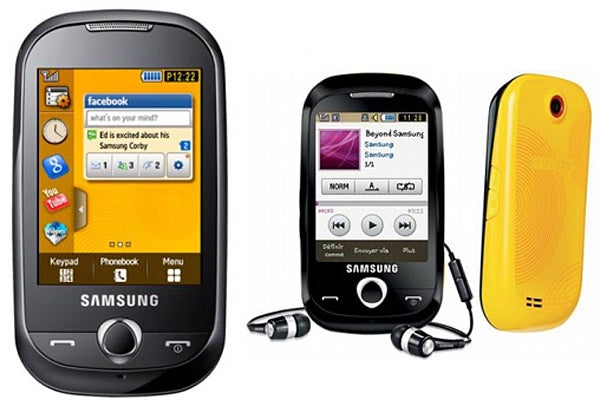
On the plus side, battery life is pretty impressive, no doubt helped by the fact that the phone doesn’t have to deal with battery-sapping 3G or Wi-Fi technology. The upshot is that you can expect to get around three and a half days worth of moderate usage from it, which isn’t bad for a touchscreen phone.
Unfortunately, charging and syncing the phone with a PC is carried out via the handset’s proprietary Samsung connector, so if you don’t have this lead to hand you won’t be able to upload new music or photos to it. Worse still, if you’re left it at home before going on holiday with your mates, the likelihood of borrowing a compatible charger when the battery’s flat is reduced. The sooner manufacturers standardise on micro-USB, the better we say. This port also doubles as the headphone socket. However, Samsung has been smart enough to supply the phone with a stereo headset that has a split lead so you can use your own cans with the phone without forsaking the hands-free functionality.
”’Verdict”’
The Samsung Genio Touch is by no means perfect. It’s disappointing that a phone that’s targeted at social network users lacks 3G and it’s maddening that Samsung hasn’t include an onscreen QWERTY keyboard. In other areas, however, it puts in a good showing thanks to its easy to use operating system, impressive line-up of widgets and good battery life. If you’re on a budget, but are interested in a touchscreen handset, it’s worth checking out.
How we test phones
We test every mobile phone we review thoroughly. We use industry standard tests to compare features properly and we use the phone as our main device over the review period. We’ll always tell you what we find and we never, ever, accept money to review a product.
Trusted Score
Score in detail
-
Performance 7
-
Design 7
-
Value 8
-
Features 6
General
| Height (Millimeter) | 103mm |
| Width (Millimeter) | 56.5mm |
| Depth (Millimeter) | 12mm |
| Weight (Gram) | 90g |
| Available Colours | Yellow, pink, white, orange |
Display
| Screen Size (inches) (Inch) | 2.8in |
| Screen Resolution | 240x320 |
| Touchscreen | Yes |
Battery
| Talk Time (Minute) | 540m |
| Standby Time (Hour) | 730hr |
Storage
| Internal Storage (Gigabyte) | 0.05GB |
| Camera (Megapixel) | 2 Megapixel |
| Front Facing Camera (Megapixel) | No Megapixel |
| Camera Flash | No |
Connectivity
| Bluetooth | Yes |
| WiFi | No |
| 3G/4G | No |
| 3.5mm Headphone Jack | No |
| Charging/Computer Connection | microUSB |
Misc
| GPS | No |


Editorial independence
Editorial independence means being able to give an unbiased verdict about a product or company, with the avoidance of conflicts of interest. To ensure this is possible, every member of the editorial staff follows a clear code of conduct.

Professional conduct
We also expect our journalists to follow clear ethical standards in their work. Our staff members must strive for honesty and accuracy in everything they do. We follow the IPSO Editors’ code of practice to underpin these standards.
Editorial independence
Editorial independence means being able to give an unbiased verdict about a product or company, with the avoidance of conflicts of interest. To ensure this is possible, every member of the editorial staff follows a clear code of conduct.
Professional conduct
We also expect our journalists to follow clear ethical standards in their work. Our staff members must strive for honesty and accuracy in everything they do. We follow the IPSO Editors’ code of practice to underpin these standards.
