

Verdict


Key Specifications
- Review Price: £279.99
Sony Ericsson’s C903 is the latest Cyber-shot handset to hit my reviews bench. It is not long ago that I looked at the C905 Plus, a revamped version of the C905. Like the two versions of the C905 this one is a slider. But the C903 lacks some of the pizzazz of the C905 and sports a 5-megapixel camera rather than an 8-megapixel one. Hence, presumably, its slightly lower pecking-order name. Sony Ericsson styles this as a mid-range handset.
At 97mm tall, 49mm wide and 16mm thick the C903 doesn’t better the C905’s 104mm x 49mm x 18mm by a great deal, but in the hand it feels like a much more comfortable mobile phone. This is probably due to the weight differential – 96g for the C903 versus 136g for the C905. 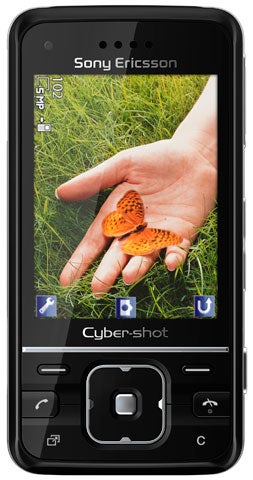
That weight difference is due in part to the build materials. The C903 has a chassis made from plastic with silver metal-look highlights. The C905 is built from higher quality materials.
The slide mechanism on my review sample was very smooth, opening and closing with solid and reassuring ‘clunks’. My sample was black and silver, or what Sony Ericsson calls Lacquer Black. There are also Techno White and Glamour Red options available.
This time round, Sony Ericsson has got the ergonomics of use right. On the front fascia, the navigation button is basically a large square with rounded edges, which is raised from its surroundings to make it easier to hit accurately. The softkey buttons are very small but are again raised to aid location. The larger Call and End keys are raised too. The only flush buttons on the front fascia are the Activity Menu and Clear keys. These sit right at the bottom of the casing and are large enough to hit accurately despite their low-profile.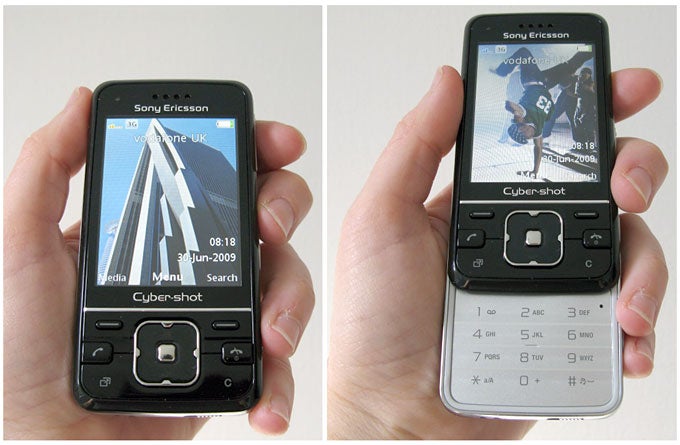
Inside the slide, the numberpad is flat but textured so that the centre of each number is slightly domed. This helps you feel your way round and hit keys accurately.
There is a quick release tab for the backplate on the bottom of the casing, but apart from that all the buttons are on the right hand side of the phone. These comprise a volume rocker that doubles for zooming when you are using the camera, the camera button itself, and a pair of buttons for flicking between stills and video shooting modes and image viewing mode.
The 2.4in screen delivers the usual 240 x 320 pixels. Sony Ericsson’s screens are usually sharp and bright, and this one is no exception. The front fascia design makes it look as though the screen dominates, too. An optical illusion, but one Sony Ericsson must be quite pleased with.
The C903 has an accelerometer that ensures the screen rotates when you are in some applications. Picture viewing is one, web browsing another. The rotation sensor is very responsive and screen rotation was fast. I just wish it worked all the time, in every application, on the main screen, everywhere, really.
There is no Wi-Fi here but there is GPS. You can geotag photos and in the main menu on the handset there is a group of applications called Location Services. Open this up and there’s quite a bit to let you take advantage of the GPS. For example, Near Me finds facilities that are close to your current location, and its database includes things like cinemas, clubs and gigs, food and drink locations, cashpoints, chemists and petrol stations. There is also Wayfinder, a point-to-point navigation application; and Tracker, a GPS tracker you can use, for example, on training runs. Google Maps is here too.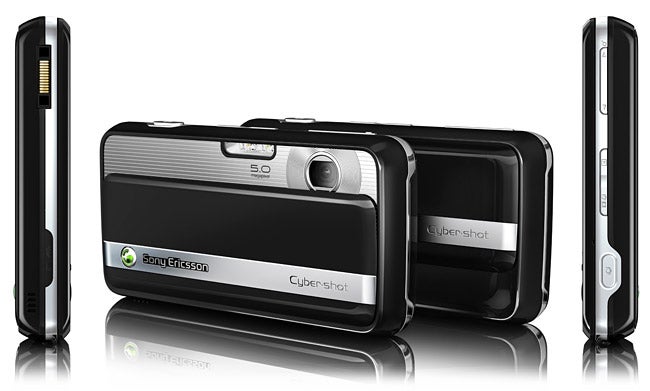
This is a 3G handset with HSDPA. There is a search function mapped to the right softkey on the home screen and this calls up a Google search box. Slap your term in and you are online in a jiffy. It is fast, efficient, and very useful.
Here’s an annoyance. TV-Out is supported but Sony Ericsson doesn’t bother to supply a cable. I always like to see this feature on a phone, but if you have to fork out for extra kit to make it work, I doubt many people will get to see their photos, video or other screen-based stuff on a telly.
There is no front-mounted camera for two-way video calling. The main camera lens sits under a slide-away cover. This fits lengthways along the whole of the backplate giving the phone’s back a very ‘digital camera’ look. The cover protects not only the lens but also a dual LED flash unit.
Camera features map to all the number buttons and if you memorise them it is really quick to get around the settings. Among the camera highlights is BestPic with up to nine images, face detection and smile shutter modes.
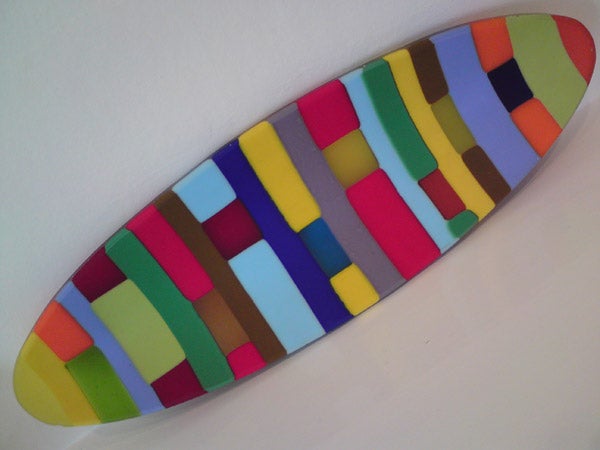
The camera quality is very good. The coloured dish, photographed indoors under normal household lights, has good colour reproduction and is sharp. Outside, the level of detail captured on the chair is perfectly acceptable, and the flower, shot quite close but without the macro mode turned on is also good. The colour reproduction and detail both impress. There is a 16x digital zoom if you feel the need.
Music playback is of course here, and as usual Sony Ericsson lets the whole show down by implementing its dreadful, side-mounted, huge, proprietary headset connector. Really, Sony Ericsson, what is the point of designing nice slim handsets if pockets get snagged by the ugly looking headset connector? The headset itself is only a one-piece affair on this mid-range handset, so you can’t even substitute a favourite set above the mic as you could with a two-piece set. This is a very low point of an otherwise good handset.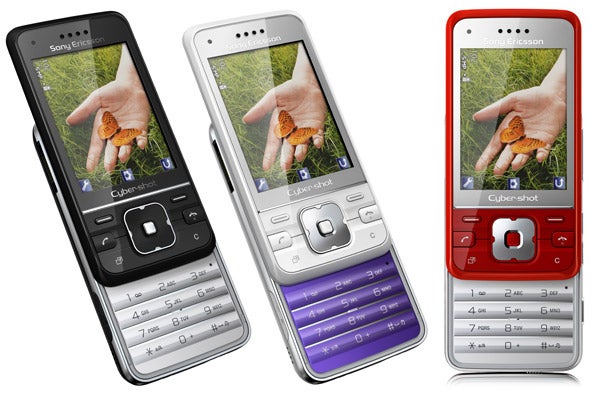
I asked the phone to play music non-stop from a full battery charge and it managed 8 hours 39 minutes of playback. More anecdotally, it was not difficult to get through two days without visiting a mains power supply. Sony Ericsson’s official battery life suggestion is 10 hours of talk and 400 hours on standby on GSM.
There is 130MB of built-in memory and a Memory Stick Micro slot under the backplate for adding more storage. As usual, Sony Ericsson includes plenty of software extras. Those I’ve not mentioned include TrackID, PhotoDJ, VideoDJ and MusicDJ, sound recorder, messaging including email, RSS feed reader, FM radio, five alarms, a pedometer, photo deformer called ‘pull face’, YouTube client, calendar, tasks manager, notes taker, timer, stopwatch and calculator.
”’Verdict”’
Nobody really needs an 8-megapixel camera on their phone, and this 5-megapixel one is easy to use and takes a good snap. The phone itself feels a bit plasticky in build terms, but the features list is good. It is a pity about the headphones debacle.


How we test phones
We test every mobile phone we review thoroughly. We use industry standard tests to compare features properly and we use the phone as our main device over the review period. We’ll always tell you what we find and we never, ever, accept money to review a product.
Trusted Score
Score in detail
-
Design 8
-
Usability 8
-
Value 8
-
Features 7
General
| Height (Millimeter) | 97mm |
| Width (Millimeter) | 49mm |
| Depth (Millimeter) | 16mm |
| Weight (Gram) | 96g |
| Available Colours | Black, white, red, pink, silver |
Display
| Screen Size (inches) (Inch) | 2.4in |
| Screen Resolution | 240x320 |
| Touchscreen | No |
Battery
| Talk Time (Minute) | 240m |
| Standby Time (Hour) | 350hr |
Storage
| Internal Storage (Gigabyte) | 0.105GB |
| Camera (Megapixel) | 5 Megapixel |
| Front Facing Camera (Megapixel) | No Megapixel |
| Camera Flash | LED |
Connectivity
| Bluetooth | Yes |
| WiFi | No |
| 3G/4G | Yes |
| 3.5mm Headphone Jack | No |
| Charging/Computer Connection | Yes |
Misc
| GPS | Yes |


Editorial independence
Editorial independence means being able to give an unbiased verdict about a product or company, with the avoidance of conflicts of interest. To ensure this is possible, every member of the editorial staff follows a clear code of conduct.

Professional conduct
We also expect our journalists to follow clear ethical standards in their work. Our staff members must strive for honesty and accuracy in everything they do. We follow the IPSO Editors’ code of practice to underpin these standards.
Editorial independence
Editorial independence means being able to give an unbiased verdict about a product or company, with the avoidance of conflicts of interest. To ensure this is possible, every member of the editorial staff follows a clear code of conduct.
Professional conduct
We also expect our journalists to follow clear ethical standards in their work. Our staff members must strive for honesty and accuracy in everything they do. We follow the IPSO Editors’ code of practice to underpin these standards.
