

Verdict


After the recent onslaught of phones that offer full frontal touchscreens and 8-megapixel cameras it is a bit of a relief to spend a week with an ordinary looking, candybar handset that has a standard numberpad where you expect to find it.
Of course, this being a Nokia N-series handset there is a lot going on here. And you are going to need fairly deep pockets if you want the N79 SIM-free because it’ll set you back more than £300 in that guise. It ought to be available free on monthly contracts before long, but I couldn’t see any evidence of that online as I wrote this review. Maybe you will by the time you read it.
With N-series handsets coming through thick and fast at the moment, Nokia has to work hard to differentiate between them. But in N-series terms, the N79 is a phone with mid-range specs.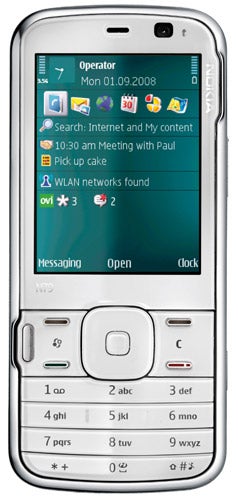
However, before I get to the internals, a quick word about the look and feel of this phone. I’ve already said it’s a candybar type. It weighs a very acceptable 97g and measures 110mm tall, 49mm wide and 15mm thick. It’s also very comfortable to hold.
The flat number pad is small, a sacrifice in order to give enough space for a 2.4in screen whose 320 x 240 pixels are clear and bright. You really do need the largest screen possible to appreciate the kinds of multimedia features Nokia offers on this handset and so the screen versus number pad compromise is one I’m prepared to live with. Still, if you find smaller keys difficult to use, you should try this handset out first before buying.
I like the accelerometer, which is one of the better implementations I’ve seen. It responded to turning the phone in my hand immediately and consistently.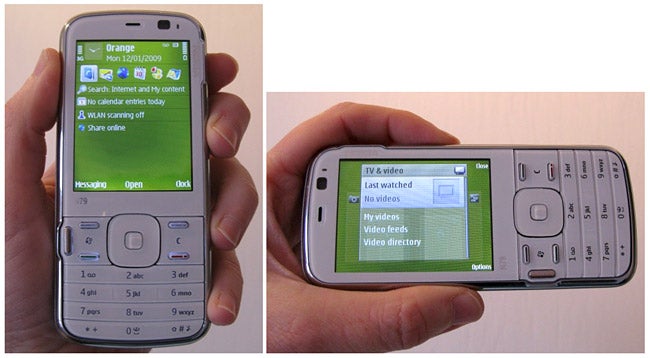
Between the screen and number pad is a relatively large area given over to shortcut buttons. Very thin Call, End and softmenu buttons are accompanied by a pair of flat keys that take you to the Nokia menu and offer the clear function. To the far left is the Nokia Multimedia Key so familiar on N-series handsets these days. This takes you to a revolving menu of multimedia features such as the Internet, music, photos, and gaming.
The navi wheel has an iPod-like scrolling capability which you can enable or disable as you see fit. It’s not as responsive or intuitive as Apple’s version but it does work and some people will prefer it. One thing I really do like is the slider on the top edge of the handset which locks and unlocks the phone.
Nokia allows you to customise the shell of your N97 and to that end you get three Xpress-on backplates; there’s a brown one, a lime green one and a blue one.
However you choose to transform the back, the front of the phone remains white. But thanks to a series of contacts on the backplate the N79 knows which cover you have attached and changes the handset’s theme to match the backplate colour. It is a simple idea, but quite beguiling. If you don’t like the idea or have a custom theme you prefer, it is easy to disable the feature.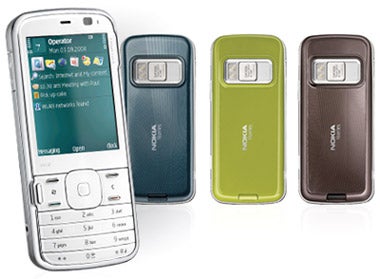
The N79 is a 3G handset with HSDPA download speeds to 3.6Mbps. It supports quad-band GSM, GPRS and EDGE. There is Wi-Fi built in and the familiar sniffer sits on the main screen ready to seek out connections and hop onto them.
There is also a front camera for two-way video calling and a 5-megapixel main camera. This has a physical lens cover which means the Carl Zeiss lens is well protected. When you slide the lens cover away the camera software starts running.
A dual LED flash helps with indoor shots and there is autofocus and a macro mode. The photos are one area in which you can take advantage of this phone’s TV-out capability though you will need to buy the necessary cable. I actually think it’s a bit mean of Nokia not to provide the cable in the box. After all, this is not exactly a pocket money-priced phone.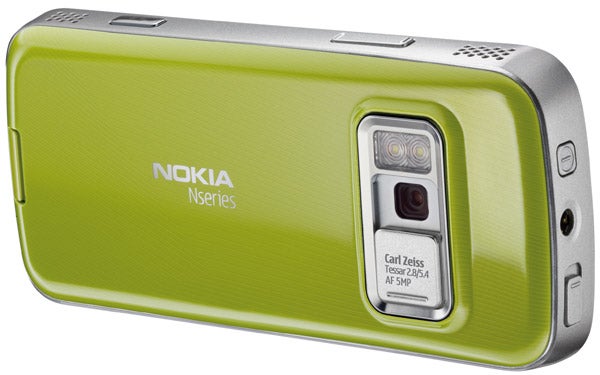
Image quality is pretty good with a couple of caveats. There is a high degree of shutter lag which means capturing moving images is tricky. Even photographing flowers in a slight wind proved testing. And indoors, even with the dual LED flash, photos can be dark.
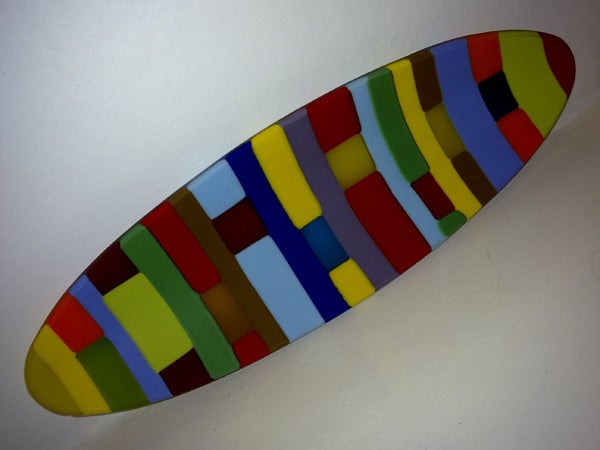
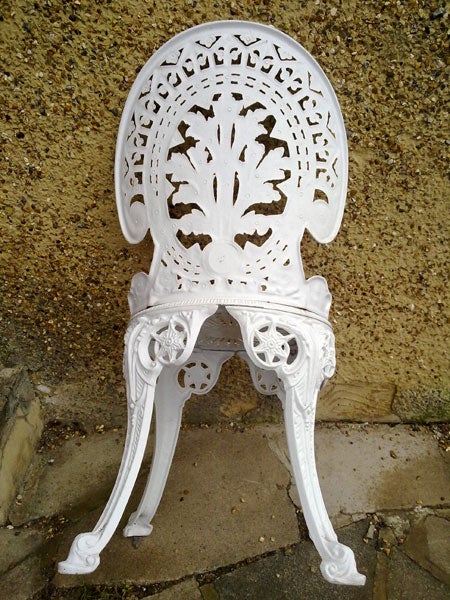
Still, photos on the whole were good. The coloured dish, shot indoors under normal household lights is crisp, though the background is far darker than it really should be. Outside, the chair is very well reproduced. Its details are clear and its whiteness uniform. Not bad for a dull winter’s day. The ”Sempervivum” plant shows off the macro mode but you can’t get as close as you can with some cameraphones.
The N79’s music playback also impressed. The sound was nice and loud through the stereo speakers on the upper and lower right edge of the phone, and the battery managed close to 10 hours of continuous play. When using the phone everyday I found that a daily charge was required to compensate for use of the GPS, Wi-Fi and HSDPA.
There is a 3.5mm headset jack exactly where it should be on the top edge of the phone and the headset itself is two-piece, so you can use your own favourite cans and benefit from hands-free.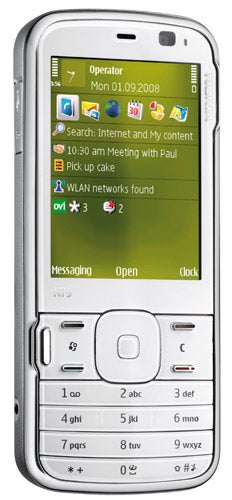
There is 50MB of internal memory and a side-mounted microSD card slot pre-populated with a 4GB card. Unfortunately my card caused an I/O error (it was unreadable) but hopefully that was a one-off glitch. There is an FM radio and an FM transmitter and this handset supports the Nokia Music Store.
As well as having music downloads on tap this is an N-gage phone so you can download games to it. But it doesn’t have dedicated gaming keys like some of the other N-series handsets.
There is a GPS receiver built-in and Nokia Maps is pre-installed. Nokia’s web browser takes advantage of the accelerometer and can readily be flipped into landscape mode by turning the handset round. As typical, there’s a calculator, calendar, PDF reader, unit converter, notes taker and QuickOffice for reading Word, Excel and PowerPoint documents. However, you need to buy a license if you want to create them too.
”’Verdict”’
If I were after an new N-series mobile and could bear to part with the SIM-free money, this is what I’d opt for. Less bulky than the current crop of dual sliders, the N79 offers lots of goodies in a pocket-friendly shell. I also like the (admittedly gimmicky) automatic theme changing as you swap backplates, and battery life is good.

How we test phones
We test every mobile phone we review thoroughly. We use industry standard tests to compare features properly and we use the phone as our main device over the review period. We’ll always tell you what we find and we never, ever, accept money to review a product.
Trusted Score
Score in detail
-
Design 8
-
Usability 9
-
Value 7
-
Features 9


Editorial independence
Editorial independence means being able to give an unbiased verdict about a product or company, with the avoidance of conflicts of interest. To ensure this is possible, every member of the editorial staff follows a clear code of conduct.

Professional conduct
We also expect our journalists to follow clear ethical standards in their work. Our staff members must strive for honesty and accuracy in everything they do. We follow the IPSO Editors’ code of practice to underpin these standards.
Editorial independence
Editorial independence means being able to give an unbiased verdict about a product or company, with the avoidance of conflicts of interest. To ensure this is possible, every member of the editorial staff follows a clear code of conduct.
Professional conduct
We also expect our journalists to follow clear ethical standards in their work. Our staff members must strive for honesty and accuracy in everything they do. We follow the IPSO Editors’ code of practice to underpin these standards.
