

Verdict


We are in Cyber-shot territory with the C902; a quad-band 3G mobile with HSDPA. My review sample came SIM-free from Expansys, but you can get it SIM free elsewhere too and it is available widely on contract.
Right from the outset I liked this phone, which manages to combine a no-nonsense attitude to design with some neat high end features. The all round blackness with flashes of silver and white give the C902 a minimalist look which makes a change from some of the bright colours I’ve seen recently.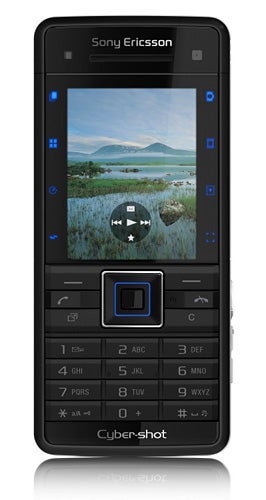
Handset design isn’t always Sony Ericsson’s strong point, with tiny or awkward buttons sometimes the bête noire of its phones. However, all is sweetness and light here. The numberpad buttons are large, individually shaped and very easy to hit at speed. Fast texting is no problem, and I was comfortable with the number pad from the outset.
The other front keys are also very comfortable to use. The D-pad is large and its central select button, although small, is slightly raised which makes it very easy to find. To its left and right, the Call and End keys, softmenu keys, Cancel and Sony Ericsson Activity menu key are all the same size but have slightly different shaping which again assists ease-of-use. It is all no-nonsense stuff.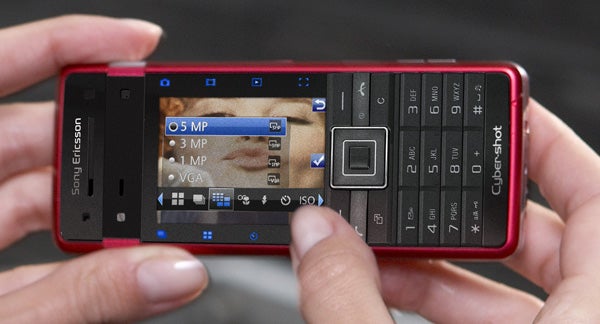
The screen’s 240 x 320 pixels and 262,000 colours are pretty much par for the course and as I’ve come to expect from Sony Ericsson the screen is bright and pin-sharp. It does, though, look a little lost most of the time. It measures 2 inches diagonally and there is a band about half a centimetre wide on both its left and right long edges, which seems like dead space when you first switch this mobile phone on.
However, this empty space gets filled when you are using the camera. At this point the screen flips into wide format, and those bands are top and bottom of the image framing area. They are now populated with four touch-sensitive icons, each backlit a nice deep blue.
Tapping these you can quickly perform a range of functions: switch from shooting to viewing mode, switch back to camera mode, switch to video mode, change focus setting (for example choosing macro and face detection modes), switch between normal, BestPic, panorama or frames shooting modes, choose a scenes mode (portrait, sports, document etc), set the self timer and set the flash.
Tap an icon and you then use the D-pad to choose between available options. Some of the features are replicated in the usual Sony Ericsson camera settings area, but it is handy to have them so quickly and easily accessible.
Another nifty aspect of the C902 is the camera’s lens cover. Where these are provided on candybar style mobiles they are usually a sliding cover which you flick back to get the camera started.
Here the whole phone slides apart on a hinge about half way along its length, so that the handset grows about a centimetre taller. Lens, LED flash and a tiny self portrait mirror are exposed and the camera software runs. It is a stylish and clever system, and the metal from which the back of the fascia is made provides solid protection for the lens when it is covered.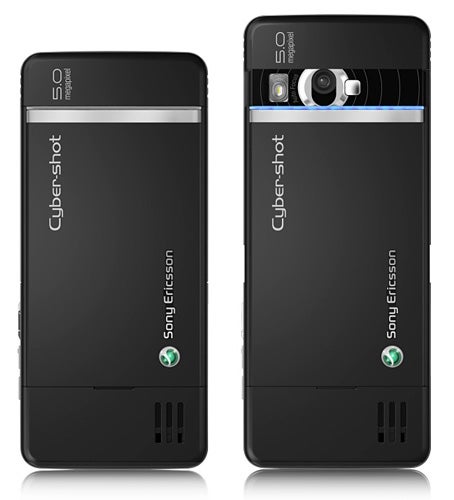
In fact, if I have a design gripe it is about the general size of this mobile. It is a bit on the chunky side at 108mm tall (when the lens cover is closed). And while at 49mm wide, 10.5mm thick and 107g in weight it is not too far off the average, smaller pockets may not be able to accommodate this phone.
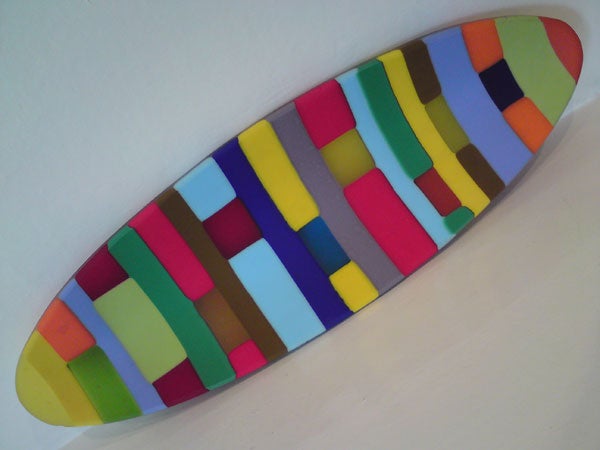
The camera’s performance is up there with the best 5-megapixel offerings I’ve seen on a mobile phone. My test shot of the coloured dish photographed under normal household lights is very sharp and its colours are vibrant.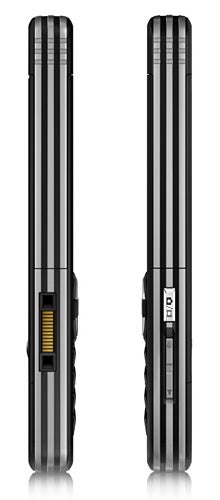
The chair is perhaps a little duller in colour than I would have liked, but the camera had to cope with a very overcast day. The purple flower was photographed in macro mode.
The phone will geocode photos and you can easily use the built in Google Maps to view the locations at which they were taken. That option is available from the photo viewing application.
Oh, and an accelerometer ensures that when looking at your snaps a quick turn of the phone is all that is required to flick between wide and tall versions of your photos.
Of course there is more than just photography to this handset. Music playing is another stalwart of Sony Ericsson mobiles and the player here offers good playback features despite this not being a Walkman branded phone. There is 160MB of built in memory and a Memory Stick Micro card slot under the battery cover which you can get to without removing the battery itself.
I am coming to loathe Sony Ericsson’s chunky earpiece connector that generally doubles for mains power and PC connection. It is simply too plasticky, too large and too ugly for the latest crop of mobiles.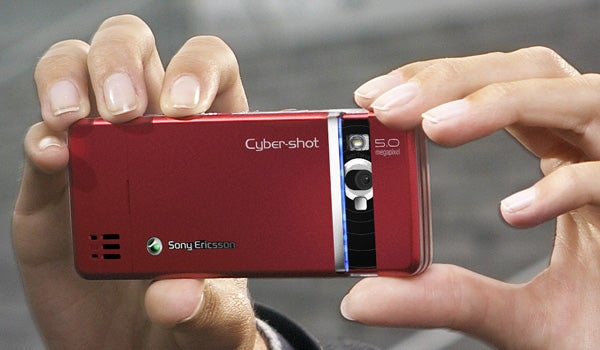
Nowhere is that more apparent than with the C902. The mains power connector has a through port so you can charge the phone and use a headset at the same time, but the side-mounted socket either used singly for the headset or along with the mains power charger is ugly, ugly, ugly.
On the plus side Sony Ericsson provides a 3.5mm connector beyond the mic of its bundled headset so you can use your own earphones, and battery life is amazingly good. I got 15 hours 38 minutes of non-stop music from a full battery charge.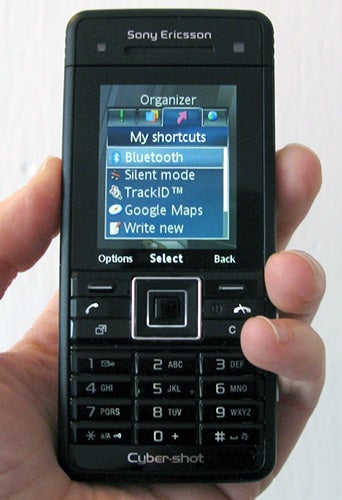
Among the other features to be found here is a very good web browser, RSS feed reader, FM radio, two-way video calling, Bluetooth (and output to a Bluetooth stereo headset), mobile email and IM, a sound recorder, calculator, task manger five alarms, calendar, notes taker, stopwatch and timer.
It is a shame that Sony Ericsson doesn’t feel the need to include Wi-Fi in a phone as capable as this one is. It isn’t often I hanker for operator free Internet capability from a Sony Ericsson handset, but this one is an exception.
”’Verdict”’
The good camera and excellent hardware design help the C902 stand out. The horrid peripheral jack really has had its day, and I’d like Wi-Fi, but even with those gripes this is a superb mobile phone.


How we test phones
We test every mobile phone we review thoroughly. We use industry standard tests to compare features properly and we use the phone as our main device over the review period. We’ll always tell you what we find and we never, ever, accept money to review a product.
Trusted Score
Score in detail
-
Design 9
-
Usability 9
-
Value 8
-
Features 9


Editorial independence
Editorial independence means being able to give an unbiased verdict about a product or company, with the avoidance of conflicts of interest. To ensure this is possible, every member of the editorial staff follows a clear code of conduct.

Professional conduct
We also expect our journalists to follow clear ethical standards in their work. Our staff members must strive for honesty and accuracy in everything they do. We follow the IPSO Editors’ code of practice to underpin these standards.
Editorial independence
Editorial independence means being able to give an unbiased verdict about a product or company, with the avoidance of conflicts of interest. To ensure this is possible, every member of the editorial staff follows a clear code of conduct.
Professional conduct
We also expect our journalists to follow clear ethical standards in their work. Our staff members must strive for honesty and accuracy in everything they do. We follow the IPSO Editors’ code of practice to underpin these standards.
