

Verdict


Sony Ericsson just keeps on coming with the mobile phones. In April I looked at both the non-Walkman lime green and white K660i on 3 and the Walkman branded W890i. Both are candybar style handsets, and both had plenty of good stuff about them.
Now the tri-band W380i comes along. This is a clamshell format mobile and is designed to bring the Walkman branding and features to those that want to watch the pennies.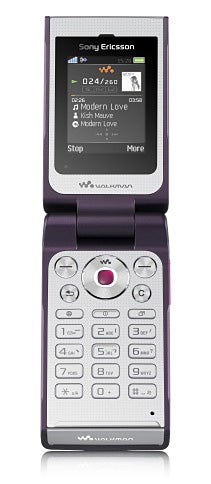
In design terms I’ve seen better from Sony Ericsson. I’m not thrilled by the angular look of this phone or by the weird bumpy pimples that sit on the front fascia. It just doesn’t look very appealing to me. But in fact the pimples are mostly about music playback control. Above them is a letterbox style OLED screen which stays invisible till you play music, or until it gets something to display such as information about an incoming call or SMS.
In the latter two cases the screen shows you who is trying to make contact. In the former you can control music playback by touching the pimples which get backlit as you use them. They are arranged in three blocks which, if you look carefully, equate to forward, back and pause/play symbols.
A slider on the back of the casing that looks for all the world like a lock for the battery cover is in fact a lock for these touch buttons. The lock is a bit of a fiddle to use, but at least you can disable and enable the ‘pimples’ as required. 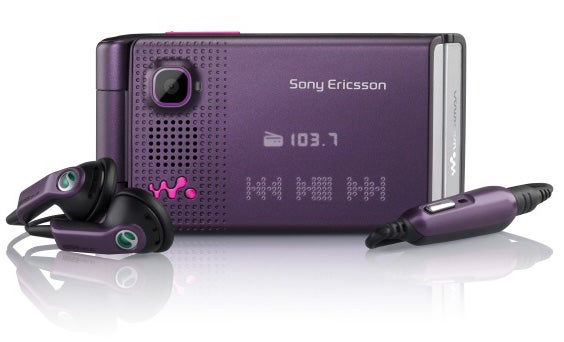
If you think that is weird then wait till you start using the gesture control. There is a bright light under the front mounted lens for the camera. This light comes on when a call is coming in and when an alarm you’ve set for the phone turns on. You can dismiss either call or alarm by waving your hand over the light. As long as your hand is not more than 7cm away from the light the alarm will go off or the call will be dismissed.
I tried it, and it worked. But I felt like a numpty waving my hand over the phone when out and about to get rid of an unwanted incoming call. And when using the phone as a wake-up alarm I usually had to find the phone before waving at it, so that opening the clam and dismissing in the old fashioned way was never much extra work.
I’ve already mentioned that I am not a fan of the angular look of this phone. Its size also reduces its appeal for me. The 100g of weight is no problem at all. But this phone is big. With the clam closed it measures 92mm tall, 49mm wide and 16mm thick. Open the clam and it grows to somewhere in the region of 165mm tall. That is just vast when you compare this mobile to the small Sony Ericsson candybars mentioned earlier.
The good news for those with larger hands is that the buttons inside the clam are large and well spaced. You’d have to be a giant to have trouble working your way around the number pad, navigation button and softmenu keys.
Sony Ericsson could have tried harder with the main screen, though. I measured it at 1.8 inches diagonally and it offers a mere 176 x 220 pixels. There is room here for a much larger screen and the one provided looks a bit lost and underspecified. 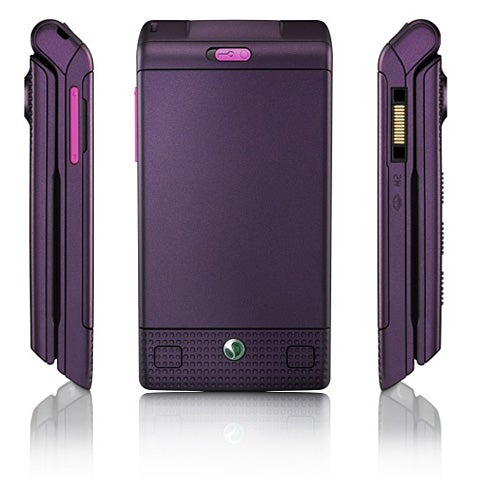
As a Walkman phone a couple of things are important – battery life and memory. The W380i comes with a mere 14MB of built in memory, a giveaway that it is a budget handset. But it also comes with a 512MB Memory Stick Micro, which nestles in a slot that is easily accessible once you remove the battery cover.
Battery life is not as hot as it could be. From a full charge the phone played music non-stop for a total of seven hours and seven minutes. This should give most people a full day of music between charges, but daily charging is probably recommended.
The headphones supplied with the phone use Sony Ericsson’s proprietary connector which is shared by the mains power cable and PC connection cable. The connector is as bulky as ever, and something Sony Ericsson really does need to look at redesigning. However the good news is that there is a 3.5mm connector just past the microphone, so you can substitute your own headset if you want to do that. 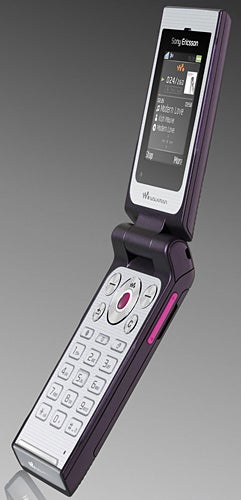
As for the camera, well it leaves quite a bit to be desired. It doesn’t shoot video at all. There is no autofocus and no flash. Stills are limited to 1.3 megapixels which really is low for any mobile, and for Sony Ericsson, which produces some of the best cameraphones out there, is shameful. Even if this is a budget mobile and doesn’t have the Cybershot branding, Sony Ericsson does itself a disservice by opting for a 1.3-megapixel sensor. The main consequence of the low resolution is that you can’t do a lot with the photos you shoot. They are only really good for looking at on the phone itself. Prints are out of the question.
As for the test shots, the coloured dish, photographed indoors under ordinary household lighting, has good colour reproduction. The chair displays a reasonable amount of detail and its white is quite uniform. The flower is a much deeper mauve in real life than the photograph suggests, but I got in quite close for this shot and the focus is not too bad at all.
Other software on the W380i includes a web browser, RSS feed reader, sound recorder, FM radio, calendar with PC synchronisation, to do list, notes manager, timer, stopwatch, calculator, five alarms and several games. You can blog photos from the phone too.
”’Verdict”’
This mobile is definitely Walkman Lite. Battery life is reasonable but not great, and I’m not a huge fan of the front control pimples. The real deal-breaker is the camera though. Its 1.3 megapixel resolution is disappointing.



How we test phones
We test every mobile phone we review thoroughly. We use industry standard tests to compare features properly and we use the phone as our main device over the review period. We’ll always tell you what we find and we never, ever, accept money to review a product.
Trusted Score
Score in detail
-
Design 6
-
Usability 7
-
Value 7
-
Features 6


Editorial independence
Editorial independence means being able to give an unbiased verdict about a product or company, with the avoidance of conflicts of interest. To ensure this is possible, every member of the editorial staff follows a clear code of conduct.

Professional conduct
We also expect our journalists to follow clear ethical standards in their work. Our staff members must strive for honesty and accuracy in everything they do. We follow the IPSO Editors’ code of practice to underpin these standards.
Editorial independence
Editorial independence means being able to give an unbiased verdict about a product or company, with the avoidance of conflicts of interest. To ensure this is possible, every member of the editorial staff follows a clear code of conduct.
Professional conduct
We also expect our journalists to follow clear ethical standards in their work. Our staff members must strive for honesty and accuracy in everything they do. We follow the IPSO Editors’ code of practice to underpin these standards.
