

Verdict


Fly Mobile isn’t a mobile phone manufacturer I have toyed with at TrustedReviews before, but you may have noticed that we’ve recently upped the number of phone reviews and that gives me a chance to break away from the usual suspects and look at a few less mainstream brands. In this instance it has allowed me to squeeze in a handset I’ve wanted to look at for a little while – the SLT100 from Fly.
This handset is only available on Virgin Mobile prepay and you have to go to The Link, Currys or Argos for it. If that doesn’t faze you then you’ll be getting your hands on something quite different from the norm.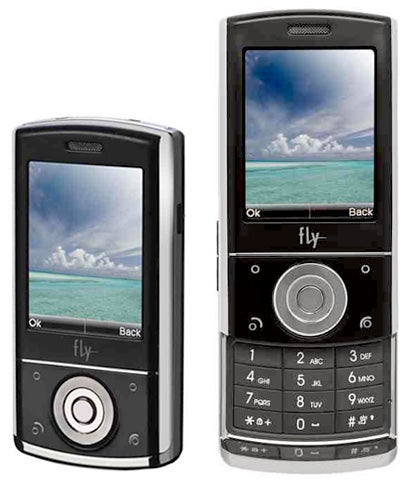
Touchscreens are normally the domain of smartphones such as handsets running Windows Mobile or UIQ. The SLT100 doesn’t boast either of those operating systems under its hood, and it isn’t a smartphone. Nor does it have a smartphone price tag. But it does have a touchscreen. This provides you with touch access to contacts, the device main menu, on screen number dialler, Bluetooth, camera, FM radio and music playback.
Sometimes the touch-icons are pretty small, but if you find you can’t hit them accurately then a stylus lives on the top-right back edge of the phone. The stylus itself fights rather tightly into its housing and so extracting and refitting it was a fiddle – a shame as the build quality of this handset is pretty good.
It is not all touchscreen access. Beneath the screen on the front fascia are two softmenu buttons and Call and End buttons. They look like touch controls themselves, but thankfully they are real buttons.
In between them is a large, dark grey navigation button with central select button. When you are on the main screen the four points of the navigation button take you to the FM radio, audio player, Bluetooth and camera, doubling up some of the touch features on the main screen. Press the central select button and you’re in the handset’s browser.
The SLT100 is a slider, so its physical number pad is hidden away till you need it. The sliding mechanism is a little tricky to use, especially one-handed. There is no ridge on the front fascia to push against, so you are left either pushing against the screen and making it grubby or using the below-screen area and hitting a button you don’t mean to.
Physically this is a stubby little handset when its slider mechanism is closed. It is 96mm tall, 49mm wide and 15mm thick. It weighs 101g. It is tri-band GSM. There is 25MB of memory built in and a microSD card slot for adding more. The slot is under the backplate and you need to remove the battery to swap cards.
I’ve already mentioned some of the software that is built in. There is a fairly good range considering the price of this phone, and it’s bolstered by some unusual features. You can set the handset up to receive POP email from up to three different accounts. There is a photo editor for images you shoot with the camera. And the touchscreen extends to offering handwriting recognition to assist with text entry. 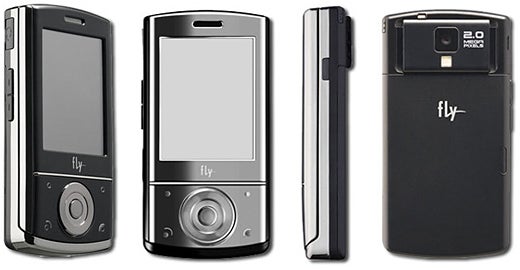
Don’t get too excited about this, though. I found it failed to work if I wrote whole words on screen. It wants to recognise one letter at a time, and you’ll probably find it slower than using T9 unless you are r-e-a-l-l-y, r-e-a-l-l-y s-l-o-w a-t t-e-x-t-i-n-g.
I’ve already noted the FM radio, and you can timetable recordings from it. You can compose ringtones too. The phone can also send the screen’s contents to a TV and you get a TV out cable in the box for the purpose. This connects to the phone using the same proprietary connector that the headphones and mains power adaptor share. 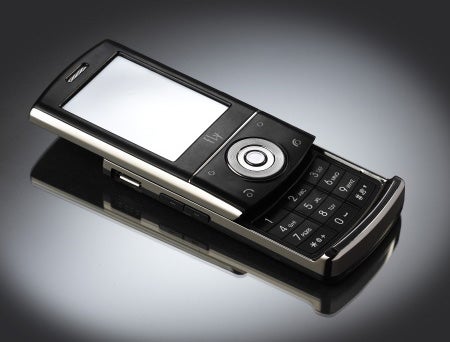
When it comes to being organised, there is a calendar, to do list, alarm, calculator, currency converter, unit converter, stopwatch and, rather bizarrely, a calculator for your body mass index.
The camera shoots stills at resolutions up to 2-megapixels and proved to be disappointing. Serious shutter lag made it impossible to take photos of anything that moved. I had to wait till she was asleep to photograph the cat.
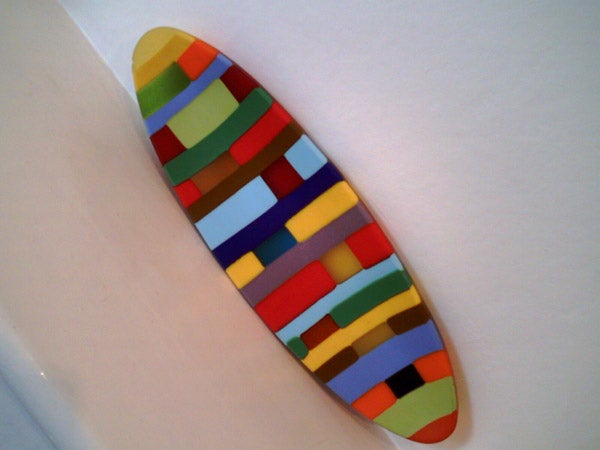
Framing photos was very difficult. Take the coloured dish, shot indoors under normal household lighting as an example. Its two ends were in opposite corners of the image when framed on the phone, but the actual shot doesn’t reflect that at all. The cat filled most of the phone’s screen when framing the photo, yet the final result has a lot more border area all round. Meanwhile, the white flowers lack detail and depth of colour.
Generally, the operating system used on this mobile was not difficult to get to grips with. However, I am not sure why the developers offer a main menu that gives you three application groups at a time in a horizontally scrolling system rather than using a standard grid. It makes getting to what you want take that little bit longer than it should. 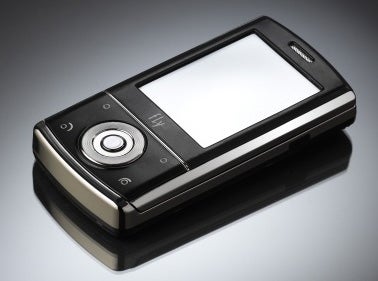
And there were occasions when I felt the device software ran a little slowly. I particularly noticed this when using the picture gallery. Thumbnails of photos stored on the handset memory took a while to materialise on screen.
I am not delighted with the proprietary headset connector, or in fact with the battery life. Playing music continuously from the internal memory after first fully charging the phone resulted in 5 hours 46 minutes of music, which I’d rate as average.
”’Verdict”’
The Fly SLT100 has some super features for a budget handset not least of which are TV out, FM radio recording and a touchscreen. But don’t buy it for the camera, which I found to be very difficult to work with, or the battery life which isn’t that strong.


How we test phones
We test every mobile phone we review thoroughly. We use industry standard tests to compare features properly and we use the phone as our main device over the review period. We’ll always tell you what we find and we never, ever, accept money to review a product.
Trusted Score
Score in detail
-
Design 7
-
Usability 5
-
Value 6
-
Features 7


Editorial independence
Editorial independence means being able to give an unbiased verdict about a product or company, with the avoidance of conflicts of interest. To ensure this is possible, every member of the editorial staff follows a clear code of conduct.

Professional conduct
We also expect our journalists to follow clear ethical standards in their work. Our staff members must strive for honesty and accuracy in everything they do. We follow the IPSO Editors’ code of practice to underpin these standards.
Editorial independence
Editorial independence means being able to give an unbiased verdict about a product or company, with the avoidance of conflicts of interest. To ensure this is possible, every member of the editorial staff follows a clear code of conduct.
Professional conduct
We also expect our journalists to follow clear ethical standards in their work. Our staff members must strive for honesty and accuracy in everything they do. We follow the IPSO Editors’ code of practice to underpin these standards.
