

Verdict


The W890i is another of Sony Ericsson’s Walkman branded handsets and it’s a testament to the sheer number of mobiles coming along for review at the moment that it didn’t push its way to the front of the queue when it arrived in my hands. Something that wouldn’t usually be the case with a Sony Ericsson mobile as I can find them a little fiddly to get to grips with at times.
The reason I wanted to get my hands on this phone as soon as it arrived is simply that in the looks and ergonomics departments Sony Ericsson really hits the spot.
Cast your mind back to last year and my look at this phone’s predecessor, the W880i. You may recall I found that mobile fiddly to use, mainly because of its small number keys and other buttons.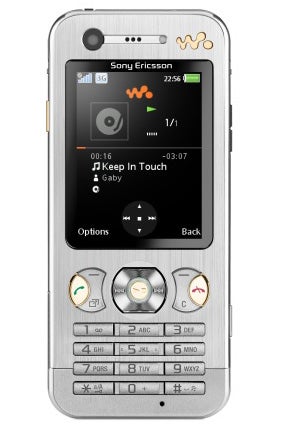
It is all change here, with the number keys quite large and well raised from their surroundings. The stubby fingered brigade may still have trouble with the keys, but I found them fine to use.
The shortcut buttons between screen and keyboard remain small, but they are shaped so that the appropriate parts of the two rocker buttons and navigation key are easy to find. My only grumble came when using the three softmenus that characterise this handset.
The two outer softmenus are accessed using the top end of their respective rockers, while the middle one is accessed using the central button inside the navigation pad. This makes logical sense on paper, but it took me a while to stop prodding the top of the navigation pad instead. I suspect any users with this problem will get over it after a few days at most, though.
On the other hand I like the Sony Ericsson Activity Menu which features in so many of its handsets. Tap the bottom of the left side rocker and up pops a set of tabbed windows giving access to running apps, notifications, online services and a set of shortcuts. It makes getting around the phone really fast.
As I said already, in the looks department this handset is a real winner. Small and stylish are the words that spring to mind, but added to that the phone feels very solid to hold. I would expect it to survive being dropped and generally treated fairly roughly.
At 104mm tall, 47mm wide and 10mm thick the phone feels very comfortable in the hand and slips into a pocket very easily indeed. Its 78g of weight are quite a welcome achievement too.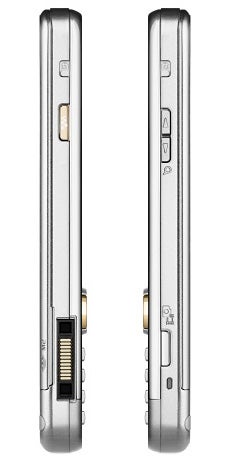
The screen is the other real delight of this phone. At 240 x 320 pixels it lives in a space I measured at two diagonal inches. Its 262 thousand colours are sharp, clear and bright. The screen comes into its own for things like web browsing and image viewing.
With all this design goodness floating around it is a real crime that Sony Ericsson can’t do something about its dreadful mains power supply and earphones connectors. There are so many things wrong with them it is hard to know where to start.
OK, how about pointing out that you don’t put the headset connector on the side of a handset if you expect it to be used because it makes the phone a pain to pocket. Top end please. 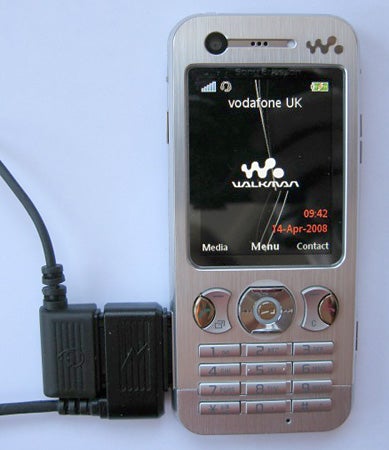
Then there is the design of the headset connector which is Sony Ericsson’s standard bulky black blob. Proprietary headset connectors are a pain even when, as Sony Ericsson has managed, they are two-piece and offer a 3.5mm jack after the microphone.
And where are the headset mounted music controls? For such a stylish phone their absence is another crime.
Final gripe in this department is that the headphones and mains power adaptor share the same connector. Now, while you can charge the phone and use the headset at the same time thanks to a through-port on the power connector, the result looks like one of those fire-hazard adapters that have about eight plugs going into a single wall socket.
The W890i certainly has a lot going on in the features department. It is a quad-band 3G mobile with GPRS, EDGE and HSDPA. It has a front-facing camera for two-way video calling. There is a meagre 28MB of built in memory, but the phone supports Memory Stick Micro and a 2GB card is provided.
Music playback is superb as you’d expect, and the front mounted controls and solid on-screen design make nipping around tracks and playlists straightforward. There is an FM radio on hand when required.
The web browser is pretty good too. You can flick into landscape mode which can help with viewing more complex sites, and zooming is achieved in 10 per cent increments using the navigation button. 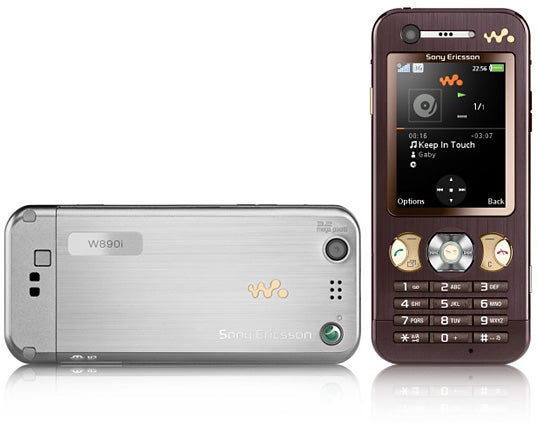
The main camera shoots stills at resolutions up to 3.2-megapixels. It lacks flash, autofocus and self-portrait mirror. There are a few pre-sets for different lighting conditions: fluorescent, incandescent, daylight and cloudy, but as usual I left the phone on its auto settings to fend for itself.
The coloured dish, shot as usual indoors under normal household lighting, is a little lacking in lustre but not bad. Outdoors the chair’s white is uniformly represented and detail is reasonable for a 3.2-megapixel sensor. The blossom was shot against a bright blue spring sky and I am not surprised the camera had difficulty giving enough depth of colour to its pink hues. But again I’d say it fared quite well.
Battery life was reasonable but not as good as I’ve seen from some Sony Ericsson handsets. Playing music from the internal memory off a full battery charge gave me seven and a half hours of listening time, which should be enough to see all but the most die-hard music fan through a day.
The phone is bulked out with lots of software extras which this time around include Google Maps, RSS reader, calendar, task manager, voice memo, and various games and multimedia related apps.
”’Verdict”’
This is probably the best handset I’ve seen in Sony Ericsson’s Walkman range. I’d like a bigger screen now that 3.5G web browsing is a reality, but I don’t want the buttons compromised to get it. And on the camera front – well, maybe it is time for Sony Ericsson to bring its CyberShot and Walkman ranges together?



How we test phones
We test every mobile phone we review thoroughly. We use industry standard tests to compare features properly and we use the phone as our main device over the review period. We’ll always tell you what we find and we never, ever, accept money to review a product.
Trusted Score
Score in detail
-
Design 9
-
Usability 8
-
Value 8
-
Features 8


Editorial independence
Editorial independence means being able to give an unbiased verdict about a product or company, with the avoidance of conflicts of interest. To ensure this is possible, every member of the editorial staff follows a clear code of conduct.

Professional conduct
We also expect our journalists to follow clear ethical standards in their work. Our staff members must strive for honesty and accuracy in everything they do. We follow the IPSO Editors’ code of practice to underpin these standards.
Editorial independence
Editorial independence means being able to give an unbiased verdict about a product or company, with the avoidance of conflicts of interest. To ensure this is possible, every member of the editorial staff follows a clear code of conduct.
Professional conduct
We also expect our journalists to follow clear ethical standards in their work. Our staff members must strive for honesty and accuracy in everything they do. We follow the IPSO Editors’ code of practice to underpin these standards.
