

Verdict


Motorola’s MOTOFONE F3 is about as basic as a handset can get, with voice calls, texts and alarms summing up its feature set.
It has a price to match. For example, as I write, Phones4u is selling it on T-Mobile, Orange and Virgin Media pay-as-you-go. Choose the latter and the phone costs a total of £29.95 which includes £10 of airtime.
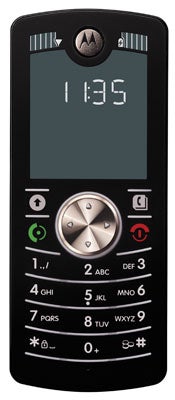
If you really do just want to make voice calls, send text messages and have a portable alarm clock, then it is pretty appealing price to pay. Surely there must be a catch? Well, this phone has some great features and is truly innovative, but yes, there is a catch – this phone is the devil itself to use effectively. I suspect it will be challenging for the mobile phone novice or reluctant user who must, surely, between them be a major part of the target market. Those in less developed countries looking for low cost mobiles might also be interested, but they too will have to deal with the problem of actually using the thing.
When you turn the F3 on you have to set its language – my choices were English, German and Italian, and it talks to you in each language, telling you to press 1 2 or 3 to make your selection. It can then continue to give you what it calls ‘Voicehelp’ to set the time and date and can carry on telling you things at various points during handset use. Or you can choose not to have this help.
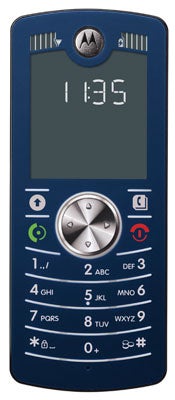
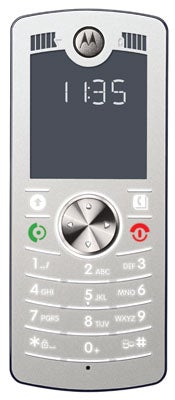
In terms of design the MOTOFONE F3 has the distinctive look of the Motorola flat keyboarded candybar handset about it. Think SLVR. The number pad keys are separated by white horizontal lines and are backlit in darker conditions. When you press one you get a tone, and this coupled with the fact that the keys are quite large, makes them easy enough to hit successfully at speed.
Above the number pad is a silver navigation pad, Call and End keys and a pair of softmenu keys. The navigation pad has no central press-to-select section. Instead you make choices by pushing the navigation pad up or using the left softmenu.
This is a small phone at 114mm tall, 47mm wide and 9mm thick, and it is extremely light at just 68g. It manages to achieve this remarkable lightness partly because of it almost total lack of internal features, and also because of the display.
It looks like the kind of LCD you find on digital watches or old calculators, but in fact the technical term is electrophoretic and Motorola calls it ClearVision. It is a technology used in e-paper and likely to be a pretty big thing over the coming years. One of its greatest benefits is that it has extremely low power consumption. The downside is that all you get is a two-tone display, which provides white text on a black background when the standby clock is on show and reverses this when you use the phone.
The display is as easy see outdoors as inside, and text it displays is very large which means it could appeal to anyone who has trouble viewing the sometimes very small characters on mobile phone screens.
Above the display there are two windows each capable of showing up to five bars of data. One displays signal strength, the other battery life.
As I’ve mentioned battery life let’s look at that next. Motorola quotes 500 minutes of talk time and 300 hours of standby. I charged the battery fully and I am more than a week into usage on that single charge. This remarkable battery life is due the fact that there is not much to eat away at it here. No web browser, no music player, no backlit display, no Bluetooth, no camera. The fact that the screen only takes power when it needs to change the display also helps extend battery life.
The dual-band capability won’t let you travel very far, and I have no idea how much built in memory there is, but I doubt there is a lot. Contacts are stored on your SIM not the internal memory – and no, you can’t expand on it with flash memory cards.
There is a lot that impresses about this phone, but now I come to the big disappointments –the deal-breakers as far as I am concerned.
The user interface is dreadful. To change some settings you need to input key combinations rather than choose from a menu, and I doubt anybody will commit all the codes to memory. In fact, there isn’t a menu system as such, and while I do think there is room for innovative user interface design that doesn’t use a menu system as we currently think of it, Motorola’s alternative seems quirky and ill-conceived. A disaster if it is really aimed at mobile phone newbies.
The worst aspect of all, though, is ironically enough, the display which in technical terms is this phone’s best feature. The phone has a fixed four-line display. The middle two are for characters, the top and bottom line for various symbols. As I’ve said, the characters are large – each one is allocated a space 4mm wide and 6mm tall and you can’t fit a lot of them on screen at once.
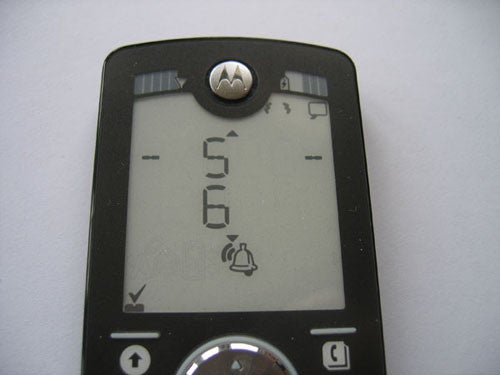
When it comes to SMS, you have to scroll a lot to read incoming messages as the screen only displays a maximum of one line’s worth of text – which is six characters – at once. If a word is three or four letters long, the next word is on the next screen. If a word is more than six letters long, it is stretched across two screens.
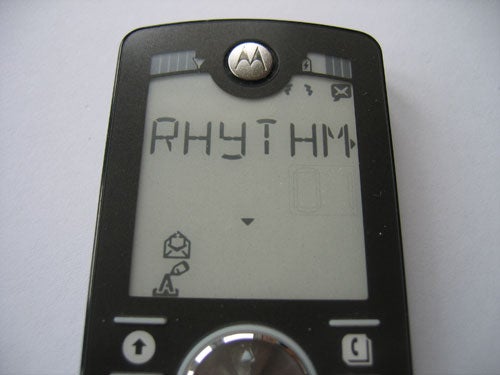
When you write texts, characters scroll automatically, so that the seventh character you enter causes the first to scroll off the left end of the screen. Texting, one of the most useful aspects of any phone in my view, suddenly becomes a real chore simply because you can’t read incoming messages at a glance or see the whole of an outgoing message at once.
And how about the screen below for a complicated looking way to choose a new ringtone?
”’Verdict”’
Motorola is to be congratulated for the sheer effrontery of releasing a mobile that costs as little as this one does. Hardware-wise I suspect many people could live with what’s here, ditto the small feature set, and there is no doubt that the screen technology has a big future. But the user interface is far from simple, and texting is a major chore.
How we test phones
We test every mobile phone we review thoroughly. We use industry standard tests to compare features properly and we use the phone as our main device over the review period. We’ll always tell you what we find and we never, ever, accept money to review a product.
Trusted Score
Score in detail
-
Usability 5
-
Value 7
-
Features 4


Editorial independence
Editorial independence means being able to give an unbiased verdict about a product or company, with the avoidance of conflicts of interest. To ensure this is possible, every member of the editorial staff follows a clear code of conduct.

Professional conduct
We also expect our journalists to follow clear ethical standards in their work. Our staff members must strive for honesty and accuracy in everything they do. We follow the IPSO Editors’ code of practice to underpin these standards.
Editorial independence
Editorial independence means being able to give an unbiased verdict about a product or company, with the avoidance of conflicts of interest. To ensure this is possible, every member of the editorial staff follows a clear code of conduct.
Professional conduct
We also expect our journalists to follow clear ethical standards in their work. Our staff members must strive for honesty and accuracy in everything they do. We follow the IPSO Editors’ code of practice to underpin these standards.
