

Verdict

Pros
- Impressive battery life
- Slim build
- Outstanding screen quality
Cons
- No BlackBerry Connect support
- Can't charge over USB
- Few small buttons
Key Specifications
- Review Price: £307.94
- Solid metal rear
- Mirror-finish screen
- 10mm
- Full HSDPA support
- 3.2-megapixel camera
The BlackBerry 8820 has been one of the best slab-style QWERTY smartphones for so long now, it’s hard to imagine anything overtaking it. Its combination of ease of use, long battery life and excellent keyboard contributed to a maximum score of 10 out of 10 when we first looked at it last August, and our opinion hasn’t changed much over that time.
But times move on, new handsets are released, and inevitably – eventually – a new champion comes along. That new champion, it would seem, is Nokia’s E71 – the long-awaited successor to the E61. Why? First, this is a simply gorgeous phone. With a solid metal rear, chrome-trimmed front and flat, almost mirror-finish screen, it’s one beautiful piece of design.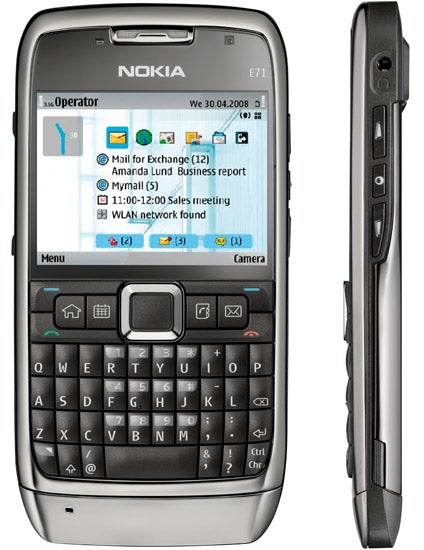
And, not only does it look fantastic, but it’s also very slim and pocketable. Unlike its E61 predecessor, which was about as broad-shouldered as a phone could get, the E71 is as slim-waisted as an iPhone and 2.3mm thinner, too, at a mere 10mm. It may boast a full QWERTY keyboard, but you can slide it into a pocket and barely notice it. Even the slip case it comes with doesn’t add to the bulk too much.
It’s a remarkable piece of engineering ergonomically, as well. Cramming a full keyboard into a chassis this narrow is easily enough done, but making it usable is much more of a challenge. Nokia has achieved that and more with the E71: the keys, like the E61 before it, are slightly rubbery so your fingers don’t slip off them when you’re trying to type; they’re slightly domed, so you can press one easily without hitting a neighbouring letter by accident; and the keyboard is blessed with a sensible layout too – important symbols such as the full stop, comma and @ characters are all accessible instantly, without the need to press shift – an ailment all too many other phone keypads are afflicted by.
The keyboard, then, is easily a match for the 8820’s excellent offering, but how about the rest of the device? Well, there’s no scrolling trackball, but the directional pad above the keyboard is easy to use and works well. If anything, the buttons for picking up and hanging up calls next to the pad are a little on the small side but they’re easy to get used to. Combine those with the four well-sized shortcut keys and the pair of soft keys and overall you’ve got a very comprehensive control cluster.
The screen’s size and resolution is nothing to write home about – it’s just 2.36in across at a standard 320 x 240 and it isn’t a touch screen – but the quality is outstanding. It’s bright, clear, and transflective, too, so when you take it outside in bright sunshine it’s almost as readable as it is indoors.
In terms of core componentry, the E71 beats RIM’s finest too. It has full HSDPA support, on top of GPRS, EDGE and standard 3G. It’s a quad-band phone, for use all around the globe. It has Wi-Fi, Bluetooth and an FM radio tuner, for when the email gets too much for you. And it has a 3.2-megapixel camera complete with LED flash on the rear coupled with a VGA video call camera on the front.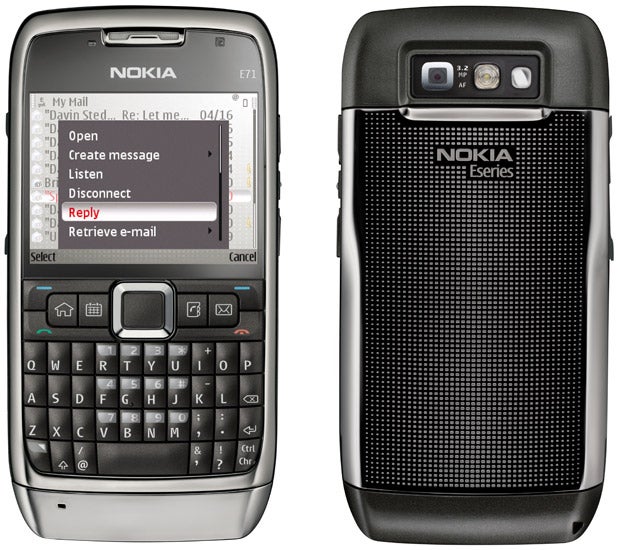
And, of course, what modern smartphone would be without a GPS receiver? The E71 is equipped with an assisted-GPS receiver (A-GPS) – this uses location information gleaned from the mobile cell you’re connected to with the aim of providing a quicker satellite fix. I’ve seen this before and not been impressed; on the E71, however, it’s an entirely different kettle of fish. I fired up Google Maps while sat indoors with only a partial view of the sky, turned on the GPS option and 15 seconds later the E71 had an accurate location fix. Not many dedicated sat-nav devices can boast speeds that quick, let alone phones, which often can take minutes on end or fail to get a lock entirely.
You don’t have to go and download Google Maps, though – the E71 comes with Nokia’s own mapping software preinstalled. Though this isn’t as quick and responsive as Google Maps, you can use it as a proper sat-nav tool, complete with turn-by-turn driving instructions. But the latter is a £7 per month additional subscription after the free three day trial runs out.
Where Windows Mobile devices often stumble, at this point, is on responsiveness and battery life. It takes a lot of processing power to render Microsoft’s OS nippy, but put a powerful CPU in a phone and the result is, too often, very short battery life. The E71 uses Symbian’s S60 3.1 platform, so responsiveness isn’t an issue – you’re hardly ever left staring at an hourglass or its equivalent when launching applications or navigating around the phone’s interface.
However, the E71’s real strength is that it manages to remain speedy and include HSDPA data support, while retaining decent battery life. And where most HSDPA capable phones I’ve used give up after around two days of light use, the E71 just keeps on going, and going, and going. You’ll easily get three and, possibly, four days of light use out of a single charge from the phone’s 1,530mAh lithium polymer battery – a truly impressive feat.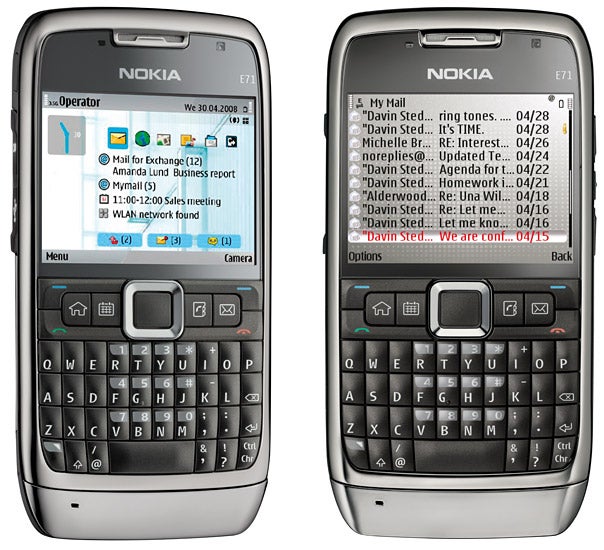
But enough about the hardware, what about the email support and document editing? Well, and by this point you’re probably not going to be too surprised, the E71 isn’t exactly shy and retiring on that front either. As well as POP3 and IMAP accounts, which are an absolute doddle to connect to (the E71 impressively defaulted to IMAP when I asked it to connect to my Gmail account), the E71 now includes Nokia’s Mail for Exchange email client by default, so you can connect to Microsoft corporate email accounts and receive push email over the air, sync contacts, tasks and calendar info.
Opening attachments shouldn’t be too much of a problem either, with viewing and editing support for office documents via a copy of QuickOffice (no support for Office 2007, though), PDF files and a ZIP utility as well.
There are some disappointments: there’s no longer support for BlackBerry Connect, where this is available for the E61. I would not be at all surprised if this was not remedied before too long once the clamour for it rises to deafening levels. And you still can’t charge Nokia handsets over USB – which is a pain.
”’Verdict”’
The Nokia E71’s minor niggles are quite simply swamped by its positive attributes. It’s a beautifully engineered phone, with great looks, slim build and fantastic ergonomics. It has wonderful battery life, a superb screen, effective GPS and fast mobile data.
Better than all that, it’s reasonably priced. In fact the only major thing I can see wrong with this handset is that I’m going to have to hand it back to Nokia. All I can say is: please don’t take it. Please!
How we test phones
We test every mobile phone we review thoroughly. We use industry standard tests to compare features properly and we use the phone as our main device over the review period. We’ll always tell you what we find and we never, ever, accept money to review a product.
Trusted Score
Score in detail
-
Performance 10
-
Value 10
General
| Operating System | Symbian |
| Weight (Gram) | 4.47 ozg |
| Available Colours | White Steel |
Battery
| Talk Time (Minute) | 10 Hour 30 Minutem |
| Standby Time (Hour) | 408 Hourhr |
Storage
| Internal Storage (Gigabyte) | 110 MBGB |


Editorial independence
Editorial independence means being able to give an unbiased verdict about a product or company, with the avoidance of conflicts of interest. To ensure this is possible, every member of the editorial staff follows a clear code of conduct.

Professional conduct
We also expect our journalists to follow clear ethical standards in their work. Our staff members must strive for honesty and accuracy in everything they do. We follow the IPSO Editors’ code of practice to underpin these standards.
Editorial independence
Editorial independence means being able to give an unbiased verdict about a product or company, with the avoidance of conflicts of interest. To ensure this is possible, every member of the editorial staff follows a clear code of conduct.
Professional conduct
We also expect our journalists to follow clear ethical standards in their work. Our staff members must strive for honesty and accuracy in everything they do. We follow the IPSO Editors’ code of practice to underpin these standards.
