

Verdict


Towards the end last year I looked at Samsung’s SGH-i320 – the second time I’d reviewed a handset from Samsung running a Windows Mobile operating system. With the SGH-i320, Samsung had produced a robust design and added some rather nice software extras to the Windows Mobile Smartphone standards.
In a nutshell, the same can be said for the SGH-i600. It has a strong specifications list, and some very useful added software. Certainly if you are looking for a connected Windows Mobile Smartphone it would be worth considering.
Similarly, if you need fast data communications in a Smartphone you will want to give it a second glance. This is a 3G handset with a front facing camera for video calling. It supports HSDPA which means if you’re in a coverage area you can get download speeds up to (theoretically) 1.8Mpbs. Wi-Fi and Bluetooth are both built-in as well.
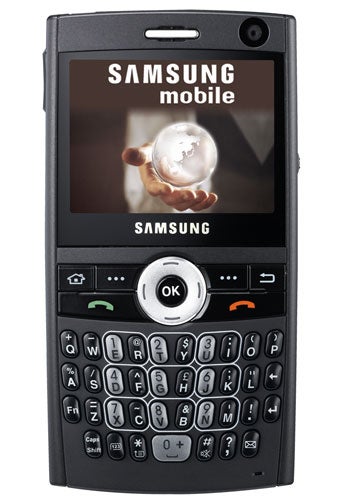
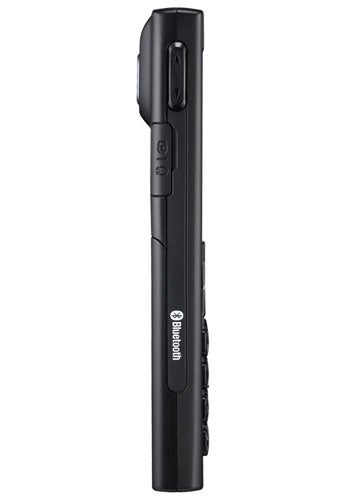
A design quirk that I’m not sure I like is that the text ‘hsdpa’ is emblazoned in white on the right edge of the casing while the Wi-Fi and Bluetooth logos are on the left edge. It is an oddly unsubtle thing for Samsung to have done particularly because the SGH-i600 is an Ultra Edition handset, which means in theory it is based around sleek lines and good design.
If you want Windows Mobile 6 you should look elsewhere as the Samsung SGH-i600 runs Windows Mobile 5.0 Smartphone edition. It is not overly well endowed with memory either having 128MB of ROM and 64MB of RAM. You can add more and the format of choice is the fiddly little MicroSD card. The slot is on the upper right edge and has a protective cover.
There is another covered slot on the left edge, this one is shared by the headphones, PC connection cable and mains power adapter. If you like to use your own headphones or hanker for a smartphone which can share the mini USB connector you may use with other devices you’ll be disappointed as the connector is proprietary.
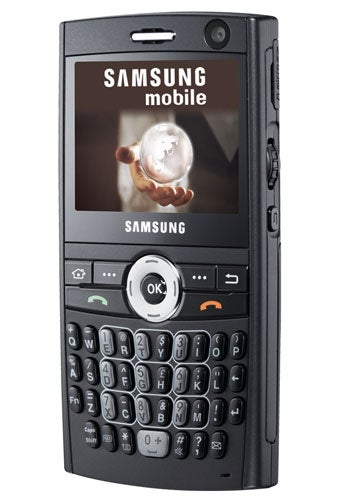
Overall, this is quite a tall smartphone at 113mm. It is 59mm wide and 11.8mm thick and weighs 105g. The screen is relatively small in PDA terms, measuring just 2.3 inches from corner to corner. It is oriented in wide format and reading e-mails and other longer texts is a bit easier than it is on tall format screens. Its 320 x 240 pixels will not be a surprise to anyone familiar with Windows Mobile Smartphones.
Samsung has done a good job with the bank of buttons that sit immediately beneath the screen. These are relatively large and clearly marked, which makes them very easy to hit successfully at speed. The navigation pad is a not such a huge success. It is a little small and I’d have liked it to be raised a bit more to make it easier to use.
The miniature QWERTY keyboard is made up of lozenge shaped keys, which are all well raised from the fascia. All but the bottom row are angled outwards from an imaginary central vertical line. This does not seem to provide a great deal of help when it comes to ergonomics but it does lend a different look to things. The number keys are picked out in grey and it is easy to switch to using them. On the bottom row is a key marked ‘123’. Hit this and the SGH-i600 immediately opens the dialler application and works with the numbers you enter.
There is a scroll wheel on the right edge, which sits very comfortably underneath the thumb. You can press it to select whatever is highlighted and just beneath it there is a back button. Meanwhile on the upper left edge is a volume rocker.
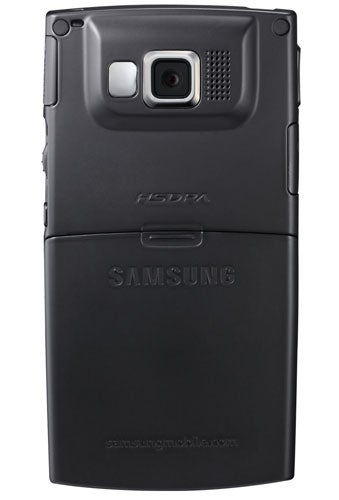
On the back is a lens for the main camera which shoots stills at resolutions up to 1.3 megapixels. There is a small self-portrait mirror but no flash. There is no side button for camera control, but it is no problem at all using the central button of the navigation pad to take shots.
When it comes to software I have already noted that Samsung adds quite a bit to the standard Windows Mobile Smartphone selection.
The range includes the Picsel viewer for reading Word, PowerPoint, Excel, PDF and plain text documents and viewing some image formats. This will be especially handy for those using the SGH-i600 for mobile email. There is also a podcast manager and RSS reader.
You also get a stopwatch, converters for various units and Voice Assist, which in theory lets you call people and open applications simply by speaking at the phone. I found it very flaky. It often misunderstood my spoken word, and when I didn’t speak to it at all it thought I had. If this were my phone I’d leave Voice Assist well alone.
Finally there is a weird little utility called D-Day which can be used to note important dates. You can put dates into categories: birthday, anniversary, holiday, business, memorial, private, travel, important or none. And you can set them to repeat every year. It seems a little over the top if you use Pocket Outlook, but Samsung must rather like it as it crops up on various handsets.
Samsung says you’ll get up to 6.5 hours of 2G talk, 3.5 hours of 3G talk, and up to 305 (very precise, that) hours on standby. My usual battery rundown test asking the Samsung SGH-i600 to play music non-stop with the screen forced on got me just over nine hours of battery life. This is pretty respectable for a Windows Mobile Smartphone.
”’Verdict”’
It is a shame Samsung was not able to move to Windows Mobile 6 with this smartphone, and I’m not sure it is really sleek enough to fit into the Ultra range. But as a 3G/HSDPA, keyboarded, scroll wheeled smartphone with some good software extras it stands up well.
How we test phones
We test every mobile phone we review thoroughly. We use industry standard tests to compare features properly and we use the phone as our main device over the review period. We’ll always tell you what we find and we never, ever, accept money to review a product.
Trusted Score
Score in detail
-
Usability 8
-
Value 8
-
Features 8


Editorial independence
Editorial independence means being able to give an unbiased verdict about a product or company, with the avoidance of conflicts of interest. To ensure this is possible, every member of the editorial staff follows a clear code of conduct.

Professional conduct
We also expect our journalists to follow clear ethical standards in their work. Our staff members must strive for honesty and accuracy in everything they do. We follow the IPSO Editors’ code of practice to underpin these standards.
Editorial independence
Editorial independence means being able to give an unbiased verdict about a product or company, with the avoidance of conflicts of interest. To ensure this is possible, every member of the editorial staff follows a clear code of conduct.
Professional conduct
We also expect our journalists to follow clear ethical standards in their work. Our staff members must strive for honesty and accuracy in everything they do. We follow the IPSO Editors’ code of practice to underpin these standards.
