

Verdict

Orange has an uncanny knack of producing mobile units that get closer and closer to my single device ideal. I’ve been using the SPV M3100 since last September and it managed to fulfil many of my needs, being smaller than the SPV M5000, but still sporting a slide out, full qwerty keyboard. But much as I liked the M3100, I found that I still ended up carrying my old Samsung D600 much of the time, since it made a more convenient handset for actually making phone calls. But now Orange may well have cracked it with the SPV E650 and my days of carrying two phones around with me could be well and truly over. 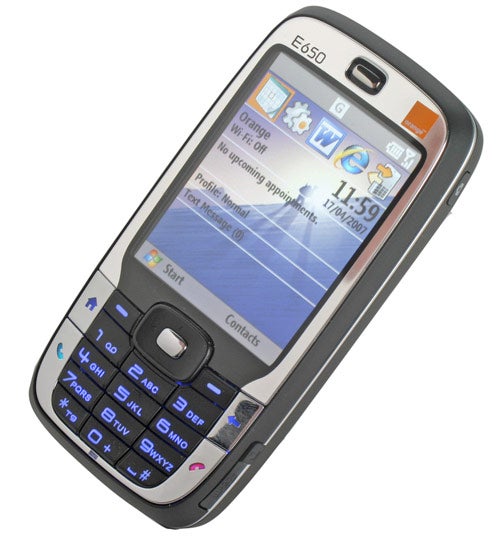
The SPV E650 is based on HTC’s S710 smartphone and once again Orange is first out of the gate with a new Windows Mobile device. This comes as no real surprise considering that Orange pioneered Windows Mobile smartphones with the original SPV, and although that particular handset was pretty awful, Orange’s commitment to the Windows Mobile platform has definitely paid off.
The most impressive thing about the E650 is that it just looks like a phone. OK, it looks like a slightly large phone by today’s standards, but at a glance, you wouldn’t think that it was anything other than a regular handset. The 2.5in screen dominates the front of the device, and even though it sports a pretty standard 240 x 320 resolution with 65,000 colours, it does a great job of showing off Windows Mobile version 6. There’s a mirrored frame surrounding the screen and the keypad, which helps make the SPV E650 look surprisingly stylish for a smartphone.
The Home, Back, Call and End buttons are all part of the mirrored surround, and despite picking up a fair amount of paw prints, they look good and are easy to access. The rest of the keypad is finished in matt black – there’s a cool blue backlight to the keys, but there’s also an ambient light sensor below the 0 key, which ensures that the light only comes on when needed. There’s a four-way navigation pad with a centre select button, along with two soft buttons on either side. 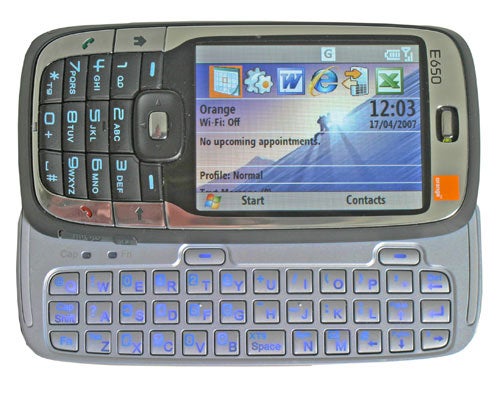
Sliding the front of the E650 to the left reveals the full querty keyboard – the screen also automatically switches from portrait to landscape mode. Despite being very small, the keyboard is well laid out and it’s good to see that all the major symbols are only an Fn click away, rather than needing a trip to a separate menu. It’s particularly good to see that Full Stop is a single key press, making entering URLs pretty simple. You even get two status lights that tell you when Caps Lock and Fn are active, and as with previous devices, a quick double tap of either will lock the mode for multiple key entries.
Since the E650 runs Windows Mobile 6 for smartphone, rather than the Pocket PC version, there is no touch screen support. This means that all of your navigation is done via directional buttons and select keys. At first I found this rather difficult and frustrating, since I’d been used to just stabbing at the screen with a stylus or even my finger. However, after using the E650 for a few days, I became accustomed to the new navigation method and soon found it perfectly natural to get around my applications this way. 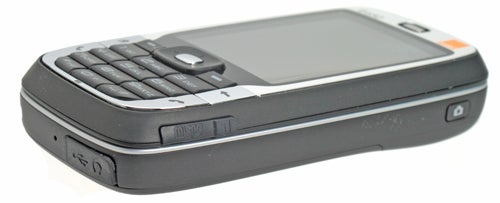
Moving from a Windows Mobile 5 device to Windows Mobile 6 doesn’t seem to bring with it masses of advantages, apart from the fact that it looks subjectively prettier. One thing I did notice is that the smartphone edition of the OS loaded on the E650 has a slightly cut down version of Office Mobile. Unlike previous versions of Office Mobile that I’ve used, this version will not allow the user to create new documents, instead it only allows you to open existing documents. Strangely though, you are able to edit those documents, which means that as long as you have template documents on the device, you’re able to open them, edit them and save them as new documents. I’m really not sure why Microsoft has not allowed document creation on the smartphone edition of Windows Mobile 6, but at least there is a work around, meaning that this is only a slight frustration, rather than a potential deal breaker.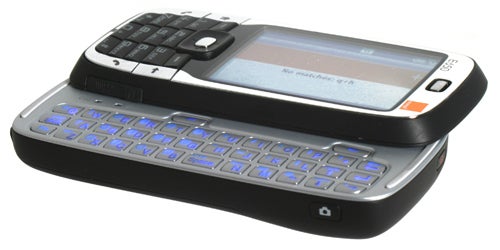
As with the last couple of Orange SPV devices I’ve tested, Pocket MSN was conspicuous by its absence. However, after a chat with Microsoft I was informed that Windows Mobile 6 will be shipping with Windows Live Messenger instead of Pocket MSN as soon as the final version is ready. Microsoft was kind enough to send me the latest beta code for Live Messenger, which I promptly loaded onto the E650. Live Messenger works very well indeed and gives you the option to be fully connected wherever you are. With effective mobile email, SMS and of course voice calls also on tap, the E650 really is a pocket sized office for the mobile worker.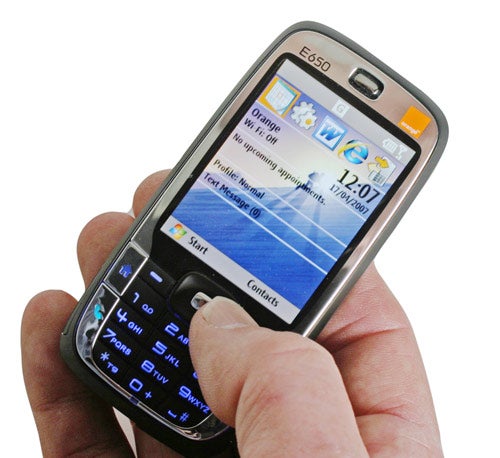
The SPV E650 is driven by a Texas Instruments OMAP 850 CPU running at 201MHz. That’s a pretty modest engine for a Windows Mobile device, when you consider that the SPV M3100 sports a 400MHz Samsung processor, and that’s far from the fastest around. As a result, the E650 does feel a tad sluggish in some situations, the most obvious being when the screen switches from portrait to landscape – this can sometimes take around three or four seconds, which is a little annoying. There’s 128MB of embedded ROM and 64MB of RAM onboard – after installing Live Messenger I found that I was left with around 46MB of free storage space. Of course this can be augmented via the microSD slot, which is conveniently located on the right side of the device, protected by a rubber flap. Orange bundles a 128MB card with the E650, which is a little small considering that you can pick up a 1GB card for around £7.50 these days.
On the right side of the E650 is a dedicated camera button, which will activate the 2-megapixel camera and then act as a shutter release. The pictures produced by the camera are pretty good, and stand up well to other camera phones with 2-megapixel sensors. If there’s one criticism of the camera, it’s that the colours it produces are quite subdued, leaving images that should be vivid, looking slightly washed out. There’s no LED flash though, which some users may find disappointing. That said, I’ve yet to be really impressed by an LED flash in a phone. The picture below was taken in the late afternoon on an overcast day, using only the natural light from the window – and yes, my cat is a total poser!
The power button is located on the top edge of the device, while along the right you’ll find volume controls and a shortcut button for voice dialling. Finally at the bottom there’s a rubber flap hiding the mini-USB port, which is used for synchronising with your PC and charging the device. The E650 will charge while connected to a USB port on your computer, but there’s also a mains adapter in the box for charging away from a PC. Orange quotes seven days standby time, and I wouldn’t argue too much with that – I found that I was getting over four days between charges, with me fiddling with the E650 at regular intervals and making the odd call. 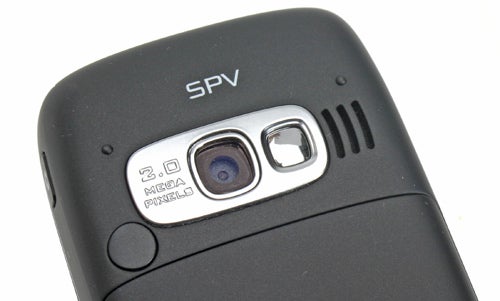
This is a quad band GSM device, so you should be able to use it pretty much anywhere in the world, assuming that Orange has a reciprocal agreement with local carriers of course. Heavy data users may be disappointed by the lack of any form of 3G support, but to be fair the E650 isn’t about heavy data use, it’s about the convenience of carrying a single device in your pocket without weighing you down. You do get EDGE support, which does result in reasonably fast data transfers, but obviously video calling is off the menu, so if that’s important to you, you’ll have to look elsewhere.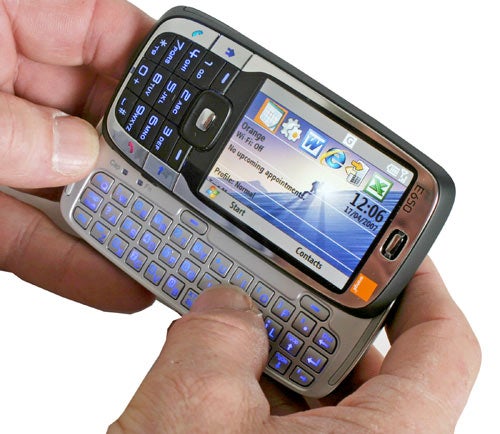
There’s Bluetooth support, both for voice and data, so you can send and receive files wirelessly with other device, as well as connect to headsets or to an integrated hands free system in your car. Of more interest is the integrated Wi-Fi. Not only does this mean that you can browse the web and receive emails far faster when connected to a hotspot, but it also opens the possibility of using VoIP on the E650. The potential for free calls over an Internet connection is quite a compelling proposition for many users, especially those who already have a Skype account and a load of contacts. Interestingly, the Skype minimum system requirements specify a CPU speed of over 300MHz when using Intel or Samsung chips, but only 195MHz for an OMAP chip, which means that the E650 makes the grade.
With a weight of just over 130g, the E650 isn’t light by handset standards, but is far from heavy when you consider its feature list. Likewise, the dimensions of 102 x 49 x 18mm are pretty large compared to many super-thin handsets, but relatively svelte compared to any other fully featured smartphones. 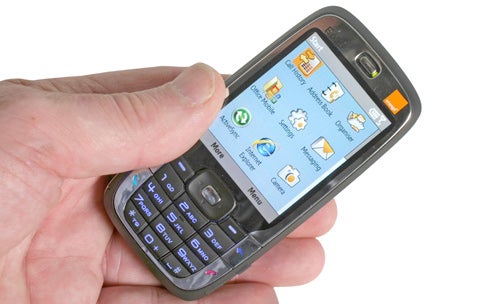
As a phone, the E650 feels comfortable in the hand, with a tactile back and keys that have a solid feel to them. If you don’t fancy sliding out the full keyboard, you can use the front keypad to compose SMS messages or even short emails. The E650 utilises XT9 for predictive text entry, giving you a list of compatible words that you can choose from once you begin to enter letters. This does make for pretty fast input and can also be employed when using the slide out keyboard.
But the real key to the SPV E650 is the slide out keyboard. I know that there are plenty of other units out there that can pull off a similar trick, but this one actually looks and feels like a regular handset when closed. You’ve basically got all the advantages of a Windows Mobile device, with pretty much none of the disadvantages. And when you throw in the fact that you can pick up the E650 for free on almost any Orange contract, it becomes impossible for me not to wholeheartedly recommend it.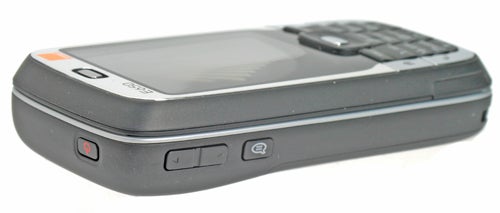
”’Verdict”’
The SPV E650 is the first device I’ve come across that can truly be described as a single solution for data and voice. It’s small enough to be carried around in any situation and fully featured enough to handle all of your mobile data needs. OK, so it’s not 3G and can occasionally feel a little sluggish, but I can live without the former and am willing to overlook the latter, because everything else about this device is just about perfect.
The fact that Orange is launching the E650 with a price tag of zero on every tariff bar the lowest £20 per month option, just makes it look like an even more attractive proposition. But as with any product, the real question is whether I would use one, and the answer is a definite yes. I shall be using the SPV E650 as my new, single mobile device from now on, and I can’t give a better recommendation than that!
How we test phones
We test every mobile phone we review thoroughly. We use industry standard tests to compare features properly and we use the phone as our main device over the review period. We’ll always tell you what we find and we never, ever, accept money to review a product.
Trusted Score
Score in detail
-
Usability 10
-
Value 10
-
Features 9


Editorial independence
Editorial independence means being able to give an unbiased verdict about a product or company, with the avoidance of conflicts of interest. To ensure this is possible, every member of the editorial staff follows a clear code of conduct.

Professional conduct
We also expect our journalists to follow clear ethical standards in their work. Our staff members must strive for honesty and accuracy in everything they do. We follow the IPSO Editors’ code of practice to underpin these standards.
Editorial independence
Editorial independence means being able to give an unbiased verdict about a product or company, with the avoidance of conflicts of interest. To ensure this is possible, every member of the editorial staff follows a clear code of conduct.
Professional conduct
We also expect our journalists to follow clear ethical standards in their work. Our staff members must strive for honesty and accuracy in everything they do. We follow the IPSO Editors’ code of practice to underpin these standards.
