

Verdict


Pros
- Decent print quality
- Wireless support included
Cons
- Tiny LCD display
- No front USB socket
- Speed well below claimed levels
Key Specifications
- Review Price: £89.99
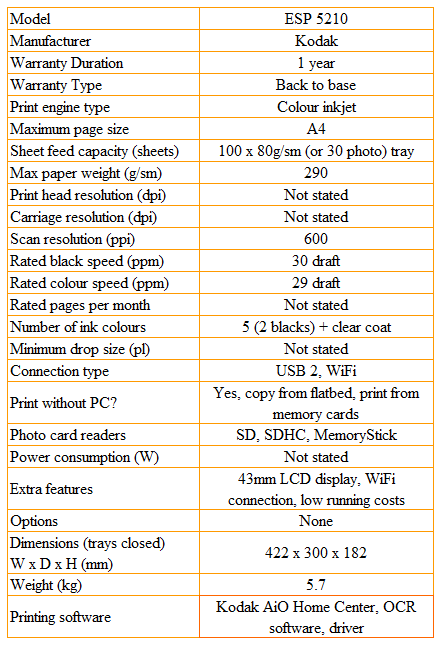
- 43mm (1.7-inch) LCD display
- WiFi support
- 600ppi scanner
- 100-sheet tray
- SD/MemoryStick slot
Kodak now has a range of all-in-one inkjets for the home enthusiast and small office. Most are priced at over £100, but the new ESP 5210 is available through limited outlets at £90. So, what has been cut back to lower the asking price?
To look at the new machine, you’d be forgiven for thinking it was an ESP 5250, as it’s built into the same case. The only obvious difference is the size of the LCD. The one in the ESP 5210 has a diagonal of just 43mm (1.7in) – the 5250’s LCD is 61mm (2.4in) – which means that menu text appears very small, though it’s just usable.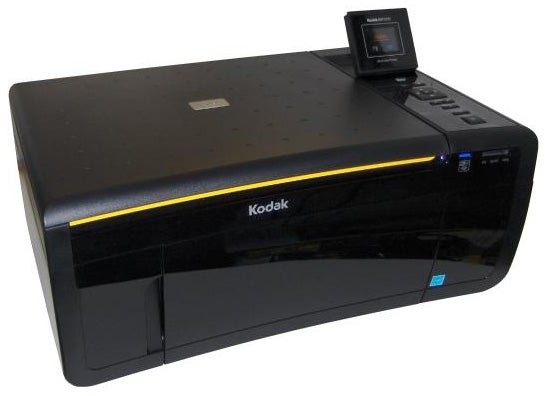
In front of the small screen is the same column of control buttons as on recent ESPs, with a square of navigation arrows, as well as zoom and rotate buttons for photo thumbnails.
Set into the top right corner of the front panel is a single memory card slot, which can take either SD or MemoryStick cards, and a blue indicator for wireless connection. It’s disappointing to see no USB/PictBridge socket on the front panel, so you can print photos directly from a camera or a USB drive. It’s a small extra manufacturing cost for a lot of extra flexibility.
The centre section of the front panel folds down to become the main paper tray and a telescopic extension pulls out to act as an output tray. This is a common technique in low-cost all-in-ones, but it does increase the footprint of the machine considerably. The same tray is used for up to 100 sheets of plain paper or 30 photo blanks, though you can’t load both media at the same time.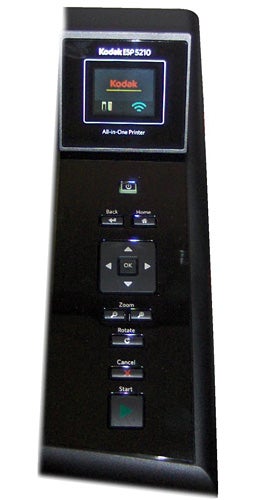
At the back is a single socket for USB connection, though we suspect many customers will use the wireless link. The printer’s firmware offers a wireless connection wizard and the on-screen alphanumeric keyboard is easier to navigate than most, making the input of WEP passcodes a quick and simple process.
Although drivers are provided on CD for Windows and Mac, the software is keen to upgrade itself and downloads files totalling nearly 100MB. On a slow broadband link, this takes a while and spoils the out-of-box experience. You can understand downloading one updated part of a software suite, but when the whole lot needs replacing, the CD becomes redundant.
Physical fitting of the print head and the two ink cartridges – one black and the other four-colour – is the work of seconds. The all-pigment inks work together with a clear cover coat, designed to produce high-gloss photo prints.
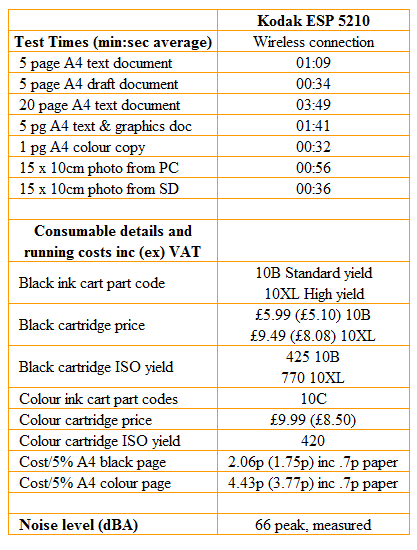
Kodak claims speeds of 29ppm in colour and 30ppm in black. We assume these are for draft mode prints, so we printed a five-page text document in draft mode to start with. While it is considerably quicker than normal print mode, which is the default, we still saw no more than 8.8ppm, less than a third of the claimed figure.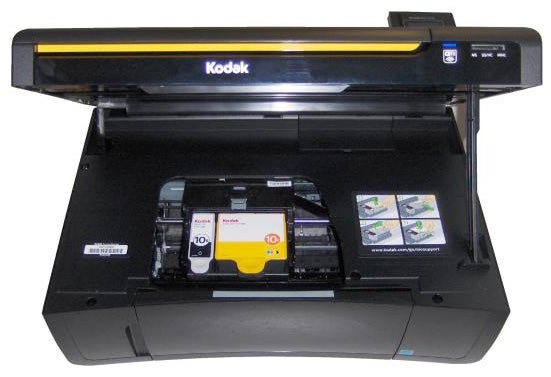
In normal mode, the black print speed is around 4.4ppm, though on a longer 20-page document it does rise to 5.1ppm. On the first run of this test, the printer paused for over two and a half minutes before starting up as if nothing had happened. This only occurred once and the second run completed without a hitch. Printing our five-page black text and colour graphics test produced 3ppm.
These speeds are quite acceptable for an inexpensive all-in-one, so it’s a shame Kodak, like most of its competitors, feels the need to hype them out of all proportion to what will typically be seen.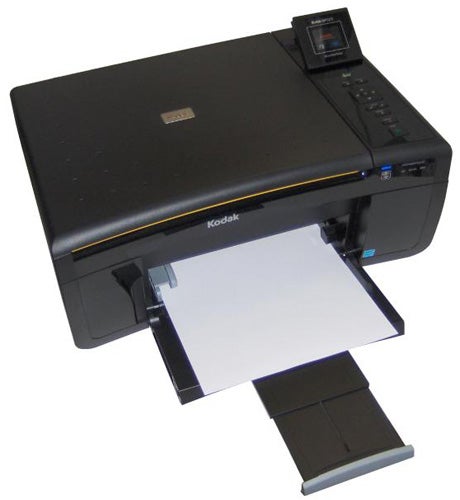
The quality of the prints is pretty good, with reasonably clean black text showing only a very occasional character misshape. Draft mode print is lighter than normal mode, with occasional misalignment from line to line but, as the term suggests, it should be quite suitable for draft documents.
Colour print is bright and attention-grabbing, though there’s slight haloing of black text over coloured backgrounds. A colour photocopy produced reasonably accurate colours and although text was considerably fuzzier, it’s still OK for day-to-day use. Photo prints are generally sharp, with good colour rendition and reasonable foreground detail, though a lot of this is lost in areas of shadow
Kodak vaunts the low running costs of its inkjet printers and we can confirm that costs come out considerably lower than most of its competitors. We calculate a black page cost at 2.1p and a colour page at 4.4p, both including 0.7p for paper.
Verdict
As we’ve noticed before, new models in Kodak’s range aren’t always better value than what they replace. Compare the ESP 5210 with the ESP 5, for example, which started life at £89 and is still available for around £65. The older machine had a 76mm (3in) LCD and card readers for SD, MemoryStick, xD and CompactFlash cards, plus a port for PictBridge cameras. The ESP 5210 drops all but SD and MemoryStick and has a comparatively meagre 43mm (1.7in) display, though it does include wireless network support. Even so, since the design and print engine is very similar in both, it’s hard not to recommend the earlier machine over this one.
Trusted Score
Score in detail
-
Print Speed 6
-
Features 7
-
Value 5
-
Print Quality 8


Editorial independence
Editorial independence means being able to give an unbiased verdict about a product or company, with the avoidance of conflicts of interest. To ensure this is possible, every member of the editorial staff follows a clear code of conduct.

Professional conduct
We also expect our journalists to follow clear ethical standards in their work. Our staff members must strive for honesty and accuracy in everything they do. We follow the IPSO Editors’ code of practice to underpin these standards.
Editorial independence
Editorial independence means being able to give an unbiased verdict about a product or company, with the avoidance of conflicts of interest. To ensure this is possible, every member of the editorial staff follows a clear code of conduct.
Professional conduct
We also expect our journalists to follow clear ethical standards in their work. Our staff members must strive for honesty and accuracy in everything they do. We follow the IPSO Editors’ code of practice to underpin these standards.
