

Verdict


Pros
- Fast duplex print
- Twin 250-sheet paper trays
- Borderless print up to A4
Cons
- Fast duplex print
- Touch panel buttons a bit dim
- Third-party Linux support
Key Specifications
- Review Price: £215.00
- Wireless connection with WPS setup
- Touch panel controls
- Full duplex print, copy and scan
- Software bundle includes Presto! PageManager
- Full function fax
Epson has a range of office-oriented inkjet all-in-ones, intelligently named Stylus Office and the Stylus Office BX925FWD is the top of the range. In the same sort of price bracket as HP’s OfficeJet 8500A Plus and Lexmark’s Platinum Pro 905, it aims to handle text printing quickly, but with the versatility to be able to print good quality colour pages, including photos.
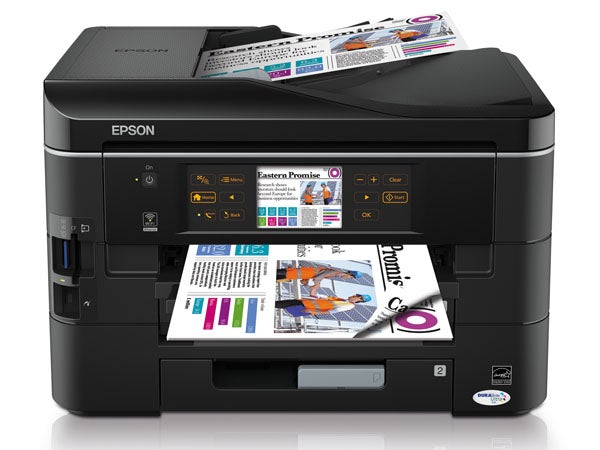
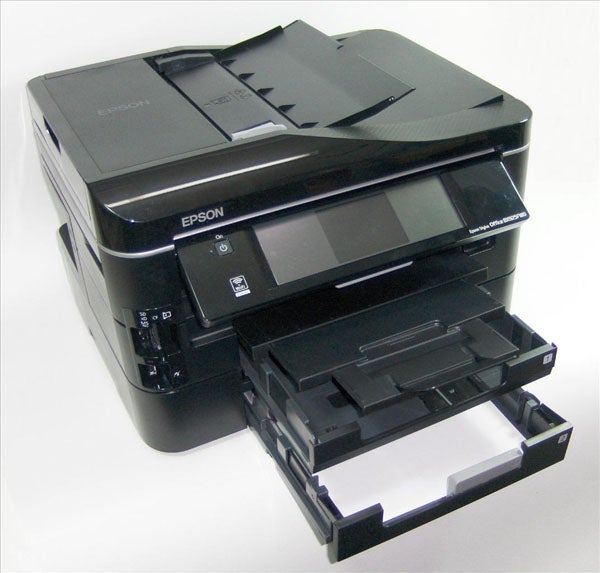
A tall, fairly square-cut machine all decked out in black, it includes a 30-sheet Automatic Document Feeder (ADF), with a cunning two-part cover which completes the printer’s smooth lines when closed. The scanner has extending hinges, so you can scan book pages as well as single sheets, and the ADF is duplex, so the printer can perform double-sided copies.
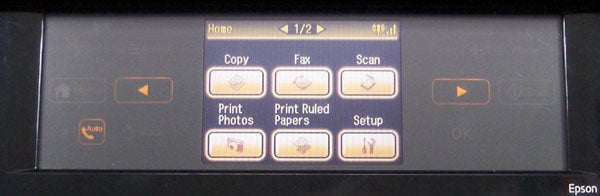
The widescreen control panel folds out to any of seven positions and has just one physical button, to power the printer on and off. Everything else is handled by a touch panel, which has an 89mm touchscreen in the centre and a series of single-function touch buttons either side. The buttons need firm pressure to operate and are certainly nothing like an iPhone screen, but are still easy enough to use.
Directly below the control panel is a three-stage telescopic output tray with a flip-up paper stop at the front. Below that are two 250-sheet paper trays, so you can load both plain paper and letterheads, photo paper or other media, simultaneously. The printer can’t feed special papers from the lower tray.
There are two memory card slots to the left of the control panel, including one for less and less common CompactFlash, and there’s a PictBridge socket below these.
Ethernet and USB sockets are positioned in the left-hand side panel of the printer, but it also has wireless connectivity and WPS setup which, with the right router, only takes a couple of button presses.
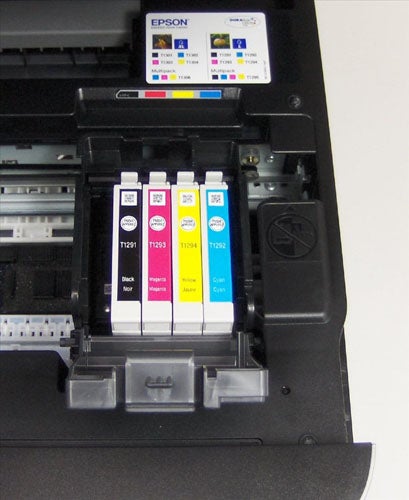
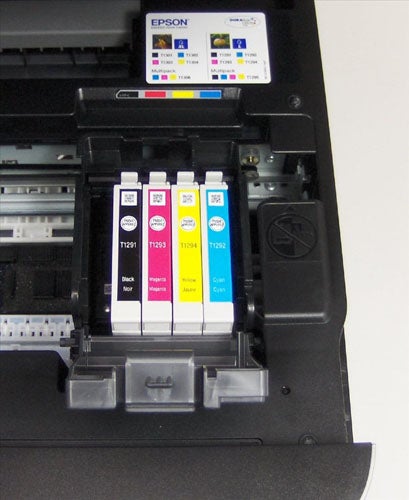
Epson uses four ink cartridges, including a double-width, high-capacity black, and these clip into the piezoelectric head and undergo a short charging cycle before the printer is ready to use.
The software bundle includes a copy of Presto! PageManager 9 for document management and OCR and there are various other Epson utilities, including Easy Photo Print. Drivers for both Windows and OS X are provided. Linux support comes from Avasys, a third-party.
Epson quotes a speed of 38ppm for black and colour print in draft mode. Rather more realistically, it also quotes 12ppm for normal mode black text and 9.2ppm for colour. Under test, we saw a draft speed of 15.0ppm, but higher than spec normal mode black text print when printing our 20-page document. The printer managed 13.2ppm and still gave 9.1ppm on the shorter five-page document. These are well above average speeds for an inkjet printer.
Duplex speeds are also higher than most other ink-jets and our 20-side document was printed at 7.3 sides per minute. The 10-side duplex copy completed in under 2:30 though a five-page single-sided copy from the ADF still took 1:01. 15 x 10 cm photos printed in 1:15, which is a good speed.
The print quality is rather better than from some other Epson inkjets we’ve looked at recently and there’s less fuzziness around text characters. Draft print, while still looking a bit dot-matrix-ish, is very readable and colour print is dense, if a bit dark in blues and greens.
Colour copies are close in colour to originals, but areas of solid colour grow a little patchy. Photos are excellent, with the printer’s high resolution giving plenty of detail, though again blues and greens are a touch dark, by default.
The ink cartridges are available in two yields, the Stag set and the Apple set. Using the higher resolution gives page costs of 2.6p for black and 6.6p for colour, including 0.7p for paper, both of which are impressive and below most colour laser equivalents.
”’Verdict”’
As a high-end, small-office inkjet, the Stylus Office BX925FWD does pretty well. One of only a few machines with twin A4 paper trays, it prints fast – faster than most of the competition in duplex mode – and offers full duplex copying and scanning, as well as print. Given its main function as an office all-in-one, it also has good photo functionality, card readers and much better than average photo resolution. Most of all though, it has impressively low print costs.
Trusted Score
Score in detail
-
Print Speed 9
-
Features 9
-
Value 8
-
Print Quality 8
Features
| Networking | Yes |
| Card slot | 2 |
| Connection Type | USB |
| Extra Features | Duplex print and copy, fax, touch panel with 89mm LCD touchscreen, twin paper trays |
Physical Specifications
| Height (Millimeter) | 300mm |
| Width (Millimeter) | 446mm |
| Depth (Millimeter) | 368mm |
| Weight (Gram) | 9.8g |
Printing
| Type | Inkjet |
| Duplex | Yes |
| Paper Size | A3 |
| Colour | Yes |
| Number of Catridges | 4 |
| Sheet Capacity | 500 |
| Print Resolution (Dots per inch) | 5760dpi |
| Rated Black Speed (Images per minute) | 15ipm |
| Rated Colour Speed (Images per minute) | 9.2ipm |
| Max Paper Weight | 255 |
| Print Without PC | Yes, copy from flatbed or ADF, print from memory card, PictBridge |
Functions
| Scanner | Yes |
| Copier | yes |
| Fax | Yes |
Scanning
| Scan Resolution (Dots per inch) | 300dpi |


Editorial independence
Editorial independence means being able to give an unbiased verdict about a product or company, with the avoidance of conflicts of interest. To ensure this is possible, every member of the editorial staff follows a clear code of conduct.

Professional conduct
We also expect our journalists to follow clear ethical standards in their work. Our staff members must strive for honesty and accuracy in everything they do. We follow the IPSO Editors’ code of practice to underpin these standards.
Editorial independence
Editorial independence means being able to give an unbiased verdict about a product or company, with the avoidance of conflicts of interest. To ensure this is possible, every member of the editorial staff follows a clear code of conduct.
Professional conduct
We also expect our journalists to follow clear ethical standards in their work. Our staff members must strive for honesty and accuracy in everything they do. We follow the IPSO Editors’ code of practice to underpin these standards.
