

Verdict


Key Specifications
- Review Price: £259.99
Bigger is better – what a controversial statement, but there are some areas where it’s true. One of these has traditionally been the PC monitor, where it applies to several areas. One is build quality; since bigger screens tend to be not only more expensive but also more exclusive, so you usually get a minimum level of quality. The other one, however, is resolution: since the widescreen revolution, the highest resolution you are likely to find on anything below 22in is 1,680 x 1,050 – though that will be changing over the coming months. Go up a size to 24in, and you’re into full HD (1080P) territory with likely resolutions of 1,980 x 1,200, while 30 inches will nab you the enviable figure of 2,560 x 1,600.
With its HG281DJ, Hanns.G offers a compromise. It has a big 27.5in panel, offering the same 1,980 x 1,200 pixels as its smaller 24in cousins – and amazingly, at a price that would barely get you the cheapest of these! Generally available for around £260, this is one of those technology deals that simply seems too good to be true. Our mission today is to find out if it is.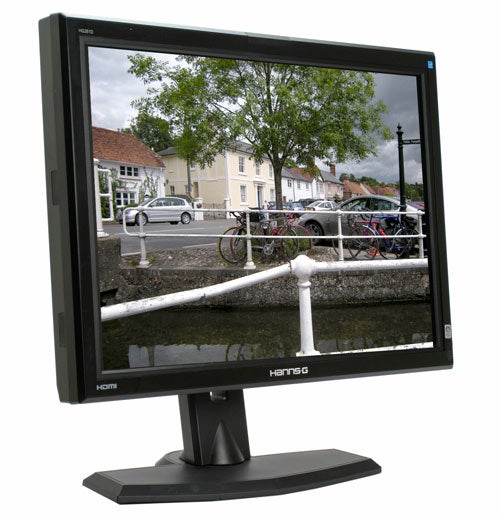
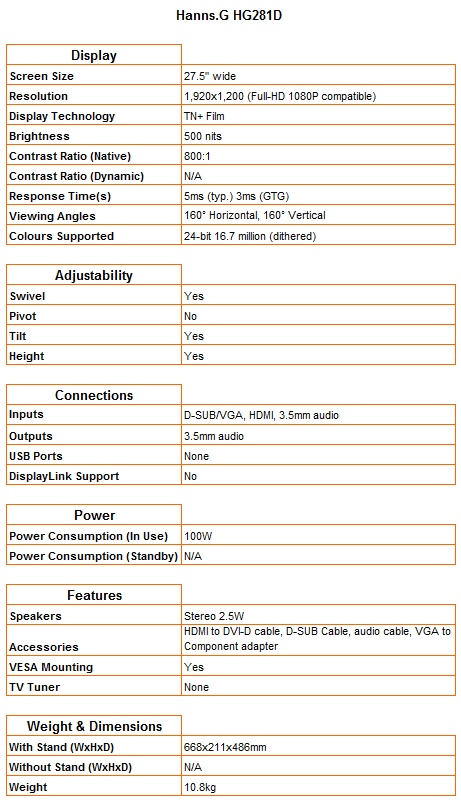
Before I get onto the monitor itself, the bundle is worth an honorary mention. The most common cost-cutting annoyance manufacturers indulge in is leaving out digital cables, but this is another area where the HG281DJ left me pleasantly surprised. The usual VGA cable is joined by audio and HDMI cables, and even better, a VGA to component adapter for the Wii or older Xbox360 owners out there. These additions are as impressive as the rest of what you appear to be getting for the money.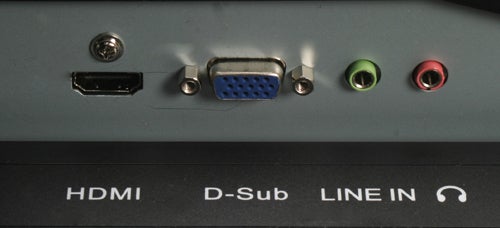
As you might have guessed by the adapter, the Hanns.G doesn’t feature any connectivity other than HDMI and VGA, which really is all you’ve any right to expect – though I can’t help regretting that the company didn’t find some way to throw in native component. Annoyingly, the power socket is located just between the stand and the bezel, making it rather difficult to access. Still, it’s not like you’ll need to fiddle with it often. Cable management is excellent, being similar to the Dell UltraSharp 2408WFP in that you simply route them through a rectangular cut-out in the stand.
Adjustability is also far better than I was expecting for the price. In addition to a decent amount of tilt and swivel, you get height adjustment of up to 12cm – an essential feature on any monitor, but rare in even 22in budget models. The only minor quibble is that if you push the screen down too far, the transport lock mechanism engages, and you have to push a button on the stand’s back to be able to move it again. This display also has a VESA mount, so you can easily hang it on your wall using a VESA-compliant bracket or arm.
The overall build quality of the monitor, though not flawless, also surpasses expectations. Only part of the stand’s base is supported by a metal plate; the rest is moulded in plastic that’s been reinforced with a lattice structure. It felt strong enough to withstand a fair amount of abuse, and there are of course rubber pads to protect your desk. The only part that feels somewhat flimsy is the bezel, but treating it with a bit of care should avoid problems. Heat is also dissipated well as the top of the display never becomes too hot.
In terms of looks, the HG281DJ is a bit of a mixed bag. To start off with, the rather broad bezel is made up of three parts – a matte black inner and outer surround that are divided by a piano-black inlay that carries the rather in-your-face Hanns.G logo and some rather brash stickers. The power LED is a ‘G’ illuminated in blue on the bottom right, and is large enough to be distracting. 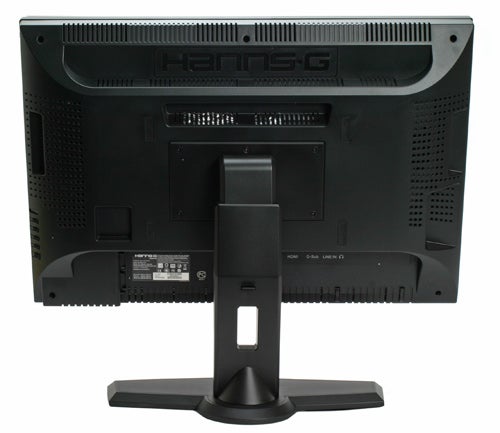
It’s also quite clear where the savings have been made. The chassis is dotted by sealed cut-outs and indents, obviously intended to house extra features not included here. For instance, what appears to be an infrared sensor above the LED is not, and at the bezel’s top centre there’s a space for a rocking webcam that has been sealed with a non-matching matte plastic plate.
Unfortunately, these irregularities do rather break the monitor’s otherwise fairly clean lines, and add to the overall ‘thrown-together’ feel. Still, once you remove the two stickers, there are certainly less attractive screens around, especially since the matte black stand makes a nice, streamlined impression.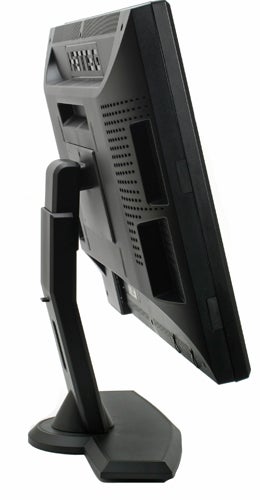
Unfortunately, the same cannot be said for its OSD controls. The buttons consist of a row of five down the monitor’s right side. From top to bottom, these cover Menu/back, followed by Auto/input select, Up/brightness and Down/volume, with Power at the bottom. This side arrangement means you have to lean around to see which button does what until you’ve perfected the art of blind operation.
It’s also worth noting that the power button is not only the same shape and size as the others, but is also spaced equally with them, which doesn’t exactly help with the blind operation learning curve. Another unnecessary irritation is that you’re forced to go through a menu when selecting between the two signal inputs. Why not just have a dedicated input switch?
The OSD itself is a bit of a boring affair with its shades of green, black and white. That said, it is well laid out and easy to use. Adjustments are minimal, comprising only brightness and contrast, dynamic on/off (here called X-contrast), colour presets and four-step sharpness – no gamma or colour temperatures to be found here. Out of the four colour presets – Warm, Nature, Cool and User – Nature is the one you’ll want to use most, since it offers a good balance.
Of course, once you turn the HG281DJ on, you’re unlikely to pay much more attention to its awkward controls or how its chassis looks. I had been using a 24in model till now, so wasn’t expecting the extra inches to have this much impact. But even I was blown away by how much bigger everything became. There is nothing quite like playing a game of Unreal Tournament 3 on a 27.5in display, except maybe playing it on a 30 incher. The advantage that the Hanns.G has over larger 2,560 x 1,600 displays is that you don’t need a monster of a gaming PC to run games at the panel’s native resolution. 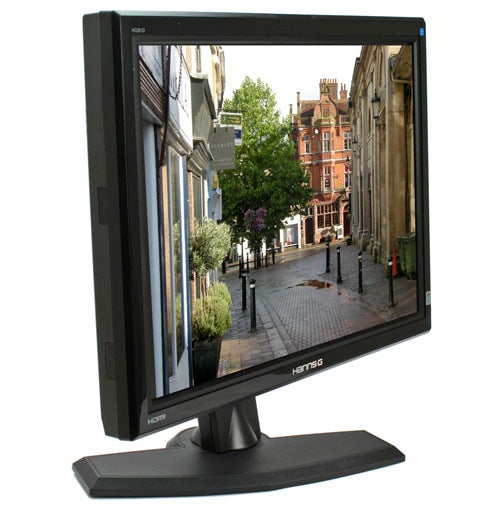
To my surprise, initial subjective impressions of image quality were quite positive, with bright – but not oversaturated – colours and good viewing angles. Getting into some serious testing, I’m glad to say the Hanns.G HG281DJ continued to impress, considering its budget nature. Horizontal viewing angles are indeed above average, with a minimum of the colour and contrast shift usually found on TN panels. Unfortunately it betrays its nature with truly terrible vertical ones.
Backlighting is fairly even, though there is some moderate backlight bleed at the screen’s bottom. As you would expect, the Hanns.G was unable to distinguish between the lightest and darkest tones in our greyscale test – but even here it outperformed quite a few equally expensive 24in TN models. Text at 9pixels was reasonably sharp and easy to read, and there was only some barely noticeable banding across dark colour gradients.
In terms of image quality, there’s very little to complain about during everyday use. And if you’re willing to sacrifice just a little bit of shadow detailing, and don’t mind sources being shown without any processing to reduce noise and artefacts, this monitor makes for a reasonable entertainment device. However, the one biggest and inexplicable omission is a 1:1 pixel mode. This unfortunately means that if you hook up a 1080P console like the PS3 or Xbox360, everything will be stretched.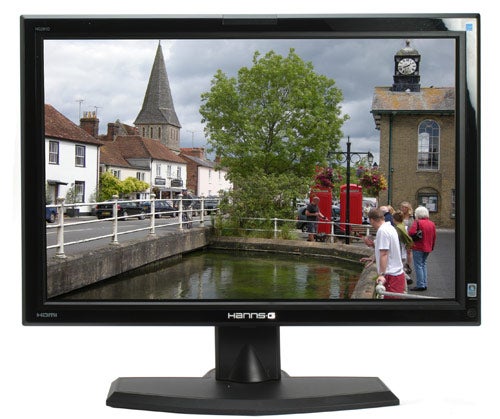
Unsurprisingly, the integrated speakers are a spot of further bad news. Though they’re a tad less terrible than on most monitors, you still wouldn’t want to use them for entertainment. Thankfully Hanns.G had the good sense to include an audio pass-through system (3.5mm in and out), meaning you can hook up external sources when not getting a feed through HDMI.
”’Verdict”’
27.5 inches of decent display quality for under £260 is a bargain by any measure, especially when you throw in some unexpected touches like height adjustment and an HDMI-DVI cable. It’s a great shame that a complete absence of aspect ratio controls makes the Hanns.G HG281DJ less than ideal for console gaming.
Trusted Score
Score in detail
-
Image Quality 7
-
Design 6
-
Value 10
-
Features 7


Editorial independence
Editorial independence means being able to give an unbiased verdict about a product or company, with the avoidance of conflicts of interest. To ensure this is possible, every member of the editorial staff follows a clear code of conduct.

Professional conduct
We also expect our journalists to follow clear ethical standards in their work. Our staff members must strive for honesty and accuracy in everything they do. We follow the IPSO Editors’ code of practice to underpin these standards.
Editorial independence
Editorial independence means being able to give an unbiased verdict about a product or company, with the avoidance of conflicts of interest. To ensure this is possible, every member of the editorial staff follows a clear code of conduct.
Professional conduct
We also expect our journalists to follow clear ethical standards in their work. Our staff members must strive for honesty and accuracy in everything they do. We follow the IPSO Editors’ code of practice to underpin these standards.
