

Verdict


Key Specifications
- Review Price: £629.99
When you’re writing for a technology publication on a regular basis one runs the risk of becoming blasé about technology. However, when you take a step back it is remarkable how far things have come even in a couple of years. One of the first reviews on TrustedReviews was a Viewsonic VP211b, a 21in LCD display that blew Riyad away back in September 2003. In that review Riyad observed that 1,600 x 1,200 was the highest resolution that a single DVI port can handle, whereas now it’s 1,920 x 1,200. Back then, a 24in widescreen was an enormously expensive and exotic beast, whereas now its relatively affordable. So is there now any point getting excited about a 4:3 screen? The answer in this case is a definite yes.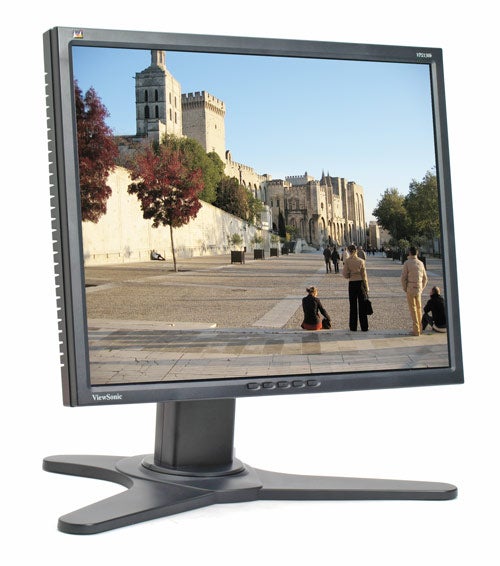
The Viewsonic VP2130b is part of Viewsonic’s professional range. It’s a very smart unit, set in a black bezel that isn’t too thick as with some displays, which lends itself to multi-monitor set-ups. The model number is at the top right, the Viewsonic Toucan’s at the top left and the logo at the bottom left.
It has a diagonal viewing area of 21.3in and a native resolution of 1,600 x 1,200, making it a perfect replacement for large 20in+ CRT screens. I can certainly vouch for this as until quite recently my home display was a 22in Mitsubishi Diamondtron CRT screen and though it was great to have a screen that size I was getting pretty tired of the fact that it covered most of my desk. 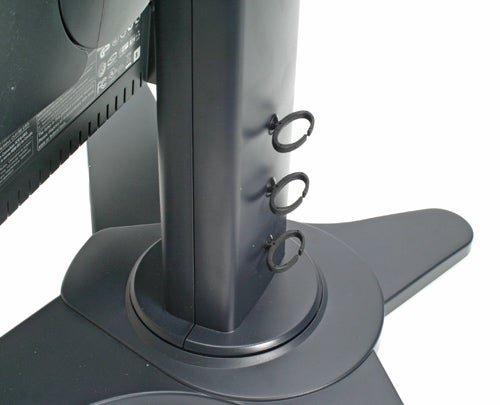
That said, while the screen itself is only a few inches thick the screen with still take up a fair amount of desk space, simply because of the large spread out stand. However, a screen such as this is still a far less imposing presence on your desk than even a smaller CRT.
There also aren’t many CRTs that rotate, pivot, tilt, and go up and down – none in fact I would say. One thing that was odd though was that the stand wouldn’t sit entirely flat on the desk with the rear two spokes lifting slightly off the ground. This meant that I couldn’t move the screen with one hand as I had to hold onto the stand to keep it fixed on the desk.
The movement is very impressive though. You can swivel it round up to 135 degrees left and right, making it easier to show your colleagues you’re latest work of genius or equally just to share those amusing pictures of Peter Crouch that you’ve just been emailed.
You can also tilt it down at an angle of five degrees and upwards 20 degrees. The coolest part is being able to pivot it 90 degree into portrait mode, which is great for working on an A4 document as you can see a page and a half at a glance. Even in landscape mode you can still view two pages side by side at 95 per cent size. 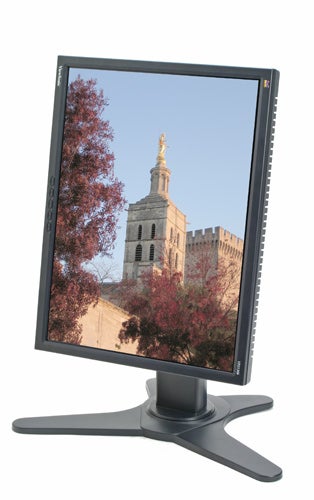
At the back of the stand are three hoops for cable management, though as you can’t feed the cables through the stand it’s still not that neat.
Connectivity is decent with both DVI and VGA connections. There’s also a four port USB 2.0 hub though this is located underneath, which isn’t that easy to get to. The best way is to pivot the screen so that you can reach the ports on the left.
Five buttons are placed at the bottom middle bezel area. The button labelled one and two give direct access to the two inputs and for navigating the OSD. This is a little old fashioned looking but it’s not too hard to move around in. Unlike some screens that dumb things down you can set the colour temperature to one of six standards, such as 6500K, 7500K and 9300K, which is what professionals who work with images prefer. Alternatively you can go with a standard sRGB setting though in this mode it’s not possible to adjust contrast and brightness. 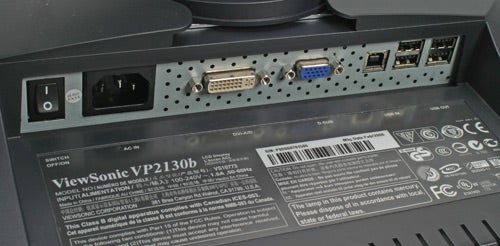
One option is oddly located inside the Manual Image Adjust option, which actually enables you to select a Picture-in-Picture (PIP) function, so that you can connect another source via VGA and view that in a box on the screen at the same time. You can move the position of this on the screen to a corner of your choice.
When you switch to a different resolution, say to launch a game, an icon with the resolution and input will pop up but fortunately you can turn this off in the OSD if you wish.
In terms of testing I happened to still have on my desk a 24in Dell 2407WFP behemoth. With a native resolution of 1,920 x 1,200 it has the same number of horizontal lines but has more resolution to the sides, making for a very good comparison.
Incidentally running multiple monitors with one 24in screen and one 21.3in screen next to it was amazing and something I got used to very quickly. Shame it was only for one day. In fact, I could have done with a second 21.3 inch screen to the right on my widescreen Dell. One for the lottery ticket I guess.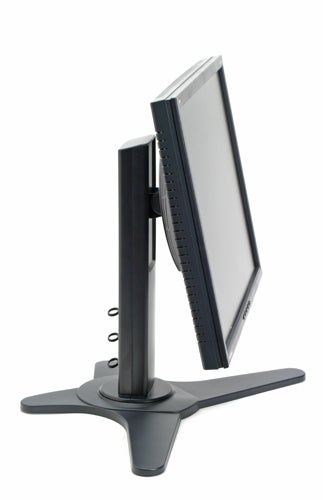
I had high hopes for image quality on the VP2130b and my first impressions were good. From the off it looked like a very bright screen with excellent sharpness and colour purity, looking even better than the Dell 24in. Investigation further with our DisplayMate tests showed this to be true.
The colour banding test that caused some problems for the Dell 2407 24in were entirely absent, with the Viewsonic showing how it should be done. Colour purity was essentially perfect, with even and rich colours across the whole of the screen. Grey scales and colour scaling were also fantastic, with even stepping and everything visible right to the end without compression.
This was evident when viewing actual images. On the Dell, detail seemed missing in darker areas, whereas all was clear on the Viewsonic, giving some justification for its quoted contrast ratio of 1000:1.
For video though the Dell seemed to have the edge. As ever, there were no discernable issues with response time, with 8ms (grey-to-grey) quoted, but the screen was slighly less bright and vivid. 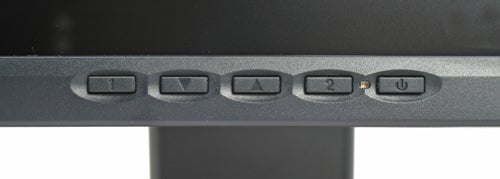
For gaming performance I tested with a bout of Counter-Strike: Source and found the screen performance to be perfectly smooth. However, if gaming is a high on your list, then spending extra to get a 24in widescreen display would be worth considering.
The Viewsonic then is a touch more suited to the professional environment rather than entertainment and also offers corporate friendly features such as software than enables IT departments to asset manage.
Image quality is first rate, and the features are good. Of course, for around £130 more you can get the 24in Dell but if colour accuracy and contrast is paramount then this is a better choice.
”’Verdict”’
Widescreen may be the new black, but thanks to its superior colour accuracy the Viewsonic 21in monitor has black down perfectly. If colour accuracy is important to your work, two of these will be a better bet than a 24in Dell, despite the cost. Alternatively, for a straightforward upgrade from a large CRT this is highly recommended.
Trusted Score
Score in detail
-
Image Quality 10
-
Value 8


Editorial independence
Editorial independence means being able to give an unbiased verdict about a product or company, with the avoidance of conflicts of interest. To ensure this is possible, every member of the editorial staff follows a clear code of conduct.

Professional conduct
We also expect our journalists to follow clear ethical standards in their work. Our staff members must strive for honesty and accuracy in everything they do. We follow the IPSO Editors’ code of practice to underpin these standards.
Editorial independence
Editorial independence means being able to give an unbiased verdict about a product or company, with the avoidance of conflicts of interest. To ensure this is possible, every member of the editorial staff follows a clear code of conduct.
Professional conduct
We also expect our journalists to follow clear ethical standards in their work. Our staff members must strive for honesty and accuracy in everything they do. We follow the IPSO Editors’ code of practice to underpin these standards.
