

Verdict


Key Specifications
- Review Price: £649.99
Our review model, the Y11M1E/S, is the only model currently on sale and it’ll set you back in the region of £650. Considering Sony is rarely averse to demanding a premium for its laptops, its specification is nothing to sniff at. At its heart is a low-voltage Intel Pentium SU4100, which has two cores running at 1.3GHz. It’s backed by 4GB of DDR3 RAM and a 320GB hard drive, with Wireless-N Wi-Fi and Bluetooth also included. That’s a decent base-line, especially for a system claiming nine hours of battery life, but the need to keep the weight and price down means there’s no integrated optical drive.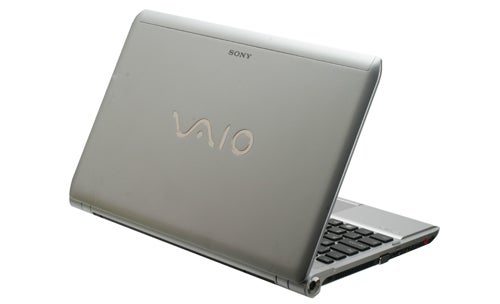
Sony hasn’t cut corners with the design of the Y Series, though. Its neatly tapered lid and silver, non-gloss finish give it an air of class and simplicity missing from so many competing laptops, while also avoiding unsightly smears and fingerprints. Sony’s signature VAIO logo and hinge mounted power button, which glows green when the machine is on and orange when in standby, merely add to its elegance.
This silver finish is continued on the inside and is nicely complemented by the black, isolation-style keyboard. At first we wondered whether the silver plastic finish might scratch easily, but a little experimentation revealed this not to be the case – it would take serious negligence to do lasting damage. 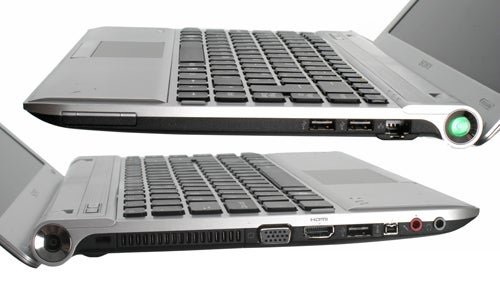
Connectivity on the Y Series is pretty standard, with three USB 2.0 ports, a mini-FireWire connection, headphone and microphone jacks (the former of which doubles as a digital audio output), VGA for analogue video, and HDMI for digital video and audio. At the front are memory card readers for SD and Sony’s Memory Stick cards, as well as the welcome addition of a hardware wireless switch. Also included, on the right, is a Gigabit Ethernet port and a 34mm ExpressCard slot.
As previously mentioned, the Y Series has an isolation-style keyboard and Sony’s experience with this kind of keyboard shows through. Despite the slight shallowness that’s typical of such keyboards, crisp and defined key actions ensure this is never a problem. 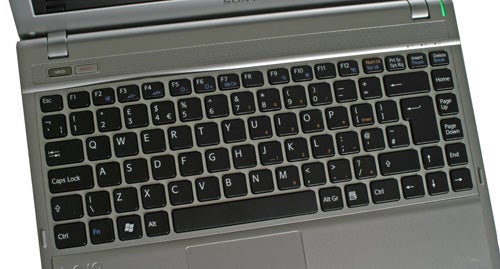
A textured, slightly curved wrist-rest also aids comfort while typing, a point helped by a layout that’s very intuitive. Our only niggle is that, due to the large touchpad, we occasionally found ourselves jogging the cursor with our palm. This is obviously quite annoying, but adjusting the Palm Check feature in the touchpad driver improved matters noticeably and it’s not a problem that will affect everyone.
On the plus side its large size makes the touchpad great to use. It’s very smooth and responsive, and supports all the usual multi-touch goodness that can make Windows 7 easier to use from time to time. Its two buttons, meanwhile, are perfectly placed and nicely responsive. 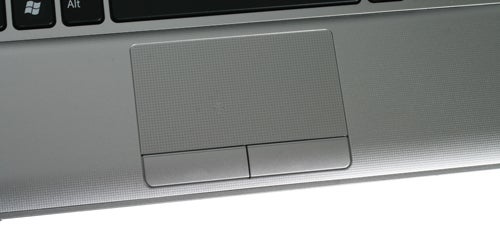
Like most laptops the 13.3in screen on the Y11 is LED-backlit and has a 1,366 x 768 resolution. In a word it’s ‘average’. Vertical viewing angles are quite poor, but horizontal ones are good enough for a small laptop and there was no noticeable backlight bleed around the edges.
When watching video we found it didn’t resolve some of the dark, fine detail, but this is fairly typical of mainstream laptops and HD material still looks as crisp as it’s meant to. We also had no problems reading small text on this screen thanks to its sharp, well-defined text production.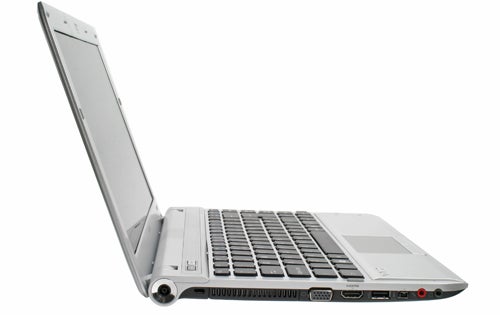
Sonically, meanwhile, the Y Series is surprisingly accomplished. As is so often the case its speakers are weak where bass is concerned, but in every other regard they perform well, with clear audio at high volumes. Though a good pair of headphones will still give you a better experience, it’s perfectly feasible to watch a film without them.
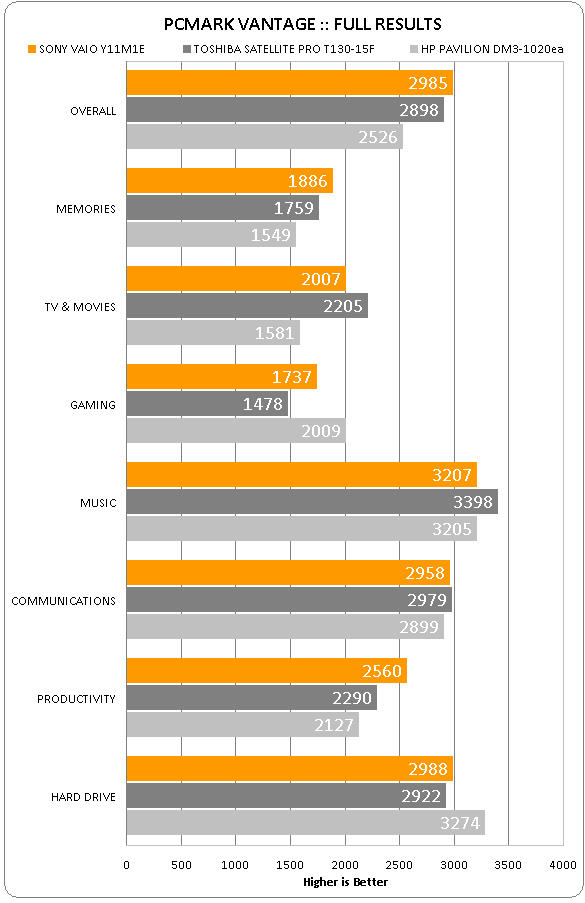
Consumers are increasingly spoilt for choice for affordable, ultra-portable laptops and we’ve reviewed plenty of good ones of late. Considering its components are virtually identical to those found in the Toshiba Satellite Pro T130-15F, it’s no surprise to see that the Sony performs very similarly in our tests. Both of these Intel-based laptops consistently outperform the AMD Athlon-toting HP Pavilion dm3-1020ea, but the difference isn’t so large as to make the HP inadequate. 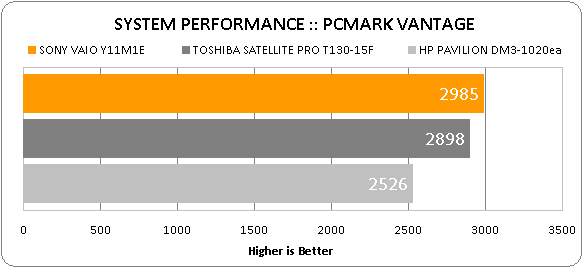
Particularly as the tables are turned where gaming is concerned. Though the ATI graphics in the HP still struggle somewhat in our Trackmania Nations test, it comfortably outperforms the Sony and the Toshiba who are both hamstrung by their Intel integrated graphics. Unless your idea of gaming is Farmville or the occasional flash game, you can forget about playing games on the Y Series.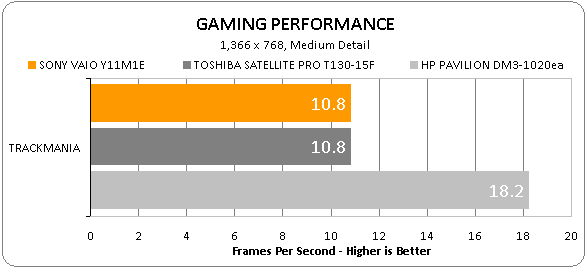
This isn’t really a problem, though, as these kinds of systems are all about longevity. Here the Y11 really shines. Its 5,000mAh (54 Watt-hour) capacity battery gets awfully close to Sony’s nine-hour claims: in our semi-intensive Productivity test it lasted an impressive 519 minutes (8hrs, 39mins).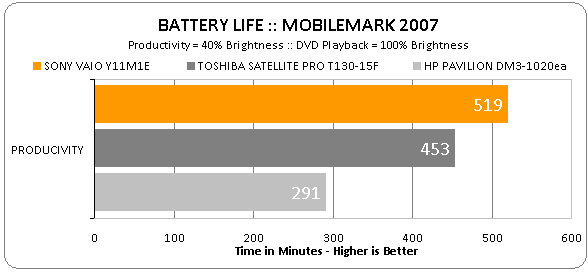
There’s very little that can touch this VAIO’s longevity at its price point, though it’s worth keeping in mind that the screen’s brightness (at 40 per cent) is just slightly lower than some laptops. Its battery life is stunning regardless, though, making it ideal for anyone who needs all-day computing but doesn’t want to break the bank for it.
In summary, then, the Y Series fulfils almost all the requirements of an excellent portable laptop. Not only does it have stylish looks, it’s also got a decent and fairly comprehensive specification and some of the best battery life we’ve seen in this segment. Only the lack of an optical drive will put people off, but if you can live without one – or don’t mind buying one separately – then this is a great option.
Verdict
Anyone who wants an affordable and portable laptop should look into the Sony VAIO Y11M1E/S. It’s attractive, good to use, excellent value and offers incredible battery life, which just goes to prove Sony can make portable laptops for any budget.
How we test laptops
Unlike other sites, we test every laptop we review thoroughly over an extended period of time. We use industry standard tests to compare features properly. We’ll always tell you what we find. We never, ever, accept money to review a product.
Trusted Score
Score in detail
-
Performance 8
-
Design 8
-
Value 9
-
Features 7
-
Battery Life 10


Editorial independence
Editorial independence means being able to give an unbiased verdict about a product or company, with the avoidance of conflicts of interest. To ensure this is possible, every member of the editorial staff follows a clear code of conduct.

Professional conduct
We also expect our journalists to follow clear ethical standards in their work. Our staff members must strive for honesty and accuracy in everything they do. We follow the IPSO Editors’ code of practice to underpin these standards.
Editorial independence
Editorial independence means being able to give an unbiased verdict about a product or company, with the avoidance of conflicts of interest. To ensure this is possible, every member of the editorial staff follows a clear code of conduct.
Professional conduct
We also expect our journalists to follow clear ethical standards in their work. Our staff members must strive for honesty and accuracy in everything they do. We follow the IPSO Editors’ code of practice to underpin these standards.
