

Verdict


There’s been a lot of hype about the Xperia X1, not least because it’s Sony Ericsson’s first handset to use the Windows Mobile 6.1 operating system since dropping the UIQ software that was found on its previous smartphones. The handset has been designed by Sony Ericsson, but is actually built by HTC and although the design looks very different to the HTC S740, the technology inside seems to be surprisingly similar.
First things first, the Xperia looks fantastic. There’s a real wow factor to the design as its surprisingly compact, especially when you consider that it houses a full slide-out QWERTY keyboard within its small frame. It also feels very solid – much more so than, say, the HTC S740. In part this is because there’s more metal used in its shell. The battery cover, for example, is an all metal affair not simply plastic with a metallic coating. However, the extra expanse of metal does make it feel a little heavier in your hand. 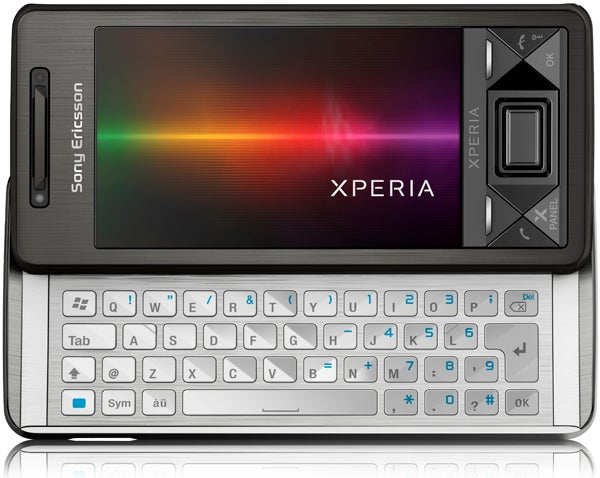
Around the edge of the handset you’ll not only find a dedicated camera button and a volume rocker switch, but also a standard mini USB port for syncing and charging the device along with a full sized headphone jack. The latter is particularly welcome as it hasn’t even yet found its way onto most of the company’s Walkman music phones.
The keyboard is naturally one of the device’s key features and you only have to apply a small amount of pressure with your thumb to slide it smoothly out from under the main body of the phone. As it slides out it causes the screen to tilt slightly upwards so it sits at a nice viewing angle.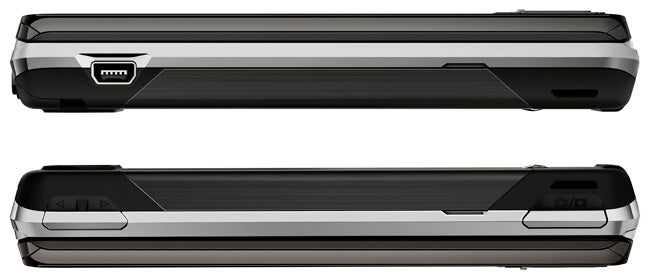
This combined with the fact that the rear of the unit is completely flat means that unlike HTC’s S740, you can happily type with two fingers while the handset sits on a desk. The keys are backlit and well spaced, but Sony has not added dedicate numerical keys. This may disappoint some, but we think the extra space this allows between the keys makes it a sensible decision.
The Xperia’s screen may be smaller than those found on other smartphones like the iPhone 3G, but what it lacks in size it makes up for in sharpness, as it has a stunning resolution of 800 x 480 pixels. This high resolution, plus the vivid colour reproduction, means that everything from films to web pages are reproduced stunningly and practically leap off the display at you.
One downer, though, is that as it’s a resistive touch screen rather than a capacitive display like those used on the iPhone and G1, it isn’t as responsive to finger presses as the screens on those handset. It works fine with the stylus, but as we often point out, we definitely prefer not having to use one.
Sony Ericsson has also managed to pack in plenty of other goodies. The X1 has good connectivity with support for Bluetooth, WiFi and HSDPA. There’s a built-in FM tuner and the 3.2 megapixel camera has both autofocus and a flash and takes snaps that are a good bit better than your usual cameraphone fair.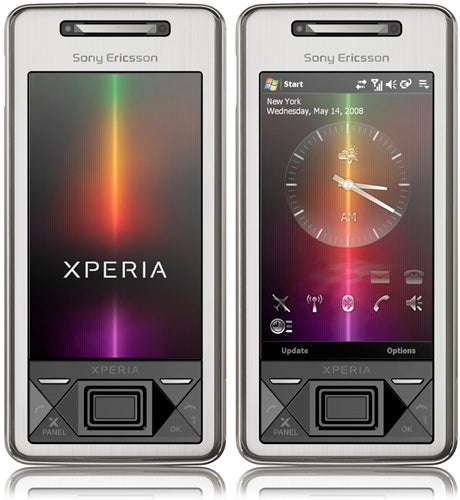
There’s also onboard GPS for use with the preloaded Google Maps software. Thankfully the battery doesn’t buckle under the strain of all these extra features. In fact battery life was impressive – we got around two and a half days out of it for relatively heavy usage of all the core features.
Despite all these positive’s the Xperia also has significant failings too. The biggest of these are due to the handset’s software and user interface. OK, we’re not big fans of the cluttered Windows Mobile menu system, but we haven’t been won over either by the X Panel interface that Sony Ericsson has added over the top.
These panels can take on two forms – either dedicated home screens for specific functions, or all round interface tweaks that aim to hide away much of the main Windows Mobile interface. The panels that Sony Ericsson provides as standard on the phone are a real mixed bunch. One does little more than simply show Google’s home page, while another simply acts as the interface for the FM tuner. In fact the only really useful one is the media panel that gives you access to your video and audio files via the same Cross Media Bar (XMB) interface seen on the Sony PSP and Walkman range of phones.
Unfortunately the problem with the Xperia X1 is not just the fact that the panels are weak, it’s also that they’re so slow to load. When you switch to a panel the phone first shows a static low resolution image of it before slowly morphing to the high resolution version that you can actually interact with. The average time for each panel to properly display is a full six seconds when the phone isn’t doing much else – it can take a lot longer when tasks are running in the background.
The only really useful panel isn’t even pre-loaded on the phone, instead you have to download it from the Xperia website and install it yourself. It’s a reworking of the Spb Mobile Shell, which gives you access to most of the phone’s features via a 3D grid of icons – it’s almost identical to the interface used on O2’s Xda Zest. While this panel isn’t perfect it does actually make the handset much more useable as a touch device as with all the other pre-loaded panels you usually have to resort to the stylus at some point or other. 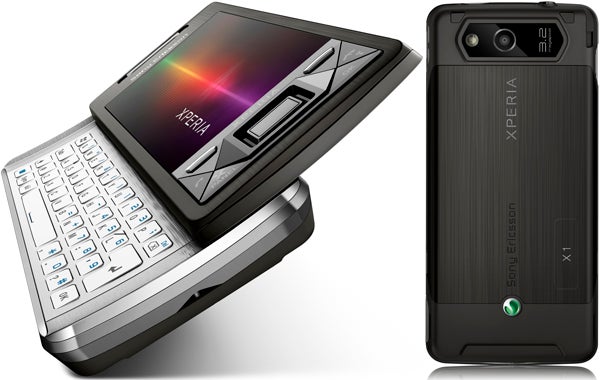
There are a couple of other niggles as well. Despite using a Qualcomm processor rated at 528MHz the handset has a tendency to feel a bit sluggish. Sometimes applications seem to freeze up for a while as it sorts itself out and switching between programs can also be slow.
We’re also not overly keen on the phone’s D-pad control. The centre of the D-pad operates as an optical controller much like the one on HP’s iPAQ Voice Messenger, but although it’s useful for scrolling through long lists, such as all the entries in a your contacts book, it’s not very accurate and it also tends to activate itself when you’re simply trying to click up or down with the outer clickable part of the D-pad. Luckily, however, you can disable the scrolling function in selected applications or turn it off completely.
”’Verdict”’
We had expected great things from the Xperia X1. In terms of the hardware it certainly lives up to the hype as it’s a great looking phone and packed full of useful features. However, the hardware is really hamstrung by the phone’s operating system and the X Panel interface that Sony Ericsson has added is over the top. At the end of the day when you pay a premium price (this is an expensive handset after all) you expect premium performance and the Xperia simply doesn’t deliver that premium experience on the software side.
How we test phones
We test every mobile phone we review thoroughly. We use industry standard tests to compare features properly and we use the phone as our main device over the review period. We’ll always tell you what we find and we never, ever, accept money to review a product.
Trusted Score
Score in detail
-
Performance 6
-
Design 8
-
Value 6
-
Features 8


Editorial independence
Editorial independence means being able to give an unbiased verdict about a product or company, with the avoidance of conflicts of interest. To ensure this is possible, every member of the editorial staff follows a clear code of conduct.

Professional conduct
We also expect our journalists to follow clear ethical standards in their work. Our staff members must strive for honesty and accuracy in everything they do. We follow the IPSO Editors’ code of practice to underpin these standards.
Editorial independence
Editorial independence means being able to give an unbiased verdict about a product or company, with the avoidance of conflicts of interest. To ensure this is possible, every member of the editorial staff follows a clear code of conduct.
Professional conduct
We also expect our journalists to follow clear ethical standards in their work. Our staff members must strive for honesty and accuracy in everything they do. We follow the IPSO Editors’ code of practice to underpin these standards.
