

Verdict

Key Specifications
- Review Price: £88.12
 (centre)
Product of the Year 2010 / Best Software(/centre)
As we outlined in our 5 Best Free Office 2010 Alternatives feature, Microsoft Office isn’t the only option available to you for your productivity needs. This is especially true if your requirements are relatively basic, or if you prefer to use online applications where you can access your documents from anywhere. Sometimes, though, there’s no replacing Office and if you fall into this category then today’s release of Office 2010 will be of great interest to you.
What’s new?
Where Office 2010 is concerned, asking “what’s new” is fraught with danger: there’s just so much. Indeed, so many new features are there, that we’ve highlighted some of the best in a whole separate article: 15 Best Office 2010 Features. It doesn’t cover all of them, but they’re our favourites and go to prove that Office 2010 has plenty to offer over the somewhat divisive Office 2007. If you want a slightly more digestible idea of what Office 2010 entails, we suggest you start there.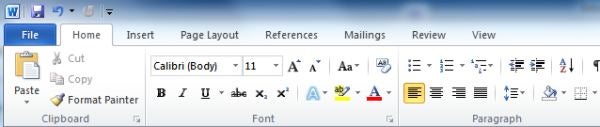
If you were one of those who didn’t take to Office 2007, chances are you weren’t too keen on its new Ribbon interface. In which case we have bad news for you: it’s everywhere in Office 2010. However, while it’s something of an acquired taste for those used to the toolbars of previous Offices, given time it’s easy to appreciate how much more efficient and intuitive the ribbons are. It helps, of course, that Microsoft has fine-tuned ribbons extensively, while also offering more flexibility so you can customise them to suite your needs. Also of great benefit is the quick access toolbar (also customisable) in the top left corner, which gives you access to common functions (e.g. save, undo, redo etc.), leaving the ribbon to deal all those context sensitive bits.
Another addition that spans every application in Office 2010 is Backstage View. This is essentially the ‘File’ tab as seen in Office 2003 et al and, unlike Office 2007 and the Office 2010 Technical Preview, it’s actually labelled as such, rather than as the ‘Office Button’ seen in both of those. This piece of semantics should help people migrating from Office 2003, but Backstage View itself is a massive improvement on the ‘File’ tab of old as it presents a consistent, unified appearance for many of the functions that are universal to all the applications. Particularly beneficial are the printing options, where you can change the page properties, preview the outcomes and execute print jobs all from one screen. This is also where you can manage permissions for collaborative documents, an area that’s much enhanced in 2010.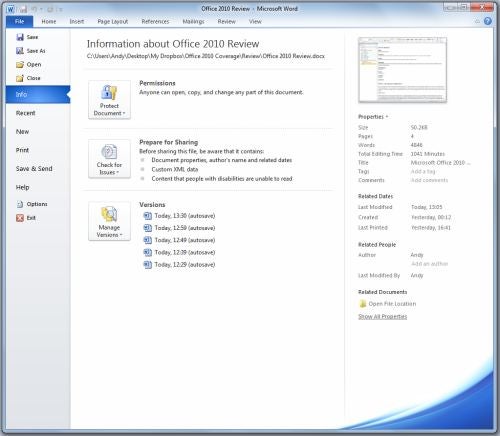
Collaboration also brings us neatly onto another new aspect of the Office experience: Office Web Apps. Though one could conceivably use the Web Apps – which comprise versions of Word, Excel, PowerPoint and OneNote – as alternatives to the real thing, they’re really meant to complement the desktop Office suite. Here you can easily access and edit your documents remotely, while also sharing them with those who mightn’t have access to a full version of Office. More impressions on the Office Web Apps can be found later in the review.
One other important development in the world of Office is the presence of a 64-bit version. For various reasons it does lack one or two features of Office 32-bit and Microsoft recommends most users stick with 32-bit, but what it does bring is a lifting of the file size limitations that might have hampered power users when using Excel or Access. In time it might bring further benefits.
Retail Packages
One thing we must deal with before all else is the various versions of Office that go on sale today. As ever they are numerous, but only three of them are available to buy from retailers. These three are: Home & Student, Home & Business and Professional. All are sold in boxed retail versions that include three licenses, and Product Key Code (PKC) versions. These versions, which presume the presence of a trial version of Office already being installed, allow the purchase of a single-use license with no further download. However, like an OEM license, they’re locked to a single PC as well.
Suggested retail pricing (inc. VAT) for these versions and what each package contains are shown below: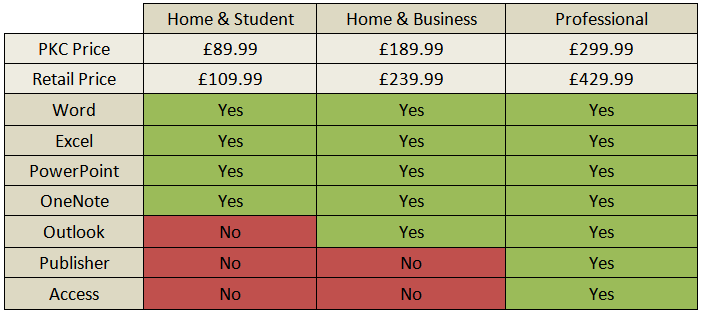
While the PKC pricing looks quite reasonable, particularly for the Home & Student version, the single-license, single PC restriction is contentious. It’s hard to argue with selling a single license, but restricting it to one PC is bound to be a nasty surprise if – having purchased it on one new system – a user decides they’d rather use it on another.
Happily, the likes of Amazon are already discounting the retail versions to at or around the suggested PKC prices. PKC licenses are being discounted in a similar manner, but we’d recommend shopping around first and opting for a retail version if you can. Whether this discounting is a short-term strategy, as it was with the Windows 7 launch, remains to be seen, but it’s unlikely prices will go any lower in the near future so if you’re planning to buy, strike while the iron is hot.
For the purposes of our review we’re going to focus on the two packages most likely to be used by consumers, sole-traders and small businesses: Home & Student and Home & Business. This means we won’t be covering Publisher (the desktop publishing application) or Access (the database application) that are featured in the Office 2010 Professional, and other applications that can be found in the Volume only versions of Office, such as InfoPath, Communicator or SharePoint Workspace.
We’ll start our review with the application pretty much everyone will use: Word 2010.
Word 2010
If you’ve used a PC in the last ten years or more, at some point in time you’ve probably used Word: it’s the workhorse of Office. Unsurprisingly it was one of the applications that were given the Ribbon treatment in Office 2007, and it benefits from many of the best new features of Office 2010 as a whole.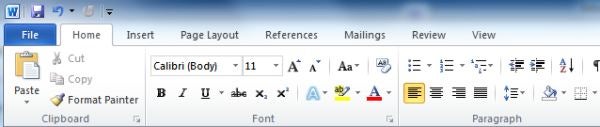
Primary among those is Paste Preview, which does away with the irritation often caused when pasting text and images from a document or web page. As the name suggests, it allows you to preview the effects such pasting will have on the formatting of your document, giving you various options to merge, adapt and retain your chosen formatting. Indeed this previewing ability is pervasive across the whole of Office, so you can always see how a particular piece of formatting will look before you apply it.
This is very helpful, but doesn’t ultimately lead to beautiful documents. For that you’ll have to rely on features like the new image editing abilities. Some might say they’re unnecessary: why not use a proper image editor? However, these new features, which include the ability to remove backgrounds, add and preview styles and filters, adjust colours and contrast, and a great deal more, make it easy for users of any ability to embed and tweak photos within a document. These are joined by significantly enhanced SmartArt, making it all the more easier to create diagrams and flow charts. 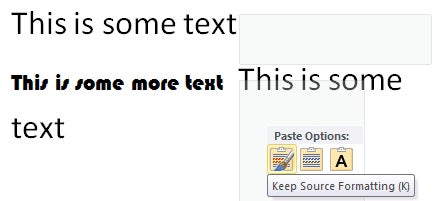
Returning to more practical matters, a feature that’s bound to become a fast favourite for anyone creating particularly large documents is the Navigation Pane. Whenever you create a heading using the ‘Styles’ dialog (under Home in the ribbon), it’s listed in the Navigation Pane – as are sub-headings. From there you can drag whole sections of the document around, eliminating the rigmarole of tedious copying and pasting. You can also search the whole document from here, which even in very large documents is instantaneous. Right-clicking each heading also provides a wealth of options, such as the ability to promote or demote headings, and print the heading and its contents in a single-click.
Word also benefits most among the Office applications from Backstage View. There are a number of options here that are incredibly useful, but best of all is the new printing options. In Backstage View the print dialog neatly combines print preview, printing options and page options into one simple screen, so you can make changes and instantly see how they will impact on your document. Other handy options included in Word’s Backstage View include the long-overdue ability to save/export to PDF, while there are numerous options to help prepare documents for sharing by checking compatibility, accessibility and stripping away hidden personal data. These features are in most of the other Office applications, too.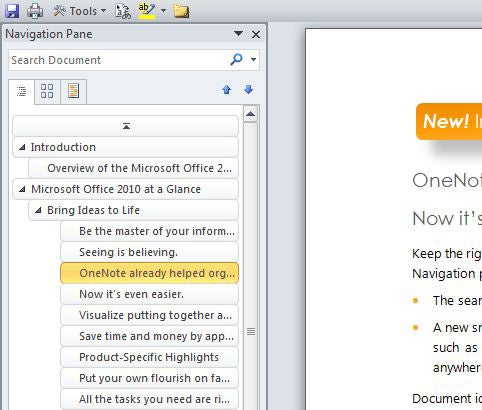
Finally, if you’re a corporate user using SharePoint, Microsoft has added simultaneous collaborative editing. Passages that are being edited are locked, with changes appearing once you’ve saved. It’s similar in execution, in fact, to the likes of Google Wave, but with all the niceties of Word. For consumers you have Office Web Apps to rely upon, and you can save your documents from Word to your Windows Live SkyDrive via Backstage View. This works quite well, though Microsoft has missed a trick in not allowing you to save locally and to the SkyDrive simultaneously. This necessitates manually saving to either if you want to keep an up-to-date copy in both locations.
Verdict
Though anyone with basic needs will do fine with free alternatives, Word 2010 makes an extremely strong case for itself. It has an ease of use and depth of features in an entirely different league to those it nominally competes with, giving those with genuinely demanding requirements more and better executed tools than ever before.
Excel
Like Word, Excel was one of the Office 2007 applications to benefit from the ribbon interface. As such the transition from it to Excel 2010 is nothing like as dramatic. Anyone transitioning from Excel 2003, however, will find Excel 2010 a very different beast indeed. And, as we pointed out earlier, though it’ll take a little while to get used to the Ribbon, once you do you won’t want to go back. This is particularly true of Excel, since it puts at your fingertips so many of the items once buried beneath several menus.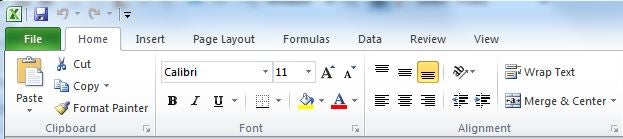
Excel 2010 also brings a number of performance enhancements. If you’re a particularly demanding user and find yourself bumping against the Excel file size limit on a regular basis then the virtually unlimited 64-bit version will keep you happy, as will further performance enhancements and exploitation of multicore processors to speed rendering graphics and loading large worksheets.
These improvements, when combined with the multi-core enhancements made to the maths engine in Office 2007, give Excel a useful turn of speed and ensure it properly exploits our modern, powerful desktop PCs. Now all Microsoft need do is put the GPU to some number crunching use, though those in academia and other well-endowed organisations can take advantage of High Performance Computing (HPC) cluster processing to off-load processing tasks to other PCs.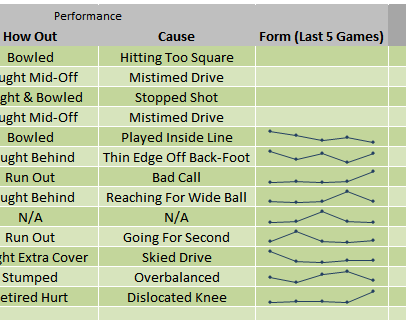
Back on planet earth, regular users benefit from a couple of new features: Sparklines & Slicers. We’ll start with Sparklines, which is a neat little way of representing trends within a cell. Options include line, column and win/loss and though their effectiveness depends greatly on the range of data and size of the cell, it’s a nice way to represent a trend in the simplest possible manner.
Slicers are rather more powerful and exceedingly useful. They’re only available when using PivotTables or PivotCharts, and allow you interactively filter the results to see what you want. So, for example, if you’ve got your annual sales in a PivotChart, you can insert a slicer and see only the results for January, February and May, or only look at sales in a particular category of product. They’re incredibly easy to use and great for quickly drilling down through data, and can be given a little style to make them suitable for presentation, too.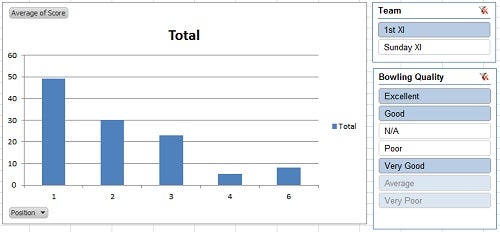
Beyond these two headline features there are a few other features worthy of note. You can now record macros for chart elements, while improvements to the functions library see the addition of 50 new functions and greater accuracy overall. Excel also benefits from the Backstage View in similar respects to the Word application, making it a good deal easier to the print spread sheets and graphics directly from Excel – something that’s always been tricky in the past.
Verdict
After the complete sea-change of the previous iteration, Excel 2010 is simply another step in the road. They are important steps, though, particularly where performance and scalability are concerned. We’re also exceedingly enamoured with Slicers, which are an absolutely joy for anyone who likes to tinker with their data.
PowerPoint 2010
PowerPoint is often the punch line of jokes, but “death by PowerPoint” has little to do with PowerPoint and much to with the inadequacies of those that present them. Nonetheless, anything that can make PowerPoint smoother, more stylish and easier to use can only be a good thing, particularly if it means people use it better. There’s plenty in PowerPoint 2010 to encourage.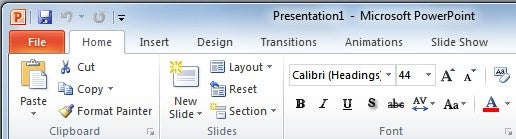
To start with, unlike Word and Excel, PowerPoint wasn’t given the ribbon treatment in Office 2007. Using PowerPoint 2010 feels quite different as result, and it’s a significant and powerful improvement. Where the ribbon is particularly effective is in making it easier for novice users to create attractive presentations. There are plenty of themes to get people on their way, while the live preview effects seen throughout Office 2010 are present in PowerPoint and prove particularly useful in previewing transitions and animations before applying them. Those transitions and animations are slicker than ever, though they’re still not quite a match for Apple’s Keynote and there’s no response to its classy Magic Moves feature.
However, while Keynote can still boast more eye-candy, PowerPoint is no ugly duckling and surges ahead in other areas. Most salient are its video integration features, allowing for embedding of both locally stored videos and videos from online services such as YouTube and Vimeo. Both work very well, though where possible we’d encourage you to use locally stored videos as your options are far more varied. You can apply many of the same tweaks as offered by the image editing tools, such as adjusting contrast and adding artistic effects, as well as edit your videos to present just the segment you actually want to use – something that’s not possible with online videos.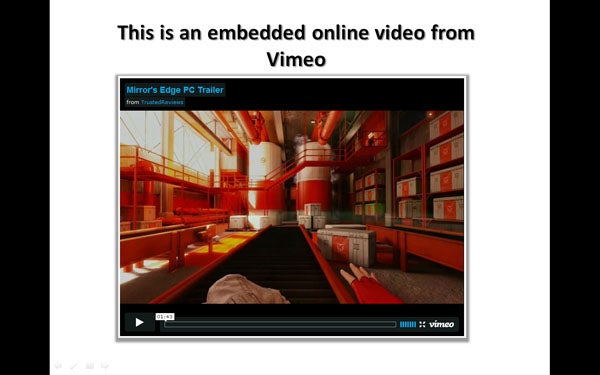
Where PowerPoint really excels, however, is in its numerous options for sharing your efforts. If you have to present remotely but don’t have access to, or don’t want to use, any of the numerous remote conferencing services out there, PowerPoint’s new Broadcast Slide Show feature is for you. A public service that requires a Windows Live ID, it will produce a link that you can send to people via email. This link will then open in any web browser and display a live version of your presentation, ready for you to proceed. Its only issue is that, unless you have a second screen to hand, you can’t present and have your notes up at the same time.
Returning to the topic of video, another way to share your presentations is to convert them to video. Accessed via ‘Save & Send’ in Backstage View, ‘Create a Video’ supports recorded narrations and timings. Videos can be outputted at three settings: 960 x 720 for computers and projectors; 640 x 480 for DVDs and online video services; and 320 x 240 for portable media devices.
Verdict
PowerPoint 2010 is another success for the Office 2010 suite. Though it still can’t match Keynote for slickness, it’s a massive improvement over 2007 and the ribbon interface is well-utilised to make creating presentations much easier for all concerned. Video integration is the headline feature, though, while the ability to quickly and easily setup remote presentations and export to video are very welcome.
Outlook 2010
Depending on who you talk to (and there was some discussion of this point in the recent podcast), Outlook is either an essential tool for email or the spawn of Satan. Those in the latter camp are likely to have experienced some kind of PST file disaster in the past, or simply been stuck using Outlook 2003 for so long that they’ve forgotten what a good piece of software actually feels like. Of course, many of 2003’s crimes – such as the glacial search – were addressed in Outlook 2007 and have also been tackled by various third party plug-ins over the years, but Outlook 2010 consolidates a lot of this progress.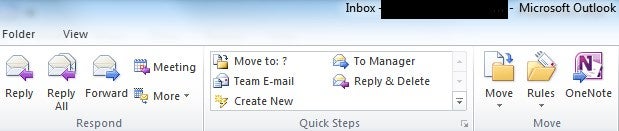
Starting with its ribbon, the standout feature is the Quick Steps box. This is similar in appearance to the ‘Styles’ box in Word and are customisable shortcut actions for such as emailing your manager or team. This is a nice, but not earth shattering addition, and on the whole the ribbon interface – which changes significantly as you move between email, contacts, calendar and so forth – works as well as we’ve come to expect. Backstage View doesn’t offer much in the way of excitement, though, with just a smattering of standard options.
Elsewhere, the interface, cosmetic differences aside, is very similar to that of Outlook 2007. By default your folder view is on the left, with calendars and tasks on the right, and your inbox and preview pane through the middle. It’s an interface that’s ideally suited to the widescreen monitors most of us use these days, but if you want to concentrate solely on your email you can use the Reading View – activated via a small button in the button right of the screen – that minimises the folders, calendars and ribbons in one click.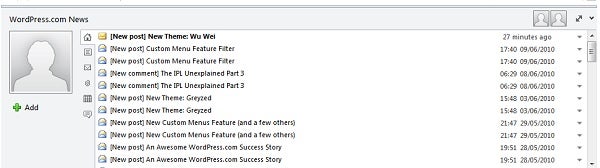
One change in the interface comes in the addition of the People Pane which, when activated, sits below emails. Of all the new features of Outlook 2010, the People Pane is our favourite as it saves a lot of sifting through old emails to find what you need. It gives you a snapshot of or your dealings with the subject/sender of the email, as well as all the attachments they might have sent you, meetings you have arranged and RSS feeds. It also feeds you status updates from social networks, a feature reliant on what Microsoft calls Social Connectors.
Social Connectors are plug-ins for social networks, with LinkedIn and MySpace currently available and Facebook and others due later this year. Once installed they will pull all sorts of information from the networks, including the obvious like status updates but also more useful stuff like contact information and profile photos. If you do use a network like LinkedIn extensively it’s a great way of ensuring your contact information remains up to date. This feature has great potential, then, but in its current form it has its limitations. Your local and LinkedIn contacts are kept separate, creating duplications and ultimately not making best use of all that extra information. This approach is understandable to an extent as users would probably complain more if their carefully constructed address book was sullied, but some way of merging this data would be extremely useful and a natural next step.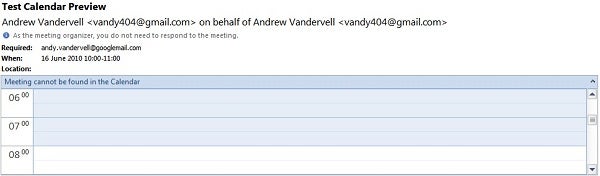
One addition we have no quibbles with, though, is Calendar Preview. This pops up a preview of your calendar on meeting request emails, so you needn’t switch back and forth to check whether a request fits in your schedule. Other small, but very useful features, include warnings when you’re not replying to latest email in a conversation, while Exchange users get ‘Mail Tips’ warning them if any recipients are out of the office or have a full mailbox.
Not all of Outlook’s new features are quite as successful, however. Conversation View, much touted in the Technical Preview and Beta releases as Outlook’s take on Gmail’s threaded emails, has been deactivated by default due to its habit of lumping together generic sounding emails. Another irritant, one we highlighted way back in the Technical Preview, is Outlook’s dreadful HTML rendering. Around 90 per cent of the newsletters and the like that landed in our inbox didn’t render properly, though they were generally still readable. It’s not a reason to avoid Outlook, but at this point in its life Outlook ought to handle things a lot better.
Verdict
Outlook remains a peerless and extremely powerful email client, but – ribbon interface aside – not all of its new features are resounding successes. Unlike Word, Excel and PowerPoint, which feel close to exactly as intended, Outlook has elements that feel like a work in progress and its HTML rendering should be much better by now. We’d recommend, if you can, trying before you buy to decide whether the upgrade is necessary. If not, you can save £100 by buying the Home & Student version that doesn’t include Outlook.
OneNote is a great application that (almost) no one uses. It’s not for want of trying on Microsoft’s part, as it has pushed the application unwaveringly for several years now and it is one of the apps that appear in every single edition of Office. 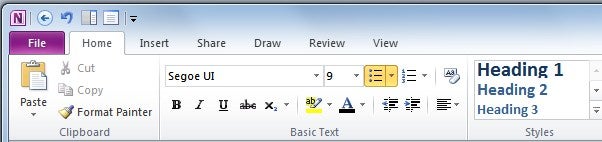
If you’re unfamiliar with OneNote, it’s a potentially very useful note taking and research tool that supports useful stuff like linked notes to recordings. In effect it’s a digital ring binder, with an interface to match. In 2010 it’s seen many of the same updates as its counterparts, which means a ribbon interface – though in OneNote it’s hidden by default – and Backstage View. Neither is particularly developed though, as the idea with OneNote is to keep things as simple as possible, hence why the ribbon is hidden by default. OneNote also gets its own Web App, which is useful for accessing your notes on the move, but seems somewhat moot as if you’re using OneNote like that you’re probably better off with a natively online application.
Probably the most noticeable improvement in OneNote 2010 is the addition of a docked view. This is activated via a shortcut on the Quick Access Toolbar, and as the name suggests docks a minimised version of OneNote to the right side of the screen. This effectively acts as the edge of the screen, with active windows automatically re-sized to fit inside it and anything dragged toward it being hidden behind. With it docked, it’s then very easy to drag and drop content from documents and webpages straight into your notebook.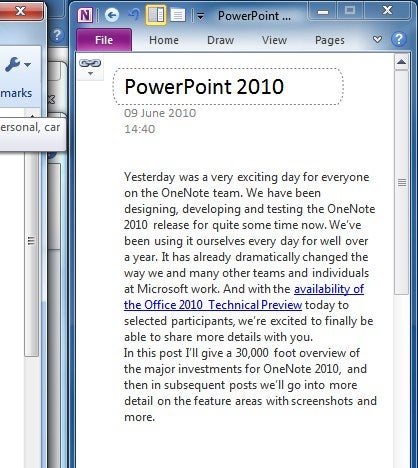
OneNote has always been a favourite among the admittedly niche Tablet PC users, but with tablets looking like they might make a recovery with the likes of the Acer Aspire 1825PTZ, Packard Bell EasyNote Butterfly Touch and HP’s Pavilion tm2 – not to mention the less PC-like Apple iPad – it’s just as well OneNote 2010 gets some enhancements in this area. This includes pinch to zoom, finger panning – where you can move around a notepad with one finger and draw with the other – and some improved UI controls for touch users. The ribbon interface helps here, too, as it’s intrinsically a lot easier to use in touch mode than the toolbars of old.
There are numerous editing enhancements, but students who deal with mathematics will be best pleased with the newly added support for equations. OneNote has also become more Wiki-like in operation. It now supports versioning, so you can more easily track changes in collaborative pages and who made them, while anything that’s been added to a document since you left is now highlighted so as not to miss it.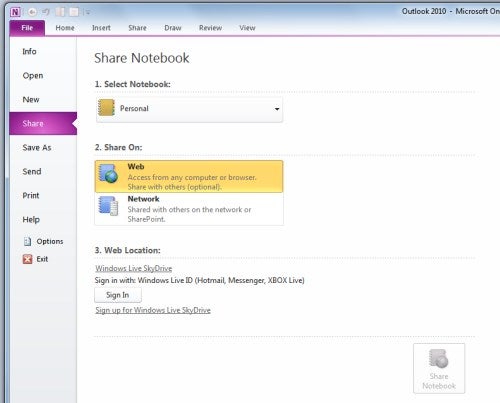
All these additions, and the many other tweaks made to enhance editing and searchability, make OneNote 2010 a solid incremental upgrade on the previous version. However, among the various changes, only the docking ability really stands out and due to the emphasis on simplicity, the Ribbon and Backstage View – so integral in other applications – don’t have the impact they have elsewhere.
Verdict
There’s nothing in OneNote 2010 to dissuade sceptics that’s it’s trying to be more organised than most people want to be, but it’s a good incremental upgrade for current users, with the integration with Web Apps and SharePoint being important for those that use it extensively.
Office Web Apps
You’ll have noticed we’ve talked a lot about Office Web Apps and how they interact with the desktop applications. And interact is very much the buzz word here, because Microsoft has designed Web Apps to be symbiotic with their desktop counterparts. This is both a good and a bad thing – good because it makes sharing documents and information much easier; bad because as a consequence Web Apps lack the depth to stand alone if necessary.
We should probably qualify that last part a bit. If you just want to tap out a basic document and the like, the Web Apps will do their job okay. However, while not obviously apparent, each one has limitations that make them inferior to the likes of Google Docs and Zoho that we covered in our 5 Best Free Office 2010 Alternatives feature.
One must only glance at the ribbon in each application to see this, as they are considerably smaller than their desktop counterparts. More obvious examples of this can be found in Word, where it’s impossible to move inserted images, to add colours to cells in tables (they’re even stripped out of desktop files) and where there’s no auto save support despite it being present in the other apps. Indeed, there are quite a few inconsistencies across the apps, with the PowerPoint Web App being the only one to offer up the enhanced SmartArt options so enjoyed in the desktop application.
Other niggles include a lack of support for legacy Office file formats, with only XML-based files (.docx etc.) allowed. Also, the Open in Word, Excel etc. button only works if you have ActiveX installed, thus limiting its support to Internet Explorer. 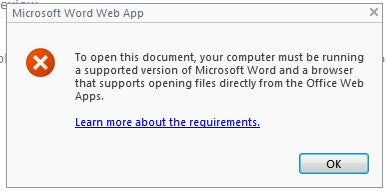
Despite all these little faults, however, as a version 1.0 Office Web Apps are still a worthy addition to the Office ecosystem. They certainly make collaborating with other users, particularly anyone who doesn’t have Office 2010 or use SharePoint, much easier and the basic interface and speed of them is very good. ActiveX limitations aside, browser support is also faultless. In time we’ve no doubt they’ll only get better.
Which Version Should You Buy?
If you haven’t already twigged it by now, our overall impression of Office 2010 is very positive. While Office 2007 users may still find reason to hold out, anyone still stuck with Office 2003 that hasn’t moved to OpenOffice.org et al should be beating down the door of their nearest retailer or IT administrator. In the final reckoning, it delivers handsomely on so many levels and shows that Windows 7 was no fluke. Microsoft is back on form.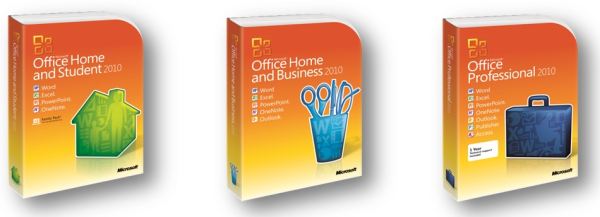
This just leaves the question of which version to buy, to which you should add “should you buy” for the sceptics out there. To the latter there’s no simple answer. That Office 2010 is more advanced and comprehensive than any other office suite out there cannot be disputed and Office 2010 adds an ease of use previously lacking, but whether its myriad of features are necessary depends on your needs. All we’d add is that, at the very least, give it a go and see if you appreciate its numerous tweaks and features. If not, carry on as you are.
If you know you need Office, though, then Office 2010 is a must-buy. It feels like the work begun in Office 2007 has come to fruition here, producing a highly polished, powerful and fast suite of applications. If you don’t need Outlook, or are happy enough with Outlook 2007, then the Home & Student Edition offers outstanding value: as it stands, £88 isn’t much to ask for software of this quality. Home & Business, meanwhile, also comes recommended, though it falls down on value due to the substantial price hike for Outlook.
Verdict
Like Windows 7, Office 2010 looks to be another landmark product for Microsoft. It proves beyond all doubt that the company is still capable of producing outstanding software that responds to and evolves with its users. This doesn’t mean everyone needs to use Office, or that it’s the completed article, but it is the template on which all future versions of the suite will be built.
—-
Microsoft Office 2010 Home & Student

—-
Microsoft Office 2010 Home & Business

—-
Trusted Score
Score in detail
-
Features 10
-
Value 10
-
Performance 9
-
Usability 9
Features
| Media Format | DVD-ROM |
| Program Type | Office Suite |
| Max Licensed Users | 3 User, 3 PC |
| System Requirements | Processor: 500 MHz or higher Operating System: Microsoft Windows 7 Microsoft Windows Vista with Service Pack 1 Microsoft Windows XP with Service Pack 3 (32-bit) Microsoft Windows Server 2008 Microsoft Windows Server 2003 R2 with MSXML 6.0 or later (32/64-bit) Hard Disk: 3.0 GB available Memory: 256 MB RAM 512 MB recommended for graphics features, Outlook Instant Search, and certain advanced functionality Others: Display: 1024 x 576 or higher resolution monitor Video Card: Graphics hardware acceleration requires a DirectX 9.0c graphics card with 64 MB or more video memory Microsoft Internet Explorer 6 or later, 32-bit browser only Internet functionality requires an Internet connection Certain Microsoft OneNote features require Windows Desktop Search 3.0, Windows Media Player 9, Microsoft ActiveSync 4.1, microphone, audio output device, video recording device, TWAIN-compatible digital camera, or scanner; sharing notebooks requires users to be on the same network Note: Actual requirements and product functionality may vary based on your system configuration and operating system, Processor: 500 MHz or higher 2 GHz or faster for OneNote Audio Search Operating System: Windows 7, Windows Vista with Service Pack 1 Windows XP with Service pack 3 Windows Server 2008, Windows Server 2003 R2 with MSXML 6.0 or later (32 or 64-bit) Hard Disk: 3 GB available space Memory: 256 MB 1 GB for OneNote Audio Search Other: 1024 x 576 or higher resolution monitor Graphics hardware acceleration requires a DirectX 9.0c graphics card with 64 MB or more video memory Internet functionality requires an Internet connection Microsoft OneNote features require Windows Desktop Search 3.0, Windows Media Player 9, Microsoft ActiveSync 4.1, microphone, audio output device, video recording device, TWAIN-compatible digital camera or scanner Advanced collaboration functionality requires connectivity to Microsoft SharePoint Foundation 2010 or to Microsoft Office SharePoint Server 2007 Send to OneNote Print Driver requires Microsoft .NET Framework 3.0 and Windows XPS features Multi-Touch features require Windows 7 and a touch-enabled device Inking features require Windows XP Tablet PC Edition or later Speech recognition functionality requires a close-talk microphone and audio output device The Desktop Experience feature must be installed prior to using OneNote on Windows Server 2008 or later Note: Online functionality requires a Windows Live ID Audio Search not available in all languages Grammar and contextual spelling features require 1 GB memory Actual requirements and product functionality may vary based on your system configuration and operating system |


Editorial independence
Editorial independence means being able to give an unbiased verdict about a product or company, with the avoidance of conflicts of interest. To ensure this is possible, every member of the editorial staff follows a clear code of conduct.

Professional conduct
We also expect our journalists to follow clear ethical standards in their work. Our staff members must strive for honesty and accuracy in everything they do. We follow the IPSO Editors’ code of practice to underpin these standards.
Editorial independence
Editorial independence means being able to give an unbiased verdict about a product or company, with the avoidance of conflicts of interest. To ensure this is possible, every member of the editorial staff follows a clear code of conduct.
Professional conduct
We also expect our journalists to follow clear ethical standards in their work. Our staff members must strive for honesty and accuracy in everything they do. We follow the IPSO Editors’ code of practice to underpin these standards.
