

Verdict


Key Specifications
- Review Price: £172.04
Although it may have attracted the most coverage for its new range of inkjet all-in-ones, Lexmark is not the only printer maker to include large LCD touchscreens in its new models. HP’s Photosmart Premium C309g, aimed at the home enthusiast with a taste for photo printing, has an 89mm touchscreen which, along with its surrounding touch buttons, is the only control on the machine, apart from its physical power button.
HP has gone out of its way to design this machine with very smooth, simple lines. The top cover, gloss black with a series of embossed geometric lines, is reminiscent of some recent HP laptops and lifting the lid gives easy access to the flatbed scanner, though there’s little allowance in the hinge for scanning books.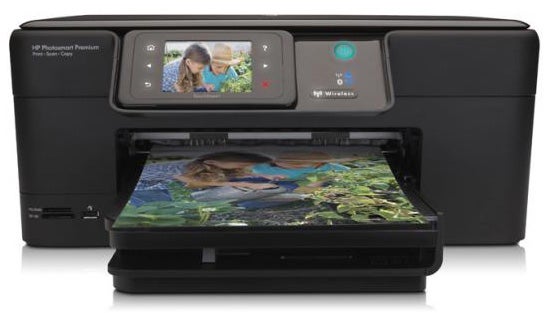
The fixed, angled control panel has a raised rim with the touchscreen set almost as a separate unit on a five-position hinge. The screen itself is surrounded by six, single-function touch buttons, which illuminate when their functions are available. This is a capacitative screen, with a bright backlight and large icons. It’s very easy to use and is a bit more sensitive than Lexmark’s. It has a 7:5.5 aspect ratio, which is better for photo previews than a widescreen.
Below the control panel is the usual paper tray arrangement, which can take both plain paper and photo blanks. The printer draws the photo tray into itself when you select photo media. A pull-out paper stop prevents printed A4 sheets from sliding onto the desk, but increases the printer’s footprint quite considerably.
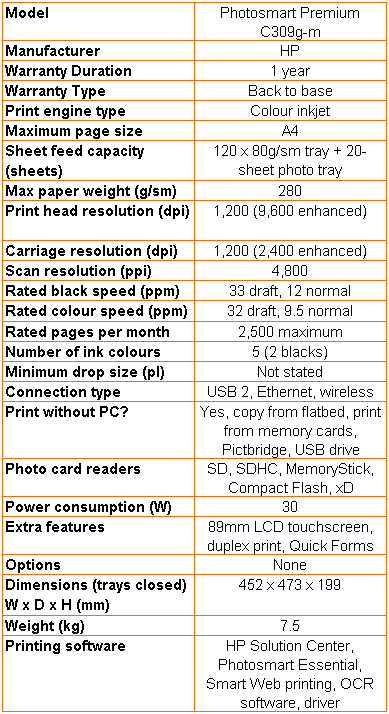
Two memory card slots, for SD, MemoryStick and xD cards are set next to a dual-purpose USB socket, which connects to PictBridge cameras and USB memory drives. At the back connections include USB and Ethernet, but the Photosmart Premium C309g also supports wireless networking.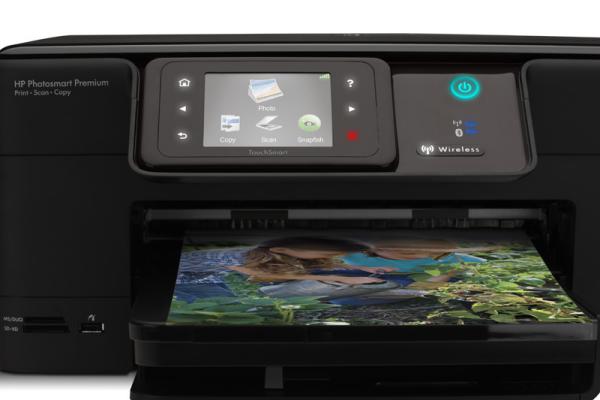
Hardware setup is a cinch; just clip the five cartridges – there are pigmented and photo blacks – into the print head and away you go. Wireless setup is also very simple, as the firmware wizard hunts for available networks and the touchscreen presents a keyboard for entering a pass code. Installation of the support software then finds the networked printer and connection is painless.
The rest of the software installation provides the usual basic file management and OCR, as well as useful applets like HP Smart Web Printing. There’s driver support on the supplied CD for Windows from XP onwards and OS X from version 10.4.
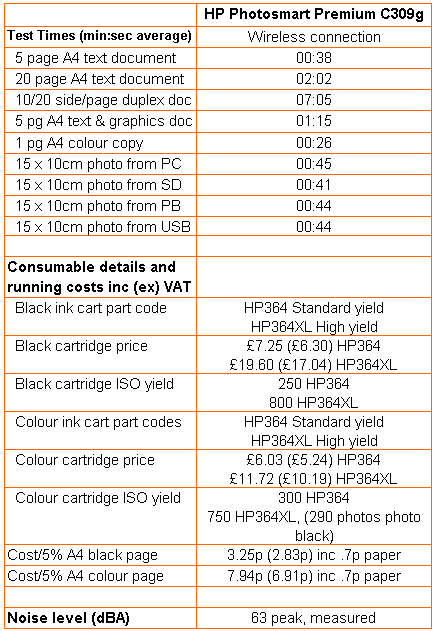
HP quotes normal print speeds of 12ppm for black and 9.5ppm for colour, but under test we didn’t get quite that fast. Our five-page black text print returned a speed of 7.89ppm, but this increased to 9.84ppm when printing 20 pages. The five-page black text and colour graphics test returned a speed of 4.00ppm. These are not bad speeds for an inkjet all-in-one.
There are two speed problems which detract from these generally good test results, though. The first is that the printer can spend a lot of time ‘preparing’ to print – we measured a maximum of 30 seconds before starting to print our black and colour test. This is after all the setup tasks have been completed and we have already printed several other test documents.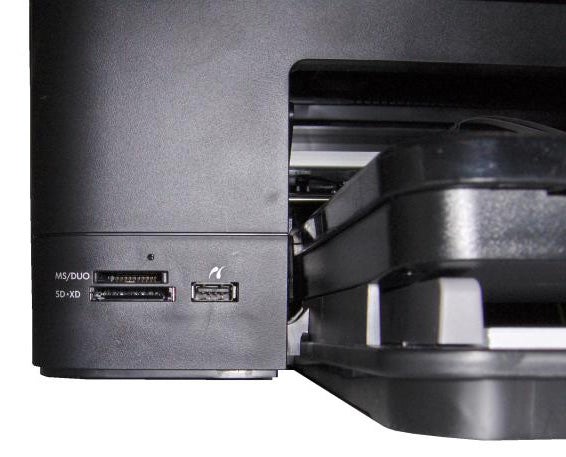
It’s very convenient for HP that the ISO speeds quoted allow it to exclude this initial preparation, though as a customer, of course, the delay is very much part of the overall print time. HP isn’t alone in doing this, though the preparation times recorded here are some of the longest we’ve seen.
The second problem is the drying time between first and second sides in a duplex print. We understand that pigmented inks need extra drying time, to insure against smudging of the finished print, but the Photosmart Premium C309g regularly waited 19 to 20 seconds between sides, which is double the time of some rival models.
Our 20-side, 10-page duplex document took 7:05 to complete, against 2:02 for the single-sided version, nearly three and a half times as long. This makes the duplex print facility almost useless, as most people won’t be prepared to accept the extra wait.
HP’s print quality continues to be high, but there are one or two chinks in its armour. Black text isn’t as clean as it might be and there is noticeable fuzz around some character uprights. Comparing print directly with the print samples produced by Lexmark’s Interact S605 showed a much cleaner text print from that machine, something we could never have said six months ago.
Colour graphics are bright and dense, with no signs of banding, but there’s some feathering in black text on coloured backgrounds. Registration is good, though. A colour photocopy showed only slight lightening of most tones, though some of the darker greens and blues suffered a little more. Photo prints are excellent, with beautifully smooth colour gradations and good levels of shadow detail. Colours are natural, but vivid where they need to be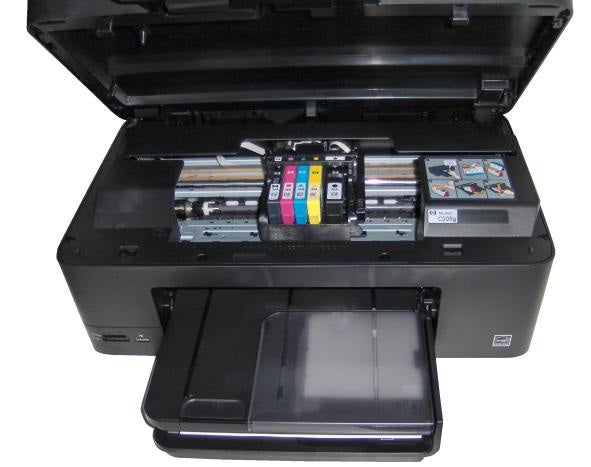
The Photosmart Premium C309g offers direct access to HP’s Snapfish online photo printing, as one of the core icons on its touchscreen. This link to professionally produced prints, posters, mugs and photo albums is very handy and means you can take a selection of images from a camera, card or USB drive and upload them, without having to use a PC.
HP provides Standard and Value versions of its inkjet cartridges, which equate to standard and high yield and, as usual, we used the high yield components to calculate page costs. An ISO black page should cost 3.25p and an ISO colour one 7.94p, both including 0.7p for paper. The black page cost is about the same as many of the printer’s rivals, but the colour cost is 2p to 4p cheaper, making it a very economical machine to run.
Verdict
This high-end HP all-in-one is something of a mixed bag. The touchscreen is very easy to use and more responsive than Lexmark’s and the Photosmart Premium C309g is faster,when printing single-sided documents. When it comes to duplex, though, it’s very sluggish and the text print quality we saw – admittedly from just one review sample – wasn’t as good as we’ve come to expect from HP inkjets. The machine is cheap to run, though, and is a versatile contender at the top end of the all-in-one market.
Trusted Score
Score in detail
-
Print Speed 8
-
Features 9
-
Value 7
-
Print Quality 7
Features
| Networking | Ethernet, Wi-Fi, Bluetooth |
| Card slot | CompactFlash (CF), Memory Stick, Memory Stick Duo, Secure Digital, MMC, Secure Digital High Capacity (SDHC), xD-Picture Card |
Printing
| Duplex | Automatic |
| Paper Size | Letter, Legal, Executive, 3" x 5", 4" x 6", 5" x 7", 8" x 10", Envelope No. 10, 3.50" x 5", Custom Size |
| Sheet Capacity | 145 sheets |
| Rated Black Speed (Images per minute) | 33 ppmipm |
| Rated Colour Speed (Images per minute) | 32 ppmipm |
Scanning
| Scan Resolution (Dots per inch) | 4800 dpi |


Editorial independence
Editorial independence means being able to give an unbiased verdict about a product or company, with the avoidance of conflicts of interest. To ensure this is possible, every member of the editorial staff follows a clear code of conduct.

Professional conduct
We also expect our journalists to follow clear ethical standards in their work. Our staff members must strive for honesty and accuracy in everything they do. We follow the IPSO Editors’ code of practice to underpin these standards.
Editorial independence
Editorial independence means being able to give an unbiased verdict about a product or company, with the avoidance of conflicts of interest. To ensure this is possible, every member of the editorial staff follows a clear code of conduct.
Professional conduct
We also expect our journalists to follow clear ethical standards in their work. Our staff members must strive for honesty and accuracy in everything they do. We follow the IPSO Editors’ code of practice to underpin these standards.
