

Verdict


Key Specifications
- Review Price: £223.25
In an ideal world we would have reviewed the Foxconn Blood Rage before we moved on to review the GTi version but things haven’t shaken out that way. The GTi tag implies that this is the hot hatch version of the original Blood Rage but in actual fact Foxconn is using the GTi name in the same way that MSI uses Pro in its model codes (or at least in its old ones).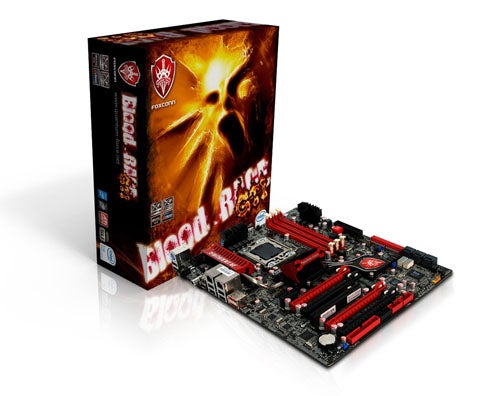
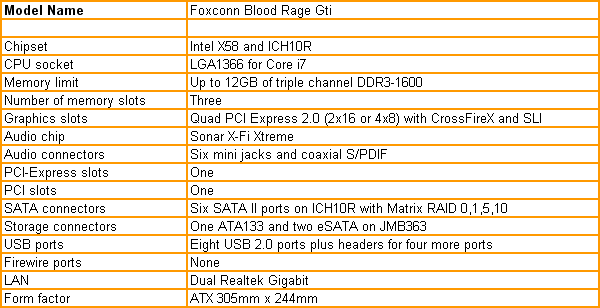
Blood Rage is Foxconn’s take on a high end gaming motherboard for Core i7 with a layout that is dominated by four PCI Express graphics slots and a price that’s eye watering. Blood Rage GTi offers a subset of the features in Blood Rage at a price that is reduced by about £40. It’s hard to be exact as the GTi will go on sale very soon so we are presently working from a guide price of £223.25 inc VAT.
The list of ”missing” features in the GTi is quite short and consists of the removal of Firewire, the absence of a SAS controller chip and a move to a simpler cooling system on the chipset and power regulation hardware. The core set of features in the GTi also looks very strong and initial impressions are favourable but you don’t have to scratch the surface very hard to raise a number of questions.
The layout of the four PCI Express graphics slots is the key thing as the slots are arranged in two pairs such that you can only install two double slot graphics cards. If you want to use three or four graphics cards you are limited to single slot models such as the GeForce 9800GT or the Radeon HD 4850. There’s nothing wrong with SLI or CrossFire using that sort of hardware but a pair of GeForce GTX 260 or Radeon HD 4890 will deliver better performance at a lower cost. Sticking with two high end graphics cards will also reduce the risk of a conflict between your graphics drivers and the games you play.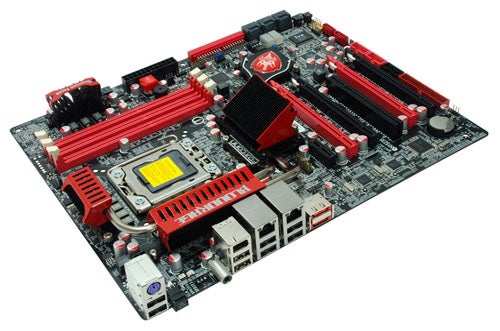
You might expect that we would complain about the three memory slots as most motherboard manufacturers choose to provide six slots. A few months back that may well have been our view but these days we have no problem with Foxconn’s direction of travel as the price of DDR3 has plummeted. Specifically the price of low voltage Core i7 DDR3 has dropped like a stone and you can now buy 3 x 2GB kits of 1333MHz DDR3 for £65 or 3 x 2GB of 2000MHz DDR3 for £100-£120. When you can get 6GB of fast DDR3 that operates below the 1.65V limit of Core i7 for that sort of price it’s hard to see why anyone would want to use six modules. That said, we would have hoped there would be a fair amount of space around the memory modules but it all looks remarkably cluttered and the area around the CPU socket is quite tight for space.
The Blood Rage models have a Sonar X-Fi riser card that carries the six analogue mini jacks so the only audio connection on the I/O panel is coaxial S/PDIF. This leaves an enormous gap that is barely filled by eight USB, dual LAN, single PS/2 and two eSATA ports, the latter of which hang off a JMicron controller. It’s a shame that Foxconn felt it was necessary to scrap the Firewire ports but that’s product differentiation for you.
There’s another piece of hardware on the I/O panel in the shape of an illuminated Clear CMOS button. You can set a jumper on the board to disable the button, so once you’ve found the settings you want you use this to prevent yourself accidentally clearing the CMOS and undoing all your hard work. 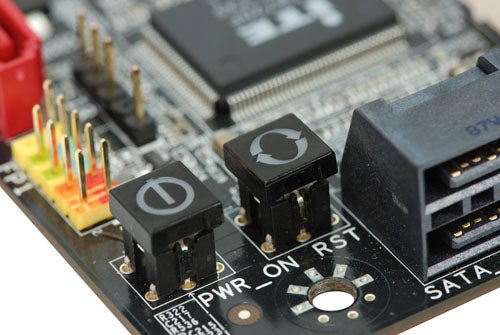
Foxconn has included three more buttons on the board; there are the usual Power and Reset buttons and you also get a Force Reset button. It has a similar function to the Clear CMOS button except that it doesn’t clear all of the BIOS settings but instead clears the overclocking settings to enable the system to restart.
When you consider that there are dual BIOS chips on the board as well as an LCD debug display for POST codes it is clear that Foxconn expects you will spend some time pushing the BIOS to the limit. Naturally we took up the challenge and the results we got were very strange. 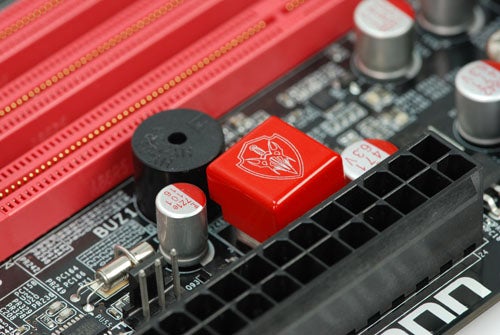
The BIOS appears quite conventional. CPU, Voltage and Memory settings each have their own screens in the Quantum section of the BIOS. In addition Foxconn has come up with a screen of Board Information that spells out the motherboard model, BIOS version, the MAC addresses of the LAN adapters and a summary of the installed CPU and memory. Take a moment to look at the Hardware Monitoring screen and you can quickly and easily see exactly what hardware is installed along with every setting that is currently in use.
We used a Core i7 965 Extreme processor and set the CPU voltage to 1.45V, QPI to 1.5V and RAM at 1.65V. Every Core i7 motherboard we have seen to date has a default RAM voltage setting of 1.5V but the Foxconn GTi starts as 1.6V so our chosen setting was the tiniest of increases.
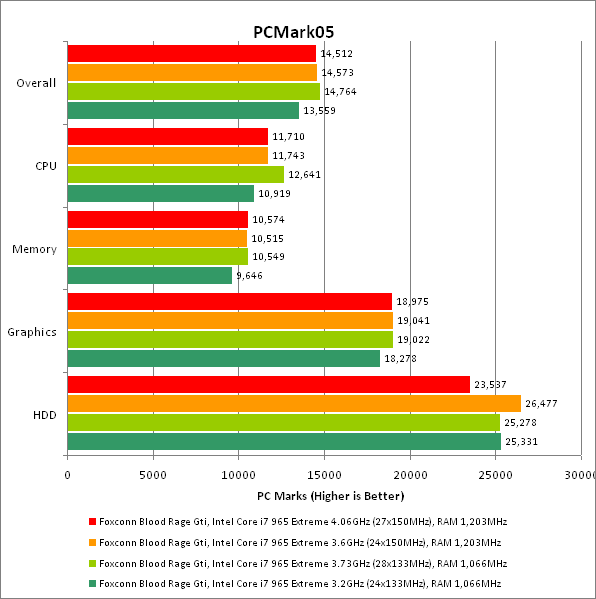
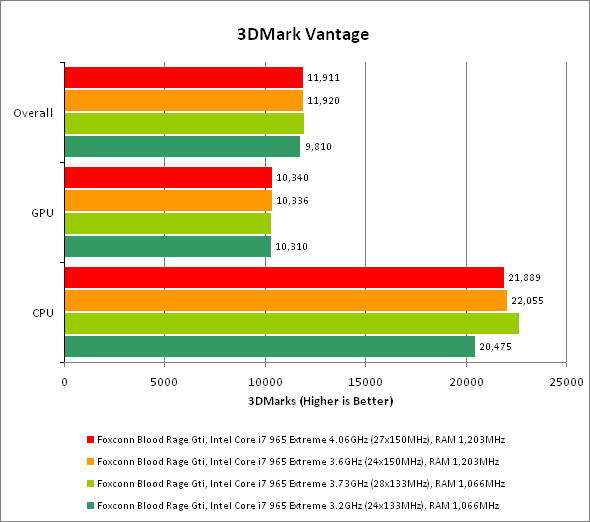
We have used these settings many times to good effect with the minimum of risk to our hardware. We started overclocking by raising the clock multiplier on the standard base clock of 133MHz and were surprised that the Foxconn ran out of steam at 28 x 133MHz = 3.73GHz. We would expect this CPU to hit 3.9GHz without much trouble. For Plan B we left the multiplier at the standard 24x setting and raised the base clock but this time we hit a wall at 24 x 150MHz = 3.6GHz which is feeble.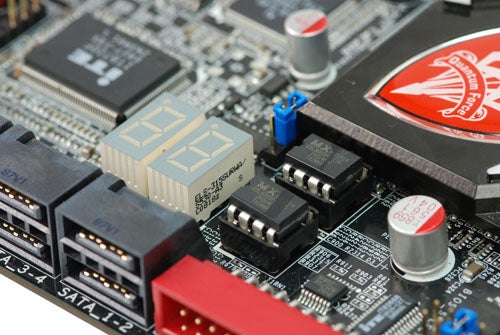
With the base clock at 150MHz we decided to raise the clock multiplier and this is where things get weird. We could raise the multiplier seemingly at will and ran a set of benchmark tests with the BIOS at 27 x 150MHz = 4.06GHz however the tests delivered exactly the same results as they did with the CPU at 3.6GHz. We can only conclude that the BIOS hadn’t increased the CPU speed in line with the settings that we used even though we checked and rechecked the figures.
This strongly suggests that the Blood Rage GTi needs some rapid work on its BIOS and until then we feel there is an enormous question mark about the overclocking abilities of this model.
”’Verdict”’
The Foxconn Blood Rage GTi packs a decent list of features at a reasonable price however the quad graphics slots aren’t much use and the BIOS seems to be in need of further development.
Trusted Score
Score in detail
-
Value 7
-
Performance 7


Editorial independence
Editorial independence means being able to give an unbiased verdict about a product or company, with the avoidance of conflicts of interest. To ensure this is possible, every member of the editorial staff follows a clear code of conduct.

Professional conduct
We also expect our journalists to follow clear ethical standards in their work. Our staff members must strive for honesty and accuracy in everything they do. We follow the IPSO Editors’ code of practice to underpin these standards.
Editorial independence
Editorial independence means being able to give an unbiased verdict about a product or company, with the avoidance of conflicts of interest. To ensure this is possible, every member of the editorial staff follows a clear code of conduct.
Professional conduct
We also expect our journalists to follow clear ethical standards in their work. Our staff members must strive for honesty and accuracy in everything they do. We follow the IPSO Editors’ code of practice to underpin these standards.
