

Verdict


Key Specifications
- Review Price: £89.06
Epson, like several of the leading printer makers, is trying to move the inkjet all-in-one into the small business sphere and its new Stylus SX600FW appears fast and smartly styled. Office use is not just about looks and speed, though, as the total cost of ownership and ease of maintenance also play important roles.
This is a very sleek looking all-in-one and it looks as if Epson has had more than a passing glance at some of Canon’s devices. While the design is different, the gloss black panels and subtle curves of the printer’s top surface show some definite parallels.
A particularly elegant feature is the folding Automatic Document Feeder (ADF) tray, which not only becomes part of the machine’s top cover, but also lifts the ADF output tray to continue the curve, leaving a completely smooth top surface when the ADF is closed.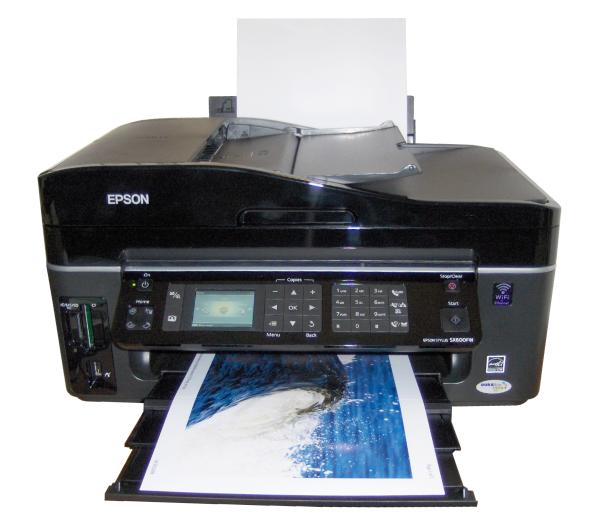
The front panel has been considerably redesigned, too, with a 63mm colour LCD panel and a series of control buttons, all sitting smoothly flush with the piano-black panel front. There’s a square of nine, large navigation controls, incorporating up/down buttons for number of copies, and there are easy ways to enlarge and reduce documents, too.
The standard number pad is supplemented by quick-dial fax numbers and last number dial and there’s a four-way mode button to switch between scan, copy, fax and photo print modes. The control set is completed by large start and stop buttons.
Memory card slots for the common types, but excluding specialist slots for miniSD or microSD – you’ll need an adapter – are grouped in the bottom left, together with a PictBridge socket for digital cameras, which can also take a standard flash drive. You can print from a flash drive and scan images to one, making it a versatile connection.
At the back, as well is a USB socket are others for cabled network, phone line and phone handset. This is a versatile machine when it comes to connections, as it also come with Wi-Fi as standard. Connection is straightforward, whichever method you choose.
In addition to the standard driver, Epson includes its useful Web-to-print utility, which squeezes prints of websites to fit paper width, and the Event Manager, which enables you to assign specific applications to the Start, Copy, E-mail and PDF buttons. Finally, there’s a copy of Abbyy Finereader to handle Optical Character Recognition (OCR).
There’s a lot you can do with this machine, without connecting to a PC. As well is the obvious functions of copying documents and printing from memory cards, Epson has been brainstorming and come up with a function to print stationery. It can print lined and squared paper and can also use an image from a memory card as a watermark on printed note paper. While this function produces pretty expensive writing paper, it’s an interesting extension to the printing functions of the machine for special purposes.
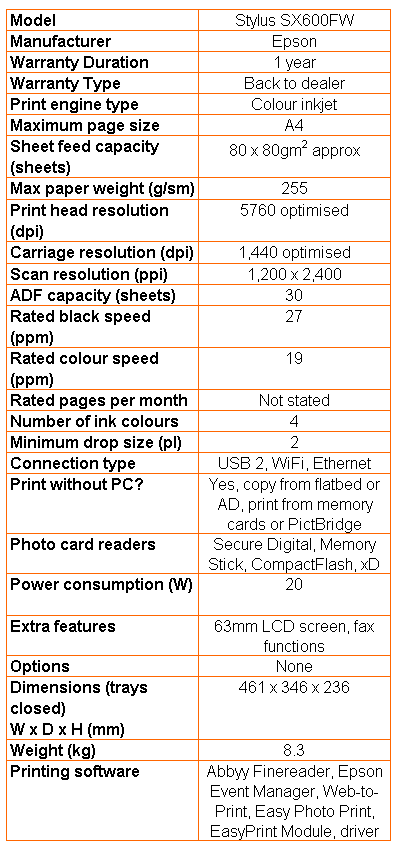
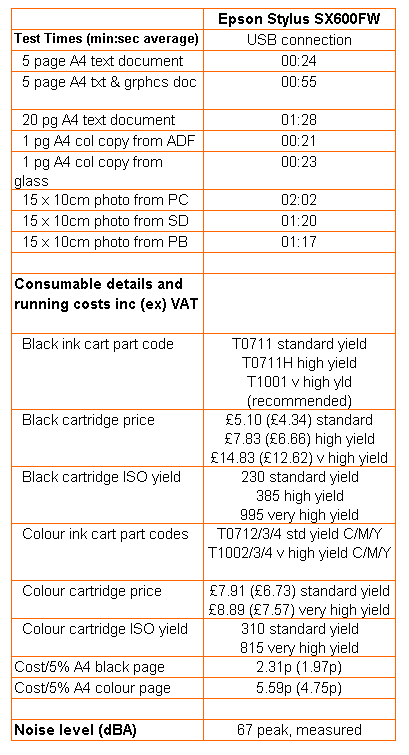
Epson quotes both draft and normal print speeds for the Stylus SX600FW, with figures of 27ppm for black and 19ppm for colour in normal mode. Our five-page text print competed in 24 seconds and the 20-page document took 1:28, giving a best case print speed of 13.6ppm. When we mixed in the colour, with our five-page text and graphics print, we saw a speed of 5.45ppm. We wonder how the company can get the figures it publishes, though in comparative terms it’s still quite a speedy inkjet.
Printing a photo in normal mode took around 1:20, which is quick for a 15 x 10cm print from an all-in-one. With its very high resolution print, photo reproduction has always been a strong point of Epson’s print engine. That’s true here, where photo prints are pin sharp, with a lot of detail, and colours looking smooth and natural. Although it only uses four inks, you are unlikely to be disappointed by its photo output.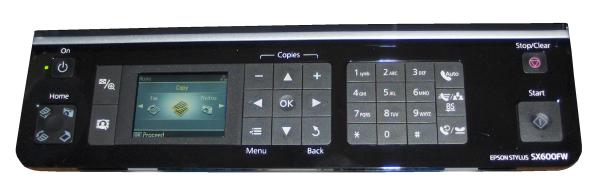
You could be disappointed by its text output, though, with noticeable jagged edges and spikes on characters printed on plain paper. Areas of colour from business graphics are passable, but not as dense as from some of its rivals, such as Canon’s latest range of all-in-ones. A single-page copy suffered from the white paper nap showing through the ink.
There’s no way you could describe this machine as quiet. The range of clunks and whirs it makes while printing or copying peaks at over 65dBA, which is noisy to any ears. It’s one area where Epson has traditionally been poor and the redesign hasn’t improved things.
Epson’s website says you should get 230 ISO pages from a standard T0711 black cartridge, but we had printed just 30 before we got a low-ink warning. While we know the first set of cartridges you fit to an Epson machine uses a lot of ink to charge its piezoelectric head, we’ve never come across such a low page-count before.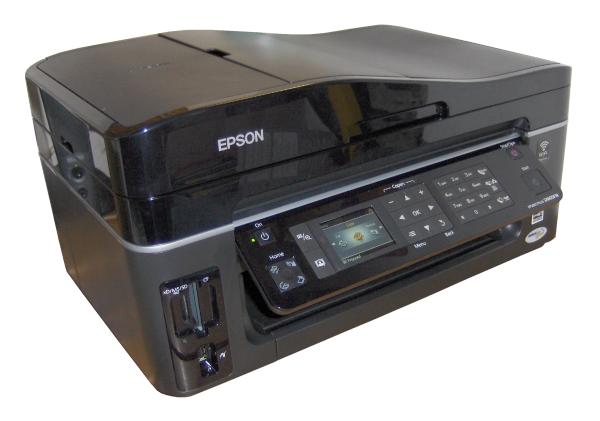
Perhaps this is one reason why Epson has introduced a new set of cartridges which it recommends for this machine, which have much higher claimed yields. These cartridges should give 995 pages for black and 815 pages for each colour, in keeping with the company’s move to sell the Stylus SX600FW to the small business market.
Using these cartridges and the best prices we could find, and assuming they do return their claimed yields, gives a cost per black page of 2.31p and a cost for colour of 5.59p. These figures are quite similar to the last two Canon inkjets we’ve tested, though marginally lower on the black print. It should be an economical machine to run.
Verdict
At first sight, the Stylus SX600FW appears to be offering a lot for its asking price. It certainly has a lot of features and is easy to use. If you buy into the higher capacity ink cartridges, it’s also economical to run, but text and colour graphics print quality on plain paper leaves something to be desired. Ask for a print sample before making a final decision.
Trusted Score
Score in detail
-
Print Speed 7
-
Features 9
-
Value 8
-
Print Quality 7


Editorial independence
Editorial independence means being able to give an unbiased verdict about a product or company, with the avoidance of conflicts of interest. To ensure this is possible, every member of the editorial staff follows a clear code of conduct.

Professional conduct
We also expect our journalists to follow clear ethical standards in their work. Our staff members must strive for honesty and accuracy in everything they do. We follow the IPSO Editors’ code of practice to underpin these standards.
Editorial independence
Editorial independence means being able to give an unbiased verdict about a product or company, with the avoidance of conflicts of interest. To ensure this is possible, every member of the editorial staff follows a clear code of conduct.
Professional conduct
We also expect our journalists to follow clear ethical standards in their work. Our staff members must strive for honesty and accuracy in everything they do. We follow the IPSO Editors’ code of practice to underpin these standards.
