

Verdict


Key Specifications
- Review Price: £223.25
Dell is becoming a major supplier of printers in its own right and to offer a compact colour laser for a little over £220 puts it in direct competition with names like Canon, HP, Lexmark and Xerox. It’s not just the initial price of the printer, though, that determines the overall cost of ownership.
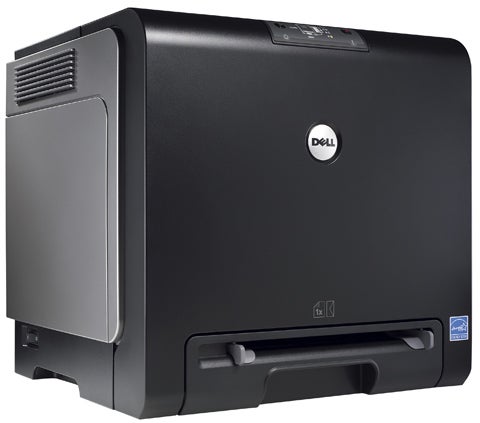
The 1320c is a big, black and silver cube, though not as big as some of its competitors, with angular, functional styling. While the control panel set into the printer’s curved, front edge has no LCD display, it does have six indicator LEDs, which show where on the printer there’s a problem, should any occur.
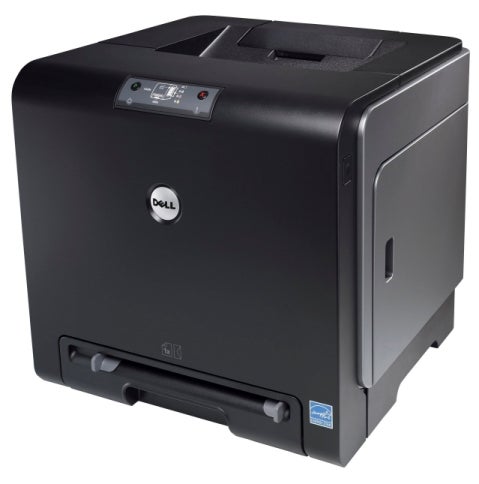
Things like low toner and paper-out fall into this category and the useful little power light shows orange when the printer is in sleep mode, green when it’s ready to print and flashing green when it’s receiving data. There are just two control buttons for continuing and halting a current print job.
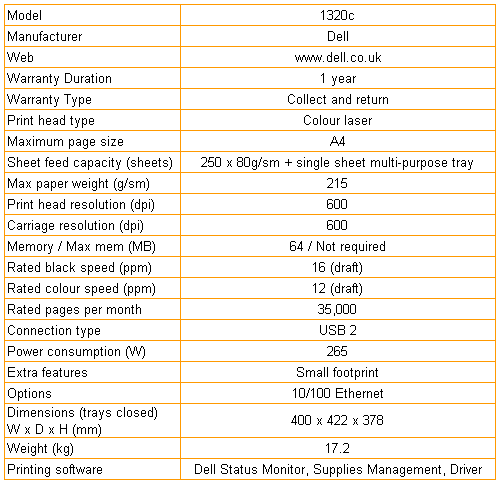
The printer can take up to 250 sheets of paper in a single tray at the bottom and there’s no option for a secondary tray. A single-sheet feed slot is provided for feeding envelopes or special media and all pages exit to the top surface of the machine where there’s a fold-out flap to support longer sheets. At the rear is a single USB socket, as one of the economies in the design is making networking services an option; just about the only option available.
Dell has employed an unconventional design in the engine of the 1320c, so you need to follow the quick setup sheet carefully. A better method, though, is to run the setup CD and watch the supplied video which covers every step in detail.
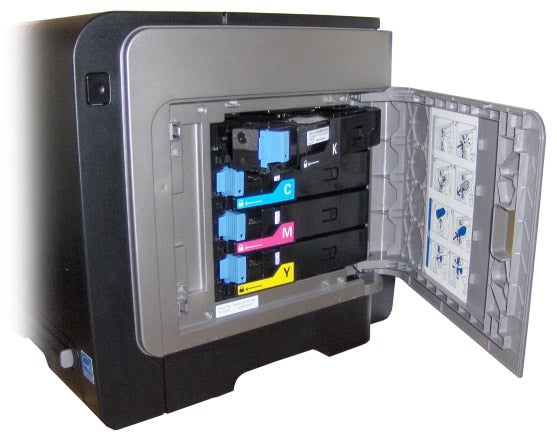
You have to insert four toner cartridges in the side of the machine, remove the large Print Head Device (PHD) from the front and pull eight packing tapes out, reinsert it and then remove a protective paper sheet from its front. Quite an involved process, which you should take slowly. By contrast, software installation is very simple as there’s only a print driver and supplies management applets, all of which install automatically.
The print driver is surprisingly sophisticated, with options for duplex – though disappointingly this is only manual duplex – multiple pages per sheet and colour profiling. Although there are no instructions to perform manual duplex, if you remove the pages from the output tray and insert them in exactly the same orientation into the feed tray, everything works fine.
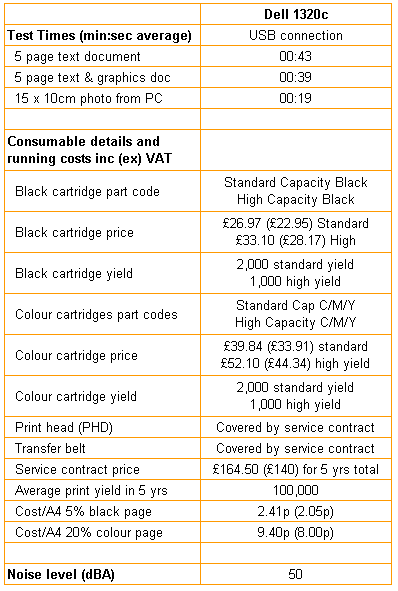
Dell claims up to 16ppm for black text print and up to 12ppm for colour. Unusually, in our tests colour print was marginally quicker than mono black print. Our five-page text document completed in 43 seconds, giving a real world print speed of 6.98ppm, but the colour text and graphics prints took four seconds less at 39 seconds, a speed of 7.7ppm. The photographic 15 x 10cm colour print took 19 seconds. None of these print speeds is particularly spectacular, even for a comparatively inexpensive colour laser printer such as this.
Print quality is generally pretty good. Black text is dense and well formed even though the printer’s resolution at 600dpi is lower than some of its rivals. Solid colour, as in business graphics, is also generally good but we did notice some slight mis-registration of black text over-printing colour backgrounds. That said, in normal use this won’t be a problem.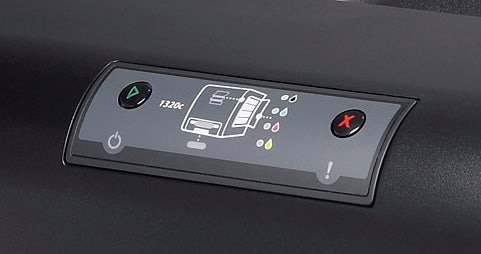
The photographic print wasn’t spectacular, but no worse than from several other colour lasers in this price bracket. Interestingly, the 1320c made a better job of the image when set to automatic colour than when we went into the driver and chose colour correction for landscape photos.
Total running costs are confused by Dell’s way of handling maintenance. While you can buy toner in either of two cartridge capacities – 1,000 and 2,000 pages – the PHD and transfer belt will also run out at some stage. Dell says this is covered by its service package, which is free in the first year and costs a very reasonable £140 to extend up to the end of the fourth.
To work out overall running costs, we added the toner costs to a notional duty cycle of 100,000 pages over four years (probably high for a small-business, colour laser) using Dell’s four-year service option. This produced a page cost of 2.41p for 5% black print and 9.40p for 20% colour. Black print cost is reasonable, but that figure for colour is high, the majority of it coming from the £44, high-yield colour toner cartridges.
”’Verdict”’
There are good and bad things to say about Dell’s 1320c colour laser. It’s nicely turned out, runs quietly and produces good quality print, but is comparatively expensive to run and lacks any real expansion potential. To add colour to business documents in a small office it would be good value, but it’s unlikely to keep up if your business expands.
Trusted Score
Score in detail
-
Print Speed 7
-
Features 7
-
Value 7
-
Print Quality 9
Printing
| Duplex | Manual |
| Paper Size | A4, A5, B5, C5 Envelope, DL Envelope, Custom Size |
| Sheet Capacity | 250 sheets |
| Rated Black Speed (Images per minute) | 16 ppmipm |
| Rated Colour Speed (Images per minute) | 12 ppmipm |


Editorial independence
Editorial independence means being able to give an unbiased verdict about a product or company, with the avoidance of conflicts of interest. To ensure this is possible, every member of the editorial staff follows a clear code of conduct.

Professional conduct
We also expect our journalists to follow clear ethical standards in their work. Our staff members must strive for honesty and accuracy in everything they do. We follow the IPSO Editors’ code of practice to underpin these standards.
Editorial independence
Editorial independence means being able to give an unbiased verdict about a product or company, with the avoidance of conflicts of interest. To ensure this is possible, every member of the editorial staff follows a clear code of conduct.
Professional conduct
We also expect our journalists to follow clear ethical standards in their work. Our staff members must strive for honesty and accuracy in everything they do. We follow the IPSO Editors’ code of practice to underpin these standards.
